
Abstract
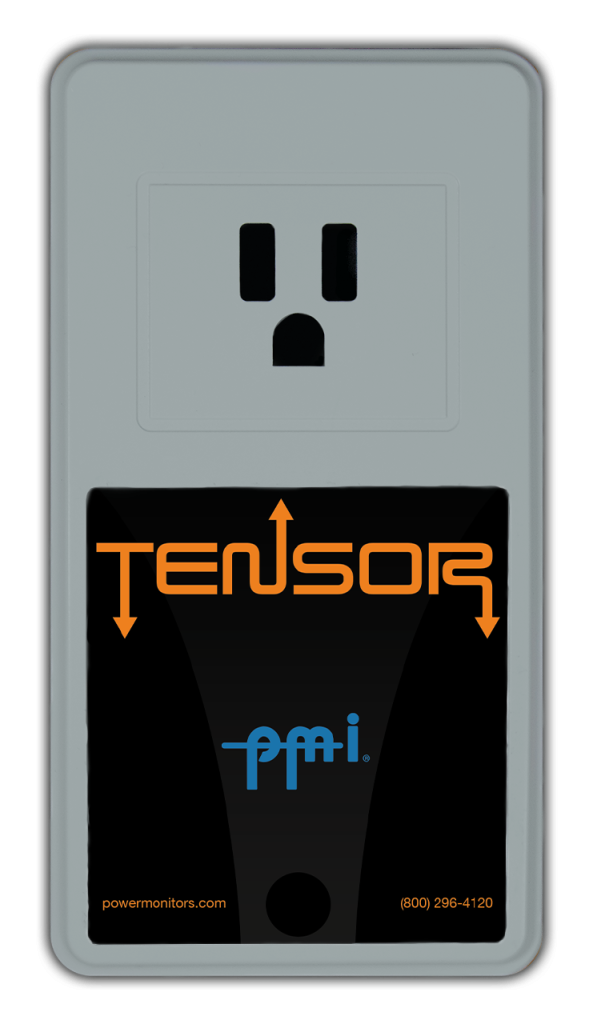
PMI has introduced the Tensor, a next generation plugin power quality analyzer. The Tensor (Figure 1) is designed to plug in to any standard 3-prong receptacle. This white paper will focus specifically on the Tensor and its features. These features include cellular and WiFi communications, remote access to real-time historical data, receptacle power control, environmental monitoring, e-mail and text message notifications, waveshape triggering for waveform captures, and access to PQ Canvass. The Tensor has the capability to record standard measurements such as voltage, current, power factor and harmonics to the 51st, but it can also capture CBEMA/ITIC events and Advanced Waveform Capture as well.
The wireless communications allow the viewing of the data at any time, from anywhere, without needing to retrieve the device to download the data. The recordings can automatically be sent to PQ Canvass, or downloaded with ProVision.
WiFi & Cellular Communications
Since the data can be viewed at any time from the comfort of the office, problems can be discovered earlier. After seeing data, if further investigation is needed, you can change the recording settings without having to go to the location. The ability to see the data and change the settings from the office can greatly decrease the troubleshooting time and save expenses.
WiFi is optionally available on all Tensors. The WiFi allows the Tensor to connect directly to a home network via wireless router. If no WiFi network is available at the location, that is not a problem. The WiFi Tensor hosts a WiFi hotspot. This allows connections from laptops and iPads to view data and download devices without the need to attach a USB cable.
On the other hand, if there is no WiFi network available, or if the Tensor is in a remote location, the Cell Tensor can be used. The Cell Tensor will have cellular connectivity anywhere that your cellular phone has a connection. This will provide all of the same capabilities as a WiFi Tensor, without ever needing to configure the Wireless network.
Enviromental Monitoring
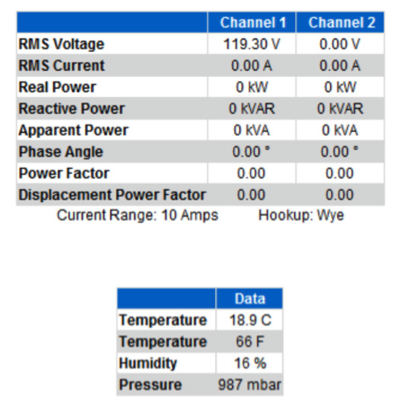
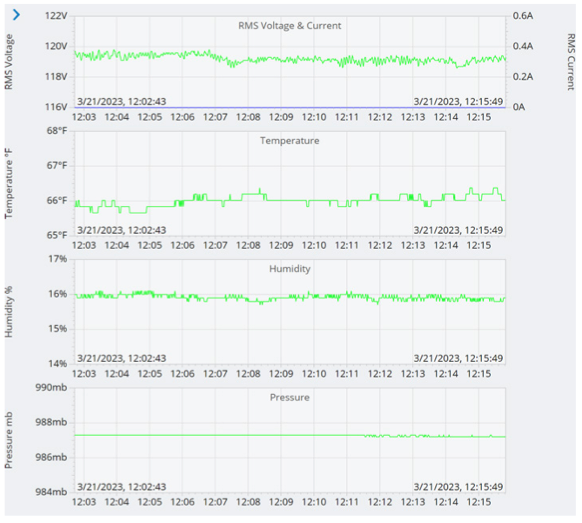
On top of the standard measurements such as voltage, current and power quality calculations, the Tensor can also measure environmental variables These environmental variables include: Temperature from 5 to 60 degrees Celsius, Pressure ranging 500 to 1100 hPa, and Humidity levels from 10 to 95% RH. This information can be viewed in ProVision (Figure 2), or in PQ Canvass (Figure 3). With this capability, and the capability to connect with other environmental sensors over BLE, the Tensor is able to draw a very detailed picture of any environment local to the device.
Receptacle Power Control
The Tensor also has a built in relay, giving it the ability to switch the power on an externally connected device. The Tensor is able to measure and analyze the input voltage to the device, the input current and the neutral to ground voltage. The relay can be controlled remotely, allowing any externally connected device to be switched from anywhere there is access to a computer.
One example application of using the Tensor is in a humidity controlled environment. If a Tensor is connected in-line with a de-humidifier, the Tensor can measure the humidity in the air. Once the humidity reaches a certain alert threshold, the Tensor will turn the de-humidifier on. After the humidity has dropped to an acceptable level, the Tensor can then turn the de-humidifier off. At the same time, the current draw from the humidifier can be measured. This allows the user to know if the humidifier actually turned on, or if it is functioning correctly.
PQ Canvass Integration
The Tensor can stream recorded data as it’s gathered during the recording session to PQ Canvass. Simply log into PQ Canvass and view all data gathered up to the present time. PQ Canvass has been designed to support a wide array of devices and screen sizes. This allows you to manage your devices, browse recordings, and even view live waveforms easily, whether at your computer at the office or with your smart phone or tablet. See the white paper “Introduction to PQ Canvass” for more information about PQ Canvass.
Alerts
Alerts can generate e-mail and text message notifications when configured with PQ Canvass. These are the same alerts generated by Revolutions and Boomerangs. The alert notification distribution system revolves around a number of components. Two of these critical components are Events and Alarms.
An Event is an occurrence which is just what it sounds like – a single event that, when it occurs, generates data transmission to the PQ-Canvass system which in turn generates a notification for all those who have been registered to receive a notification for said event. Events do not necessarily span an amount of time – each event will trigger an update packet to PQ-Canvass and, if there are any registered notification recipients, they will be notified.
An Alarm is a state that a device may be in. These states may span long periods of time (hours or even days) or may be as brief as just a second or two. Users who have created distribution lists to receive Alarm notifications will be notified when the device enters an alarm state and when it exits an alarm state. This method of notification was selected to prevent multiple notifications from being sent for a device that remains in an alarm state for a prolonged period. The exception to this rule is the “no alarm” series of alarms – these are all similar to events in that they are only triggered once, when a device falls out of its respective alarm state (voltage, current, frequency, etc). Adjustable alarm thresholds and configurable notification lists make alerts a powerful feature that saves time searching for problems and allows much quicker reaction times when problems arise.
Enhanced Waveform Capture
The enhanced waveform capture features of PMI’s Revolution recorder are included in the Tensor. These enhancements include THD triggering, waveshape triggering, and cross triggers for event capture.
Waveform capture is the highest resolution data available for PQ analysis, and is often crucial in solving tricky issues. The new waveshape triggering feature allows for capturing oscillatory transients and other events that involve significant distortion on the waveform, but without large RMS changes. For more information about the Enhanced Waveform Capture, see the white papers “Waveshape Triggering for Waveform Capture” and “Optimizing Waveform Capture Triggering”.
Live Data
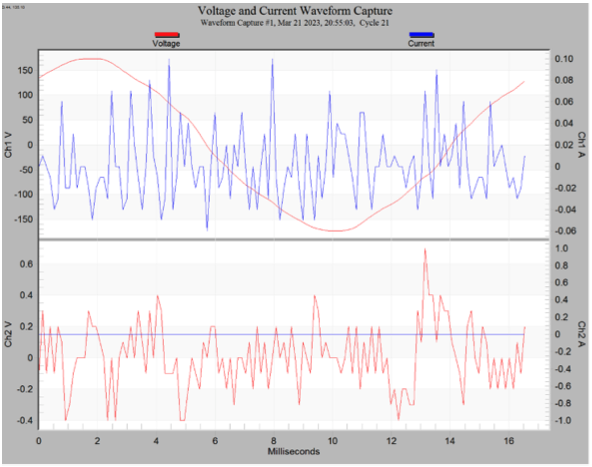
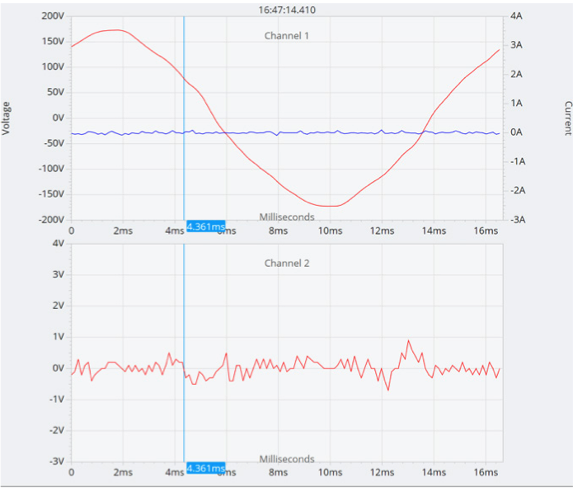
Live waveform can be viewed with ProVision (Figure 4) and PQ Canvass (Figure 5) at any time that the Tensor has network connection. This allows viewing the data almost real-time from ProVision and/or PQ Canvass. Live data allows immediate access to the Tensor data. If a customer calls to say that their reported problem is currently happening, then the technician can look at live data to see what the Tensor is reporting.
CONCLUSION
The Tensor is a powerful tool used for PQ analysis at any location with a 3-prong receptacle and it has features that are not present in its predecessors. These features include cellular and WiFi communications, remote access to real-time historical data, receptacle power control, environmental monitoring, e-mail and text message notification, waveshape triggering for waveform captures, and access to PQ Canvass.