
Introduction
Electric utilities rely on power quality monitoring to maintain grid reliability, meet regulatory requirements, and respond to disturbances across their distribution networks. As monitoring deployments grow — spanning substations, feeders, and distributed energy resources — so does the volume of data that must be collected, analyzed, and acted upon.
This whitepaper explores the growing need for automated, programmatic access to power quality data and how Power Monitors, Inc. is addressing it within our ecosystem.
What PQ Canvass API Access Provides
PQ Canvass, PMI’s cloud-based power quality platform, gives utilities centralized access to data from their deployed monitoring devices. The PQ Canvass web interface is well suited for manual review and investigation, but it was not designed for machine-to-machine integration.
PQ Canvass API Access extends the platform with a secure, programmatic interface to recorded data that has been streamed from PMI recorders to PQ Canvass. It enables utilities to retrieve data on demand and integrate it directly into their own systems.
Through the API, users can:
- Query their device inventory — Retrieve a complete list of monitored devices in an account, including serial numbers, platform types, and user-assigned labels.
- Retrieve waveform captures — Access triggered waveform data with full context, including pre- and post-trigger cycles, trigger type, and per-channel voltage and current traces.
- Pull continuous stripchart data — Request time-series recordings of voltage, current, real power, reactive power, apparent power, power factor, displacement power factor, and total harmonic distortion for any channel and time range.
- Access one-second RMS average trending data — Retrieve 1-second RMS averages for voltage, current, and real power traces for supported devices, such as Boomerangs, Seekers, Guardians, Tensors, and Bolts.
- Summarize energy consumption — Request kWh totals by channel for any time span, along with data completeness percentages.
All data is returned in base engineering units — volts, amps, watts, VARs, VA — with no additional conversion required by the client.
Architecture and Security
PQ Canvass API Access is designed to be both secure and straightforward to integrate. The protocol was intentionally kept simple so that client implementations can be built in virtually any programming language with standard networking libraries.
Connection
The API operates over a direct TCP connection secured with TLS 1.2 or higher. All communication is encrypted end-to-end. The client connects, performs a TLS handshake, and begins exchanging messages immediately.
Message Format
All requests and responses use JSON, which is supported by robust, well-maintained libraries in virtually every programming language. This makes client development straightforward regardless of platform.
Authentication and Sessions
Clients authenticate using the same credentials they use for the PQ Canvass web interface. Sessions are short-lived and scoped to a single connection, with no persistent API keys to provision, rotate, or secure at rest.
Multi-Account Support
The API supports users with access to multiple PQ Canvass accounts. After authentication, users can select which account they want to query data from and can easily switch between accounts within the same session without re-authenticating.
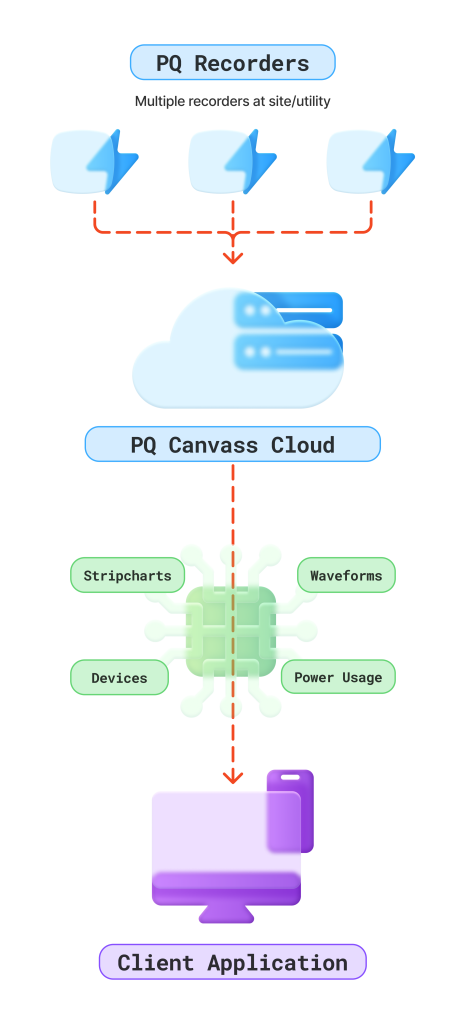
Using the API
A typical session follows a simple workflow:
- Establish a connection and authenticate with PQ Canvass credentials.
- Select an account.
- Query the list of recorders to identify available monitors.
- Request data — waveform captures, stripchart trends, trace data, or energy summaries — for the recorders and time ranges of interest.
The API provides a focused set of commands; each designed around a common data retrieval need:
- List Devices — Returns the full inventory of monitored recorders in the selected account.
- List Captures — Returns metadata for all waveform captures recorded by a device in a given time window, including trigger type and cycle information.
- Waveform Capture — Retrieves the actual voltage and current sample data for a specific capture event.
- Start/End — Returns the available data range for a recorder, so clients know what time periods can be queried.
- Stripchart — Retrieves continuous time-series data for a selected measure and channel, with support for minimum, maximum, and average values.
- Canvass Trace —Retrieves 1 second RMS averages for voltage, current, and real power traces for supported devices, such as Boomerangs, Seekers, Guardians, Tensors, and Bolts.
- Canvass kWh — Returns energy consumption summaries by channel for a given time span.
All responses are returned in JSON, making them easy to parse and integrate regardless of the client’s technology stack.
Example Use Case
Consider a utility that wants to automatically pull daily voltage THD data from a feeder monitor and feed it into an internal analytics dashboard.
Their client application would authenticate, select the appropriate account, query the device list to find the target monitor, and then request stripchart data for the voltage THD measure over the previous 24 hours. The response contains the time-series values ready to be stored or visualized with no further transformation.
This same pattern applies to any data type the API supports — swap the command and parameters, and the workflow remains the same.
Since device lists change infrequently, clients can periodically pull and cache the device inventory locally. This allows them to map PQ Canvass device IDs to their own internal asset records and skip the device list query during routine data retrieval sessions.
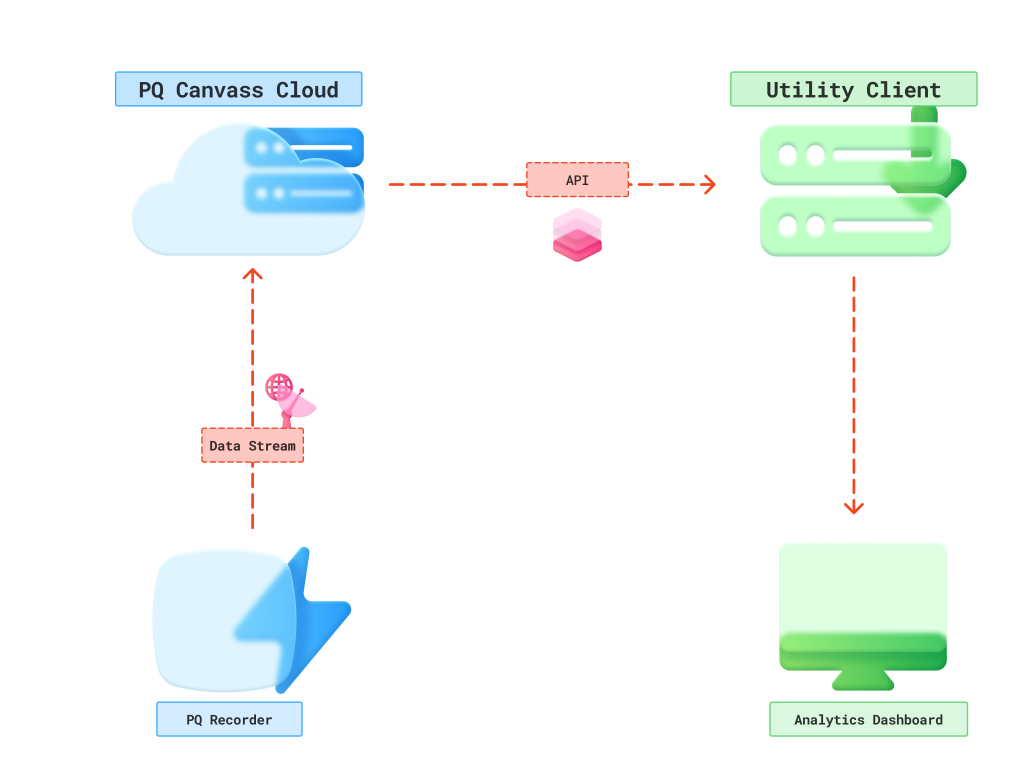
Figure 2. Example Use Case
For complete technical documentation including request and response formats, contact your PMI technical support.
Getting API Access
PQ Canvass API Access is available to customers with an active PQ Canvass account. Access requires a one-time fee in addition to the standard annual PQ Canvass subscription. To get started, contact PMI technical support — they can walk you through the onboarding process and get everything set up. Once established, your team will receive detailed technical documentation and client library examples to get up and running quickly.
Conclusion
PQ Canvass gives utilities a powerful platform for monitoring, analysis, and data review at any scale. For teams that need to go further — such as feeding data into in-house systems — PQ Canvass API Access provides a straightforward path to do so.
It bridges the gap between the data utilities collect with Power Monitors Inc. devices and the systems they use to act on it. It provides a secure, lightweight interface that fits naturally into existing workflows.
The protocol is simple by design; the data comes back ready to use, and integration can be accomplished with standard tools in any language. For utilities looking to get more value from their power quality monitoring investment, PQ Canvass API Access is a straightforward next step.