• Skip to primary navigation
  • Skip to main content

PMI

  • Home
  • Products
  • Library
    • Videos
      • All
      • Bolt Quality Tests
      • Promotional Videos
      • Support Videos
      • Power Quality Decoded
    • White Papers
      • All
      • Artificial Intelligence
      • Case Studies
      • Communications
        • All Communications
        • Cellular Communications
        • General Communications
      • Distributed Generation
      • IEEE Standards
      • Power Quality
        • All Power Quality
        • Analyzing Waveforms
        • Flicker
        • PQ Data Analysis
        • PQ Theory
      • Products
        • All Products
        • Boomerang
        • Boomerang SCADA
        • Box Recorder
        • Canvass
        • Eagle
        • Flex CT
        • Guardian
        • Merlin™
        • Meter Sockets
        • PQ Canvass
        • ProVision
        • Revolution
        • TLAR
        • Using PMI Recorders
      • Voltage
        • All Voltage
        • CVR
        • Voltage Sag
        • Voltage Unbalance
      • Harmonics
  • Training
    • All
    • PDH Eligible Classes
    • On-Site Training
    • Live Webinars
  • Support
  • Our Company
    • About
    • Contact
    • Join Our Team!
    • Receive our Newsletter
    • PQ Resources
    • Power Quality Solutions
  • Account
  • Cart - 0 items

Installing Firmware for ProVision

By Benjamin Bowman · January 1, 2011

← Back to White Papers

Abstract

Downloading the latest version of firmware for your PMI recording device with ProVision and the PMI website.

Overview

It is important to keep your PMI recording devices’ firmware up to date. Doing this will make sure that you benefit from new features added to the device and bugs that have been corrected. If you are having trouble with your device, often times the fix is to make sure that its firmware is up to date. You can check your devices’ firmware version and download the latest firmware from the PMI website by following these steps:
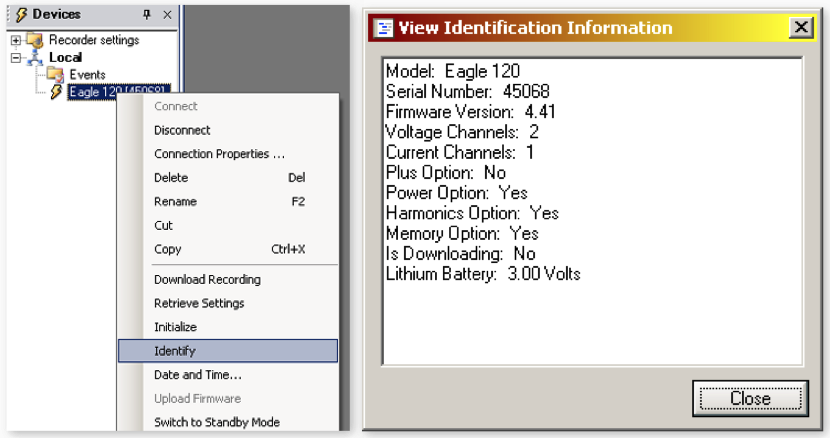
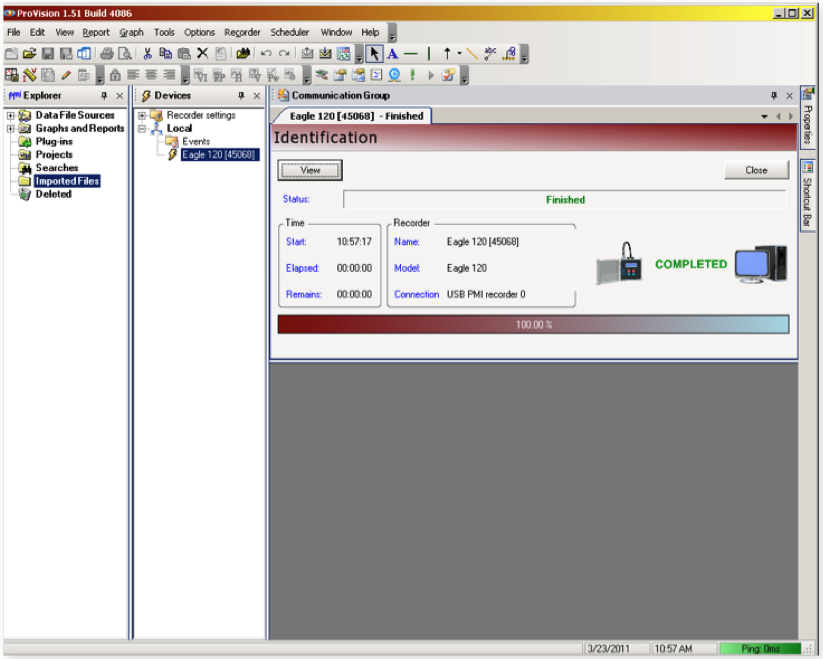
Step 1. Connect to your device with ProVision. Right click on the connected recorder and click “Identify”. An Identification panel will open on the right hand side of the screen. Click “View” in the Identification panel to open up a new Dialog box (as shown above).
Step 2. The recorder’s firmware version is the 3rd item from the top (as shown above).
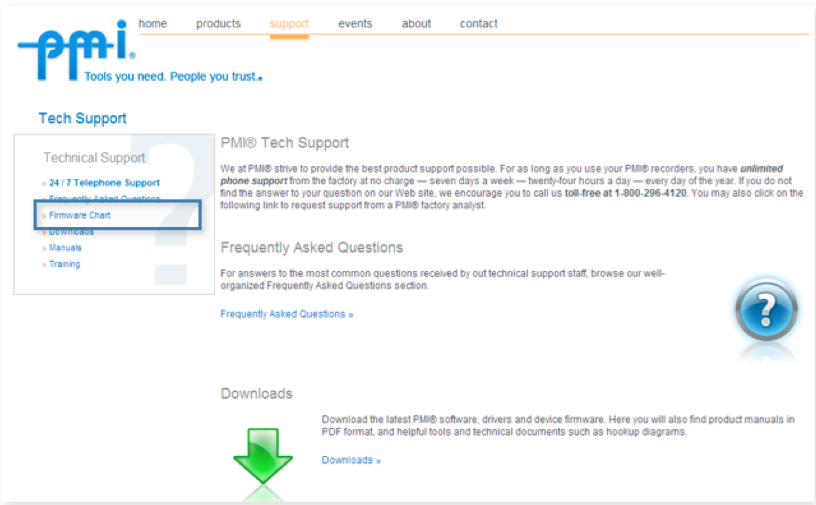
Step 3. Check the firmware chart on the website located under support > firmware chart (as shown above).
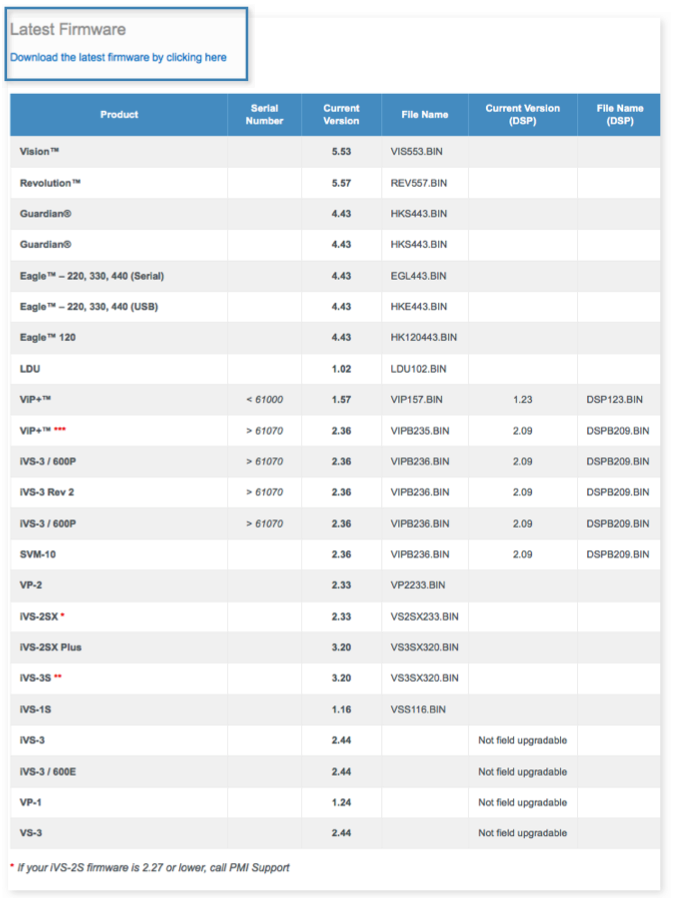
Step 4. Compare your recorder’s firmware version number with the version number of the most recent update. If your firmware is out of date, click “Download the latest firmware by clicking here” under “Latest Firmware” on the page (as shown above).
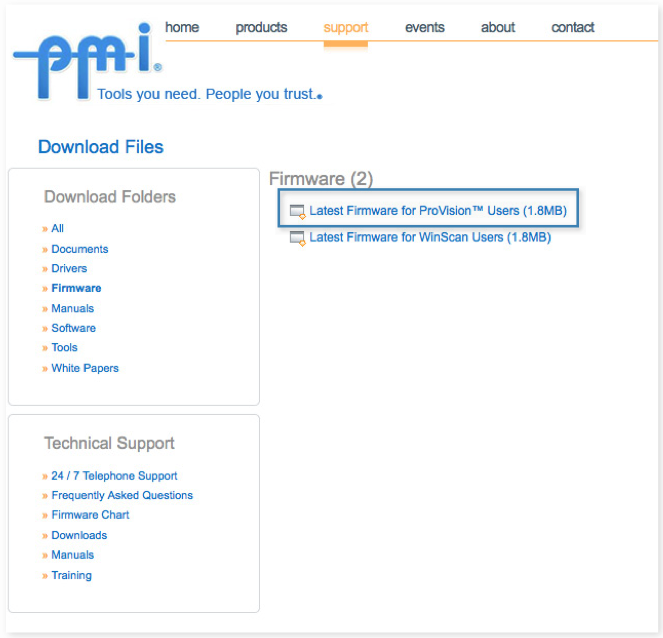
Step 5. Click on “Latest Firmware for ProVision” (as shown above).
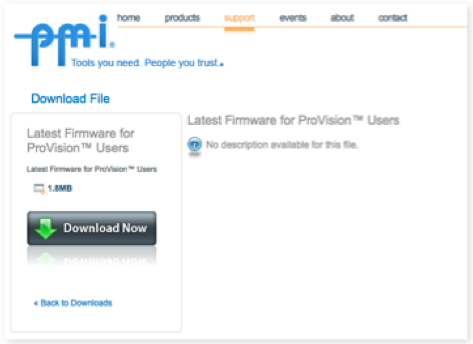
Step 6. Click “Download Now” (as shown above).
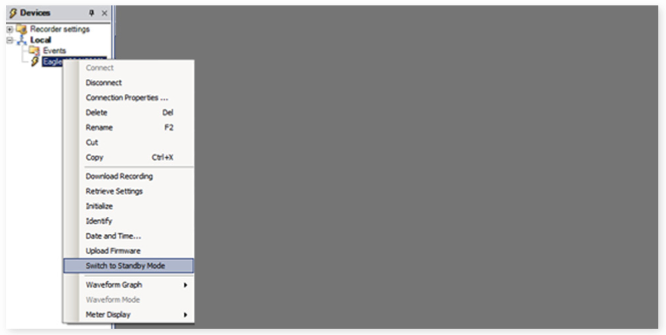
Step 7. In ProVision, right click on your recorder and select “switch to standby mode” (as shown above).
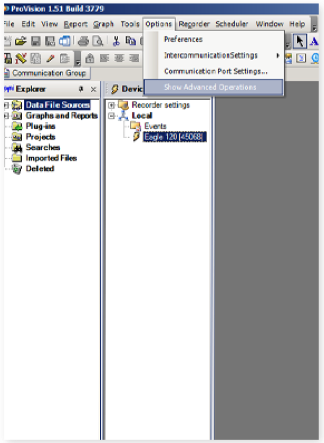
Step 8. Click “Options” and select “show advanced operations” (as shown above).
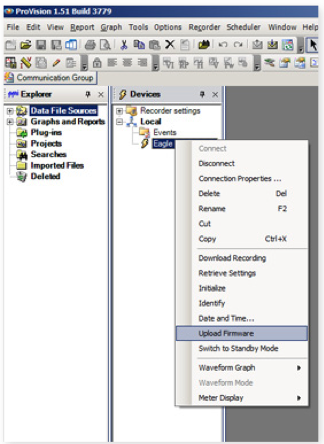
Step 9. Right click on your recording device and select “update firmware” (as shown above).
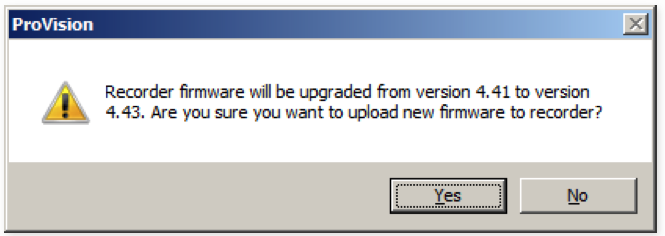
Step 10. A dialog box will appear asking if you wish to proceed. Click “Yes” (as shown above).

Conclusion

Keeping your PMI recorder’s firmware up to date is quick and easy with ProVision and the PMI website. Be sure to check your recorder’s firmware regularly to benefit from all the new features that are periodically being added.

Have a PQ question? Ask Merlin™ — free.

Send it to askmerlin@powermonitors.com or text (540) 383-3144.

Want the PDF version of this white paper?

Have a PQ question? Ask Merlin™ — free. Send it to askmerlin@powermonitors.com or text (540) 383-3144.

Power Monitors, Inc. — Tools you Need. People you Trust.

Power Monitors, Inc. is an industry-leading product design and manufacturing firm based in Mt. Crawford, Virginia. PMI® strives to solve power quality problems by listening to our customers and working with them to design and manufacture products. Total customer satisfaction is the primary goal of all PMI® staff.

24/7 Tech Support 800.296.4120

Resources

  • White Papers
  • Videos
  • Training
  • Live Webinars
  • PQ Resources
  • Support

Company

  • About Us
  • Contact
  • Careers
  • Newsletter
  • Product Registration
  • Terms & Conditions
800 N Main St, Mt Crawford, VA 22841 | Toll Free 800.296.4120 | Fax 540.432.9430
© 2026 Power Monitors, Inc.