
Abstract
Power Monitors offers a variety of Boomerang products that come with varying measurement capabilities and varying cellular carrier data plans for reporting this measured data. This white paper is going to discuss some of the many wireless carrier data plan options that are available and some of the reasons for selecting specific options or plans.
Boomerang Variations
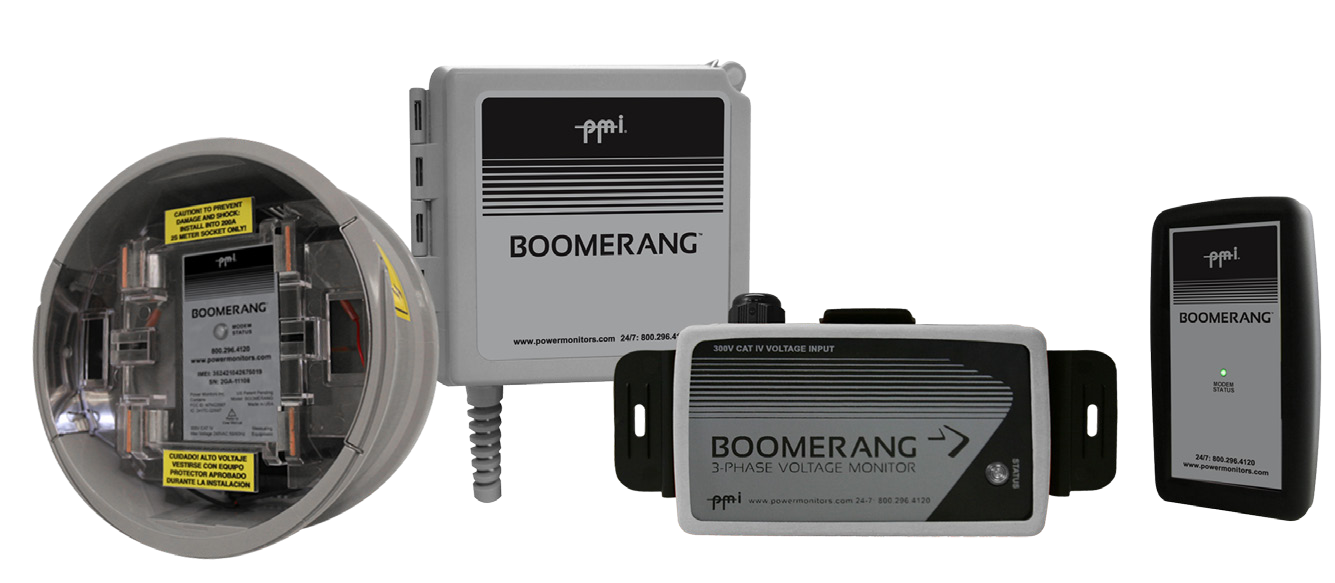
Presently, Power Monitors offers the Boomerang product in a number of configurations. These configurations are listed below and shown in Figure 1.
Single-Phase, Voltage-Only – this configuration is as it sounds: a Boomerang that can sample a single channel of voltage only. Current is not measurable with this Boomerang.
Single-Phase, Voltage-and-Current – this configuration allows a user to sample both Voltage and Current, but only on a single channel.
Three-Phase, Voltage-Only – this Boomerang can sample up to three channels of Voltage. This Boomerang cannot sample Current.
Three-Phase, Voltage-and-Current – this Boomerang can sample up to three channels of both Voltage and Current.
Carriers and Networks
Presently, PMI manufactures and ships Boomerangs that can be provisioned on either a GSM or a CDMA wireless network. Listed in Table 1 is a brief overview of the available plans ordered by tiers for respective network band providers:
Tier 1 – This tier is ideal for users who wish to use single-phase, voltage-only Boomerangs reporting into Canvass. Alternatively, if using DNP3-only for SCADA systems, then a configuration set for continuous polling at 15 minute intervals or slower is also possible. If strict adherence to a very judicious use of a higher data usage rate for limited hours of the day is applied, then the plan may also be used to have a low-polling rate for several hours with a more rapid update rate during “peak hours” or specific “hours of interest.” Also, on DNP3-only SCADA deployments, this plan will allow for a limited amount of RBE (Report By Exception) messages.
Tier 2 – This tier is a valid candidate for users who wish to use Canvass with a Boomerang that reports both voltage and current and may have more than one channel. Additionally, this plan can be leveraged by users who wish to take advantage of both the Canvass application and have their Boomerangs report into SCADA through DNP3. This configuration (Canvass + DNP3) requires a more moderate poll rate (approximately every 5 minutes). It is worth noting, however, that if Canvass support were disabled then this plan would allow for a much more aggressive polling interval for DNP3 only.
Tier 3 – This plan should be selected by users that have a need for aggressive polling or other situations that would require a high rate of bulk data transfer.
| Tier | GSM | CDMA |
|---|---|---|
| Tier 1 | 3MB | 2MB |
| Tier 2 | 20MB | 25MB |
| Tier 3 | 250MB | 250MB |
These tiers are defined by Power Monitors – they are not necessarily the same plans that a customer would receive were they to choose to deal directly with a wireless carrier. Under the tiered pricing scheme presented above, Power Monitors assumes the responsibility for provisioning each of the Boomerang devices on the cellular network band (GSM or CDMA) that was selected by the user. All billing is through Power Monitors and not through the wireless carrier.
However, users are not restricted to using Power Monitors’ tiered pricing plan. Any user may contact and negotiate rates directly with an approved wireless provider to suit their individual needs.
Canvass-Specific Data Rates
This section describes the typical network traffic used by a Boomerang during a one month period. Each of the different types of data packets that are delivered are discussed below.
Boomerangs (three-phase, single-phase, voltage-only and voltage-and-current) have the capacity to report multiple different data points at varying intervals. Every Boomerang – regardless of type – will report the following data:
- One-Second Interval Stripcharts
- Realtime Readings
- Status
- Extended Status
The default configuration with which a Boomerang ships has the following set of reporting intervals:
One-Second Interval Stripcharts are sampled at one second (as the name suggests), recorded for thirty minutes, compressed and then delivered to the Canvass system every thirty minutes. The exception to this rule is when a Boomerang has been placed into “burst mode.” During “burst mode” a Boomerang will send in a stripchart record once-a-second for thirty seconds (in addition to a real-time reading record – see below). (30-minute update rate)
Real-time Readings are “spot measurements” that are typically reported every hour. The exception to this rule is when “burst mode” is engaged – at this point, the Boomerang begins reporting real-time readings every second for 30 seconds. (One-hour update rate)
Status Readings are data packets that relay the signal strength, internal battery voltage and alarm state (along with some other troubleshooting and diagnostic information). This packet is typically delivered along with each One-Second Interval Stripchart. (30-minute update rate)
Extended Status Readings are data packets that provide more in-depth diagnostic information, mostly related to the Boomerang itself (platform id, firmware version, hardware capabilities, IP address, etc). These are typically sent once an hour. (One-hour update rate)
Traffic Specific to Three-Phase and Voltage-and-Current Boomerangs
In addition to the packets and update rates listed above, the Three-Phase and Voltage-and-Current boomerangs have an additional packet that they send, that has been structured to handle the increased payload for One-Second Interval Stripcharts. This packet (the Extended Stripchart) differs from that of the Single-Phase Voltage-Only packets in that it may encapsulate three channels of voltage and/or current measurements. Because of the increased measuring capacity, it logically follows that these stripchart payloads are going to be larger and are going to require more bandwidth to be sent.
As with the Single-Phase Voltage-Only One-Second Interval Stripcharts, these Extended Stripcharts are also delivered once every 30 minutes (with the exception of “burst mode” operation) and are compressed.
Estimated Monthly Data Rates for Canvass and SCADA Deployments
Shown in Table 2 are the monthly averages for different configuration scenarios. Further Table 2 shows a more detailed-breakout of some of the DNP3 / SCADA traffic.
| Usage Pattern | Bandwidth / Month (MB) |
|---|---|
| Canvass, Single-phase Voltage Only | 1.5 |
| Canvass, 3-phase Voltage Only | 4.5 |
| Canvass, Single-phase Voltage, Current & Power | 4.5 |
| Canvass, 3-phase Voltage, Current & Power | 13.5 |
| DNP3 / SCADA 5 Minute Polling | 5 |
| DNP3 / SCADA 1 Minute Polling | 20 |
Using TCP or UDP involves overhead, with TCP being a bit larger. The sizes of these headers are listed in Table 3.
| Header Type | Size |
|---|---|
| IP Header (used for TCP and UDP) | 20 Bytes |
| TCP Header | 20 Bytes |
| UDP Header | 8 Bytes |
The total TCP overhead for a back-and-forth exchange is 2 x (20+20) = 80 bytes, and for UDP, 2 x (20+8) = 56 bytes. This network overhead is larger than the raw DNP3 packet in some cases. The raw DNP3 packet sizes are broken out in Table 4.
| DNP3 Operation | TX Bytes | RX Bytes | TX+RX | Total+TCP | Total+UDP |
|---|---|---|---|---|---|
| Link Status | 10 | 10 | 20 | 100 | 76 |
| Class 0 Poll | 148 | 27 | 175 | 255 | 231 |
| Voltage Read | 26 | 20 | 46 | 126 | 102 |
| URBE (Voltage) | 27 | 15 | 42 | 122 | 96 |
As an example, consider a Boomerang being polled once every 5 minutes with a Class 0 poll using TCP. This would be 126 bytes per read, assuming no errors. The monthly total would be 231 x 288 x 31 = 2,062,368 bytes in a 31 day month. This would comfortably fit in a 5MB/month plan, and still allow for some errors and retries, and also some URBEs.
These byte totals are the minimum possible, and assume no errors or retries. It’s important to test with the actual SCADA system with real polling sequences to get final usage totals, and before a large rollout. Subtle differences in DNP3 protocol implementation or poll configuration can increase the monthly usage.
Connection Pooling
In addition to a per-device data plans, both the CDMA and GSM providers allow users to “pool” their bandwidth for a set of devices. In this scenario, each device is allotted a specific bandwidth for the per-month period (for example, 25MB). In a pooled scenario, all of these devices “combine” their bandwidth into one large sum (for example 4 devices would be 100MB) from which each device may consume bandwidth. This is great in scenarios where one or two boomerangs may exceed the 25MB per month limit, while others may fall below that line.
To provide a more concrete example, let’s assume the following scenario:
A utility has purchased four Boomerangs under the CDMA Tier 2 plan (25MB per month per device). Instead of a per-device plan, the user has opted to use the “Pooled Plan” thus creating a “bandwidth pool” of 100MB (4 boomerangs X 25MB = 100MB). During the monthly period, Boomerang 1 used 27MB of data, Boomerang 2 used 55MB of data, Boomerang 3 used 2MB of data and Boomerang 4 used 10MB of data. At the end of the month, all four boomerangs will have used a total of 94MB of bandwidth, leaving 6MB unused. The two Boomerangs (1 and 2 from this example) would have been subjected to large overage penalties for exceeding their 25MB bandwidth had they not been part of the pooled plan. However, under the pooled plan, no overage charges are applied and the user’s account has a remaining 6MB of unused bandwidth at the end of the month.
Note also that when requesting connection pooling, only devices with the same bandwidth plan may be pooled. For instance, in the example above all of the Boomerangs were part of the 25 MB/month plan. If a user were to order three Boomerangs at the 25 MB/month plan and one Boomerang at the 250 MB/month plan, only the three 25 MB/month Boomerangs would be able to be pooled together (unless an agreement is otherwise made with a wireless provider).
Connection pooling is standard under the Power Monitors tiered pricing plan. If you’re getting service directly from a cell carrier, connection pooling is definitely an option to consider.
Checking Data Usage with the Network Management Software (NMS)
The Network Management Software (NMS) is a utility application that can be used for configuring Boomerangs and minimal health and status checks.
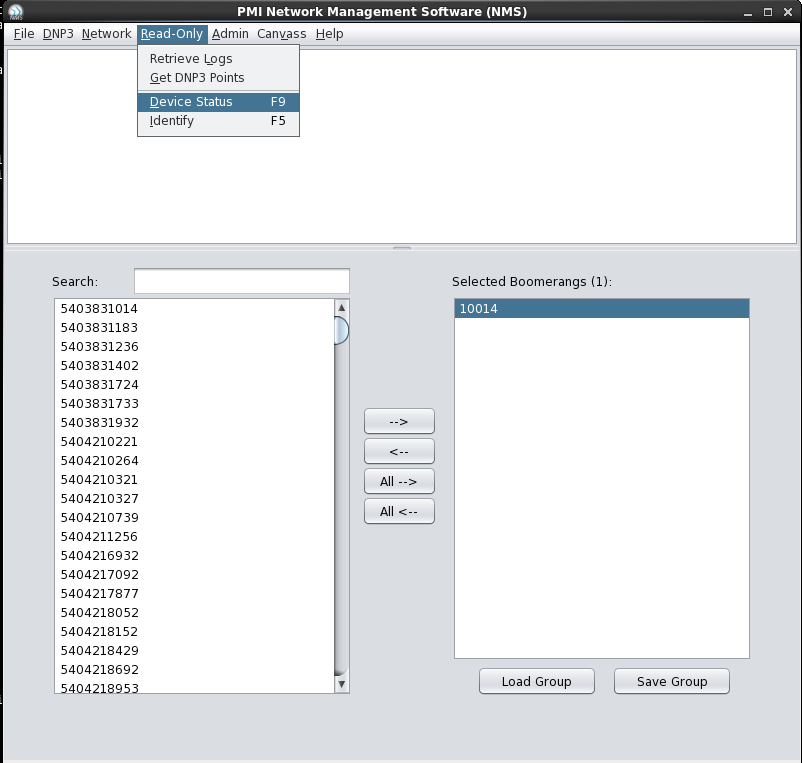
Select the Boomerang(s) from within the NMS that are to be polled. From the Read-Only menu, select Device Status as shown in Figure 2. At this point a status dialog will display the communication status with the selected Boomerang(s).
Once the operation has successfully completed, click on the “Show Report” button to launch the report viewer.
The report viewer will display all of the selected Boomerang device statuses as shown in Figure 3. From the report, find the columns labeled “NMS Bytes Tx/Rx” and “DNP Bytes Tx/Rx.” These two columns provide the number of bytes that have been sent to and received by both the NMS TCP protocol and the DNP3 protocol. The sum of all four of these readings will provide an approximate data usage for the current billing period.

Conclusion
Power Monitors’ selection of Boomerangs is varied, affording users a greater range of possibilities when trying to solve their voltage and current monitoring needs. By matching a set of devices with an appropriate data plan, users have an effective and affordable means of solving these needs, whether that be through Canvass, a SCADA system or both.