
Introduction
If you own a Power Monitor’s recorder you’re probably quite familiar with ProVision. If you aren’t, it’s Power Monitors’ Windows desktop application that lets you manage your PMI recorders, configure and download recordings, and perform analysis of interval and waveform data. While it has provided the tools you need to get the job done for the past twenty years, it has started to lag behind in form and features.
The engineers at PMI have built a cloud-based application, PQ Canvass, to fill the technology void and move power quality analysis into the future.
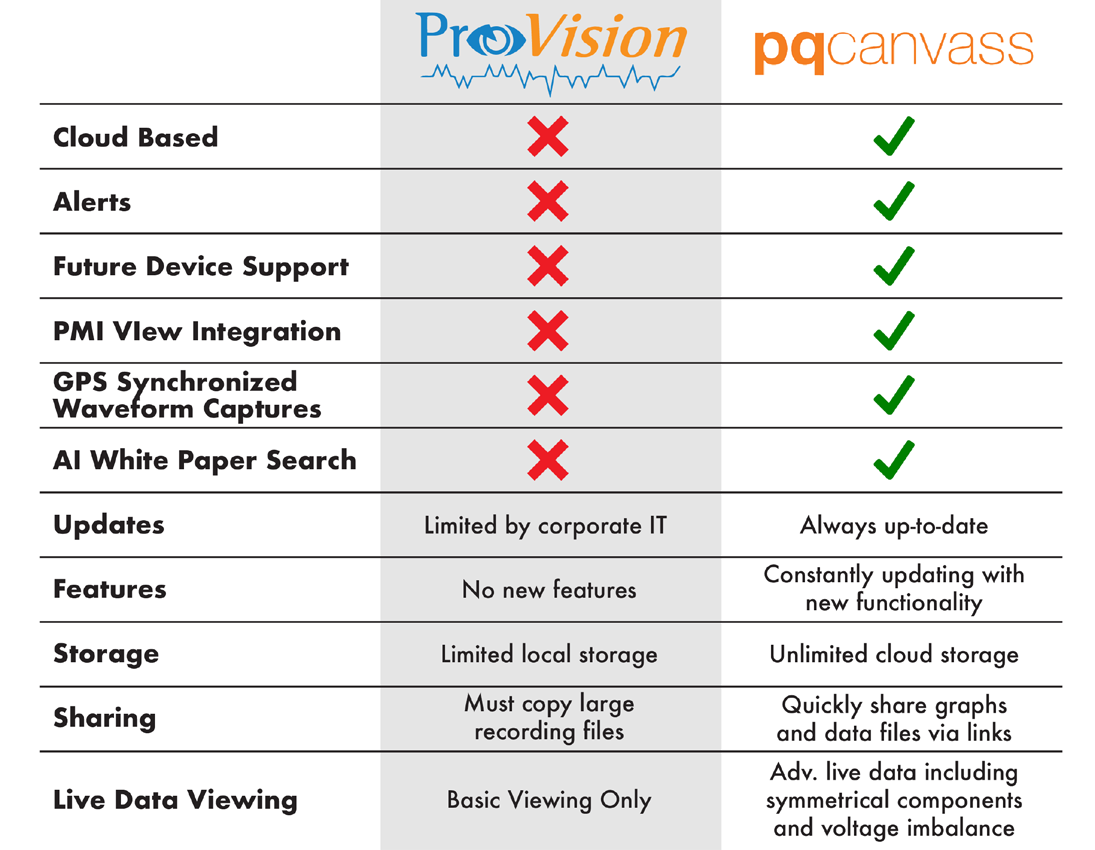
So what will you actually stand to gain from switching to PQ Canvass? Why shouldn’t you just stick with ProVision? After all, it’s free and you’re used to it… Valid questions, to which the answer is simply: with PQ Canvass you’ll spend less time while getting more out of your data.
The Benefits of Switching
The PQ Canvass web application was designed to provide features to fill our customers’ ever-growing needs to quickly sift through the mountains of data that can be gathered in a recording and find the root cause of any power quality issue.
Access From Anywhere
Recording files are no longer stored on a single user’s computer or file share like they are with ProVision, having to be copied to share the data with someone else. PQ Canvass’ cloud storage enables you to view your recordings from anywhere you have internet access.
Unlimited Storage
Our cloud storage is unlimited and large recording files are no problem for PQ Canvass.
Simple to Get Started
No more installations or updates that might require navigating complicated company policies and permissions. The PQ Canvass website is always up to date with the latest and greatest; just sign in and you’re good to go.
Ease of Use
Recordings can be downloaded from recorders using our PMI View app and then later uploaded to PQ Canvass, or, if an Ethernet, WiFi, or cellular connection is available, can be streamed directly to the PQ Canvass servers; no download necessary! Our iOS and Windows PMI View apps seamlessly integrate with PQ Canvass, enabling users to easily download recordings while offline, and then later upload them to PQ Canvass.
Notifications
Receive instant email/SMS alerts from PQ event triggers from your networked recorders.
Data Analysis
Data and compliance reports, recording analysis tools, and our helpful chat bot enable you to analyze your data faster and get contextual help about your recording; reducing the time your analysts spend sifting through hours and hours of data.
On-going Support
Only PQ Canvass will be supporting our new products, services, and features, but it also supports the other recorders you’ve been using for years. Features and improvements are constantly being added; enhancing your ability to do more, faster.
ProVision has had many years of faithful service, but unfortunately, it just can’t keep up with the demands of newer technologies and operating systems. Don’t worry, though; ProVision will continue to function with your existing recorders and you’ll be able to use it to upload any of your old recordings to PQ Canvass.
So Much More…
This isn’t an exhaustive list of all the benefits that PQ Canvass offers, but just some of the highlights. Our engineers are constantly developing new and better ways to help you monitor power quality as efficiently and easily as possible.
Switching Over
So how do you make the switch? What are the steps and hurdles for transitioning from desktop recorder management and analysis into the cloud-based ecosystem?
Signing Up for PQ Canvass
If you don’t have a PQ Canvass account yet, that’s step one. If you do, then you can skip to activating PQ Canvass on your recorders. Your PMI sales representative will be able to assist you with getting your organization an account. It’s also a great opportunity to get more details about the benefits of using PQ Canvass, insight into specific features, or even cell plans and private tunnels for streaming data from the field.
Activating PQ Canvass On Your Recorders
PQ Canvass will need to be activated on your recorders before it will stream any data to our servers. While new recorders (as of the writing of this article) ship with it enabled, some of our older models did not. Our Technical Support representatives can quickly help ensure all of your recorders are PQ-ready.
All you’ll need for each recorder is:
- Its serial number
- A USB, Cell, Ethernet, or Wi-Fi connection
The support rep will verify your PQ Canvass account info (company name, address, contact info, etc.), and then proceed to enabling the recorder in our PQ Canvass database.
Next, they will need to send some settings to your recorder, or guide you through sending them, in the event you are connected with USB or are on a private network.
Technical Support
PMI is well-versed in working with IT departments to get our tools, software, and drivers installed on your systems as needed. We understand the complexities of security policies and user permissions, and have multiple approaches to getting you the tools you need to configure and communicate with your recorders.
If you plan to use your recorders with a private cell network, you will need to get an IPSec tunnel from us to be able to communicate with your recorders from the PQ Canvass website. Otherwise, you’ll only be able to send data to PQ Canvass. Your sales representative can handle this at the same time you’re signing up for PQ Canvass.
Migrating Recordings From ProVision
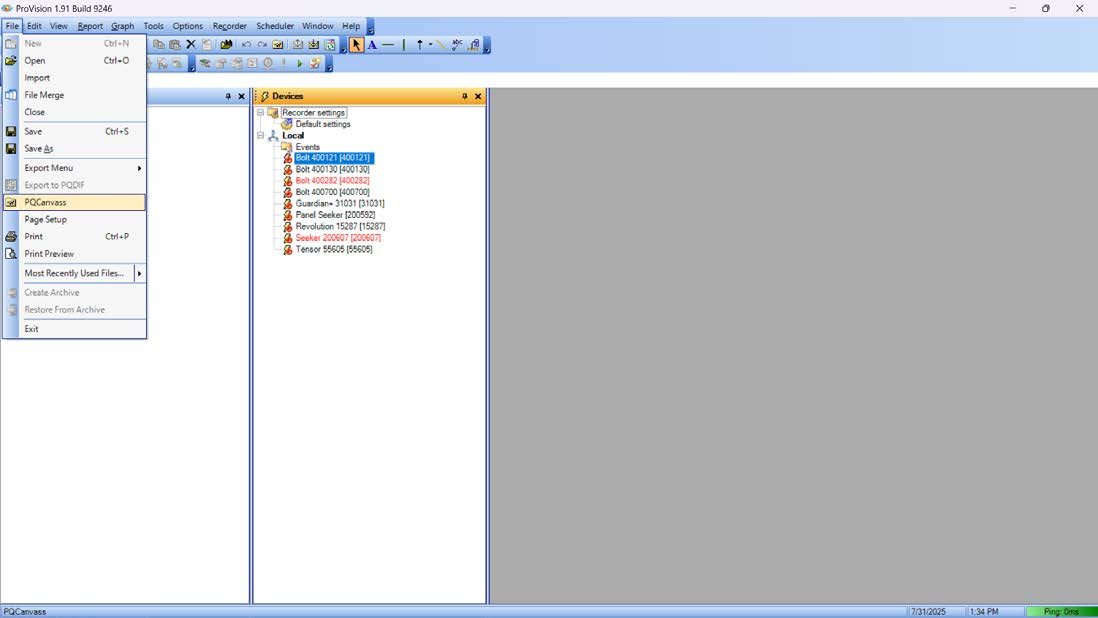
Any recording you’ve downloaded with ProVision can be easily uploaded to PQ Canvass. Just click the File menu at the top left and select PQ Canvass.
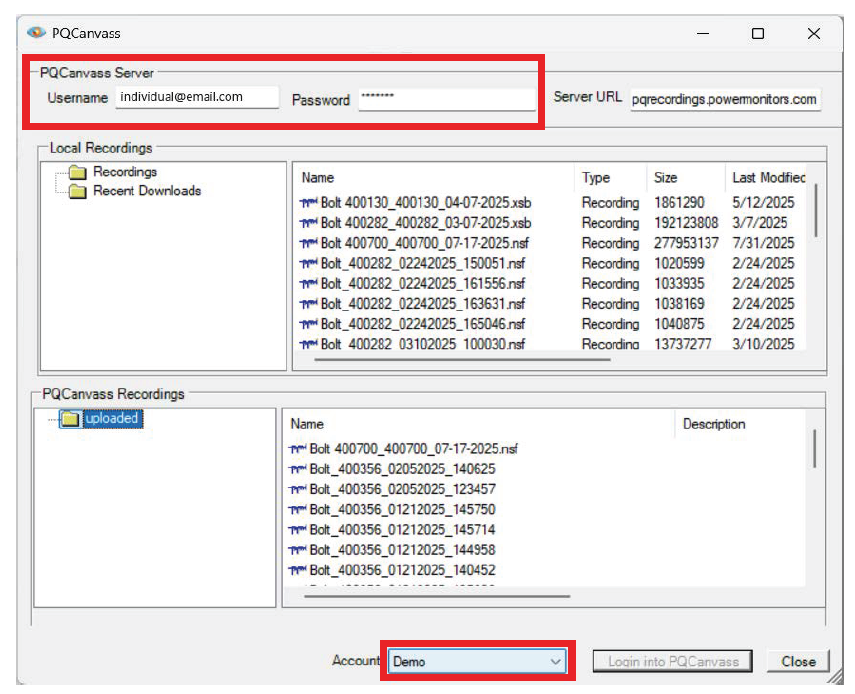
This will open a new window where you can sign in to your PQ Canvass account. Enter your username and password (Figure 3) and select your account (Figure 4). Typically, you’ll only have one account.
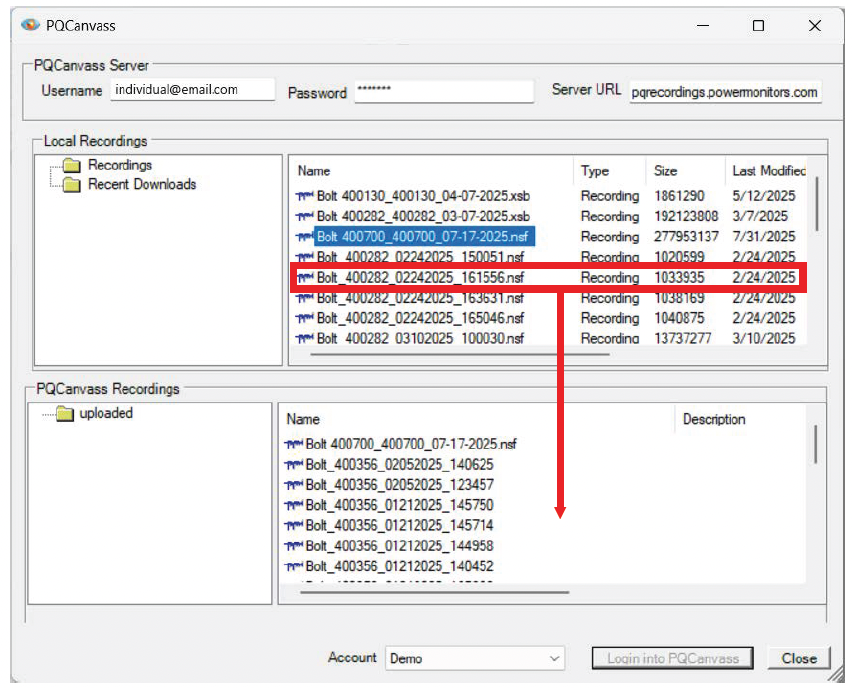
Next, drag and drop the recordings from the upper pane (your PC) to the lower pane (PQ Canvass) that you wish to upload.
Finally, click the Upload button at the bottom of the upload window.
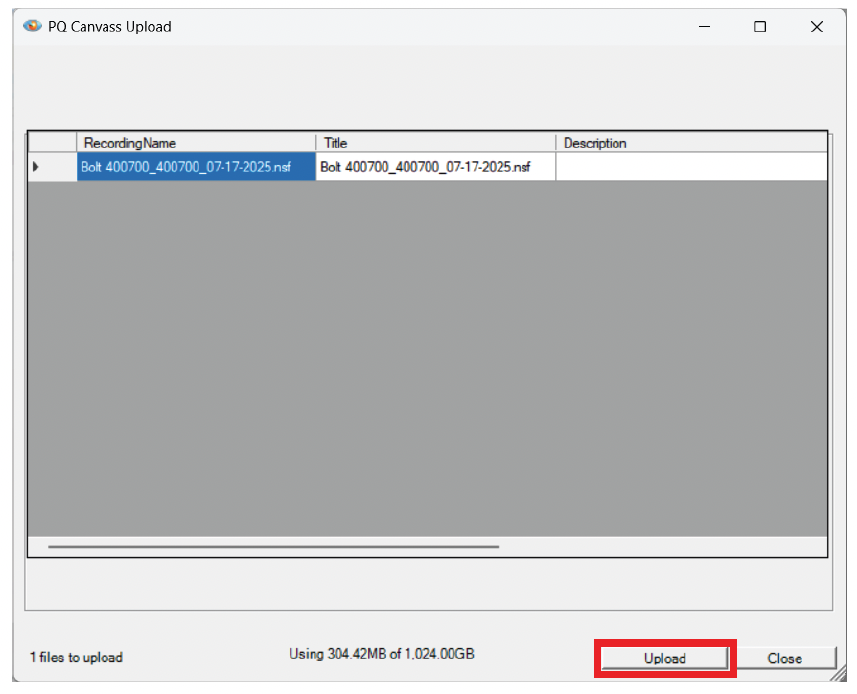
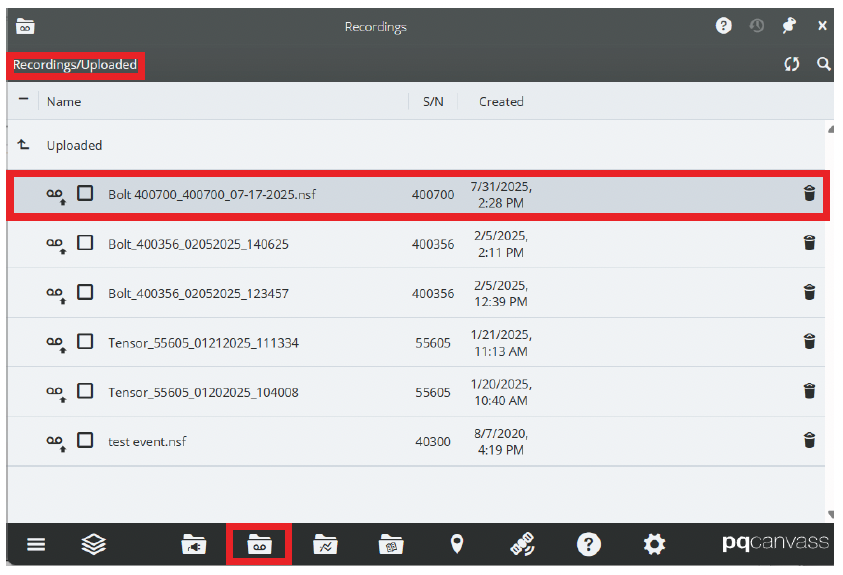
Once your recordings finish uploading, you’ll be able to find them in the Recordings page of PQ Canvass under the Uploaded folder.
Conclusion
It’s very easy to switch from using ProVision to PQ Canvass. You’ll be able to keep all of your old data, have access to faster and better tools for PQ analysis, integration with our technician-friendly PMI View apps, access recordings from anywhere, unlimited storage, alerts, data streaming, and so much more.
Call your sales representative today about PQ Canvass, so you can do more, faster.
