
Abstract
Boomerang triggering mechanisms are most often used for voltage monitoring, detecting overcurrent/high load conditions, or complete loss of load. However, the advanced triggering features in the Boomerang allow for more complex scenarios. This white paper provides step-by-step instructions on how to configure an alarm and email notification to trigger when a monitored load has not drawn the required current after a specific period of time. This type of trigger is useful for monitoring loads that cycle on and off, where a simple current threshold is not sufficient. The example load in this paper is a refrigerator. If the refrigerator’s power source has failed or if the refrigerator has not pulled any current for an extended period of time, the Boomerang can trigger an email alarm to warn that the refrigerator has stopped. Although a single-phase 120V plug-in Boomerang is used as an example here, the same concept may be used in the 3-phase Boomerang, for monitoring a large industrial load. In the 3-phase case, separate thresholds are used for each phase, and loss of load in any phase exceeding the time period will trigger an alert.
Trigger Parameters
The Boomerang includes four trigger parameters for current: lowlow, low, high, and highhigh amperage thresholds, averaging time, holdoff time, and hysteresis. The low and lowlow thresholds can be used to set to undercurrent values below a nominal current, and high and highhigh are thresholds over a nominal value. They may be any values, as long as lowlow < low < high < highhigh. The averaging time is the window size (in seconds) of the sliding window that’s applied to the 1 second raw RMS readings. The holdoff time is the minimum time a threshold has to be crossed before the Boomerang triggers. The hysteresis is a small value which acts as a slope-dependent offset to the thresholds, and is used to prevent “chattering” when the reading hovers right on a threshold value.
In this paper, a refrigerator is used as the example load to demonstrate how to trigger on loss of a cycling load. A simple current threshold can’t be used, since the load naturally cycles off under normal operation. What is needed is a trigger that fires if the load stays off for longer than the longest acceptable cycle time—that indicates that the load has failed.
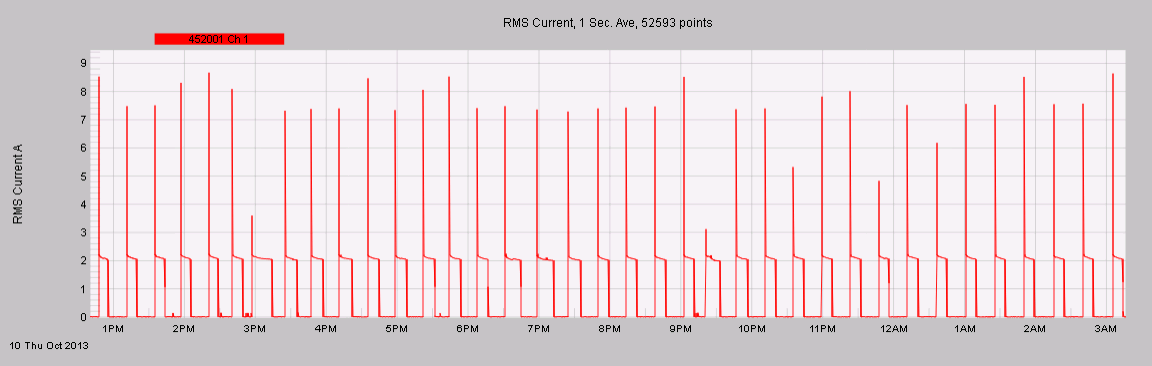
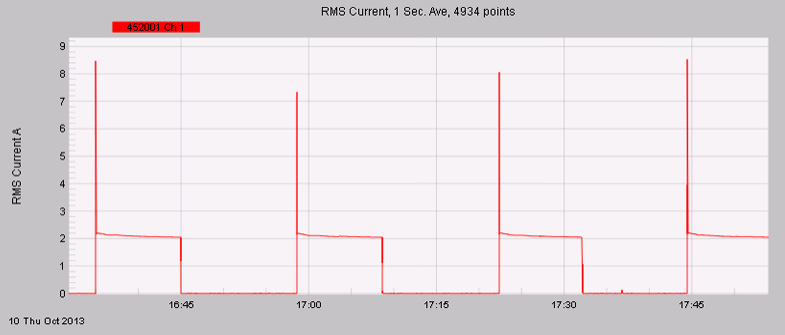
To do this, the lowlow current threshold is used with the holdoff time. The other parameters can stay at the defaults. To determine the correct settings, first look at the normal current draw of the device. Figure 1 shows a day of typical fridge activity, with the compressor cycling on and off. A zoomed in view (Figure 2) shows that the compressor draws about 2A RMS, and is usually off for about 15 minutes. This is the information needed to set the thresholds. A lowlow threshold of 1.5A and holdoff time of 30 minutes should work for detecting a failure in the fridge. These settings will cause the Boomerang to send an alert to Canvass whenever the current stays below 1.5A for longer than 30 minutes. If the current goes over 1.5A for even 1 second, the 30 minute timer will be reset, but if the current stays below 1.5A for 1800 consecutive seconds (30 minutes), the trigger will fire. The alert will go to Canvass, and Canvass will process the alert and send any programmed email notifications.
Settings Thresholds
To set the thresholds using Canvass, follow these steps:
- Visit http://canvass.powermonitors.com (or the site configured for your Boomerangs) and login.
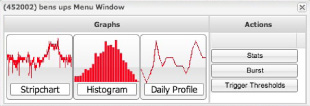
- After logging in, click on the Boomerang in the side panel. A menu box will appear. Under Actions, select Trigger Threshold as shown in Figure 3.
- A message should be displayed saying “Successfully downloaded trigger threshold parameters from xxxxxx”. Now left click on RMS Current. Left click on the box under RMS Current Low Low and change it from 0 to 1.5 Amps. Under Global Parameters, set Holdoff Time to 1800 seconds (30 minutes). The other settings can be left at the defaults.
- Click Send Threshold. A message should appear displaying the response “Successfully uploaded trigger parameters to xxxxxx”.
Configuring E-mail Alerts
Under Administration, there is a distribution list with several items to set up.
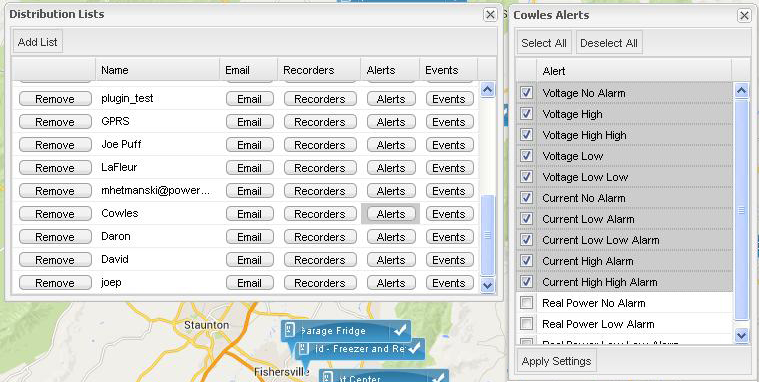
- Click on Add List and name the device. Click on Email and add any e-mail address which should receive an e-mail notification from Canvass.
- Click on Recorders and select the proper Boomerang.
- Next, set up an Alert. For the example application, the current going to the refrigerator will be monitored. To ensure that an alert will be sent on a low current condition, Current Low Low must be checked. Figure 4 shows the Voltage and Current boxes selected.
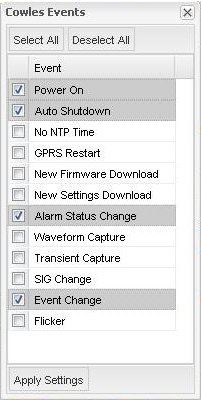
- Just to the right of Alerts, click on Events. Select at least Alarm Status Change. In Figure 5, Power On and Autoshutdown are also checked to catch power outages and restorations.
Triggering on a Current Low Low Condition
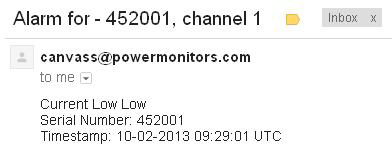
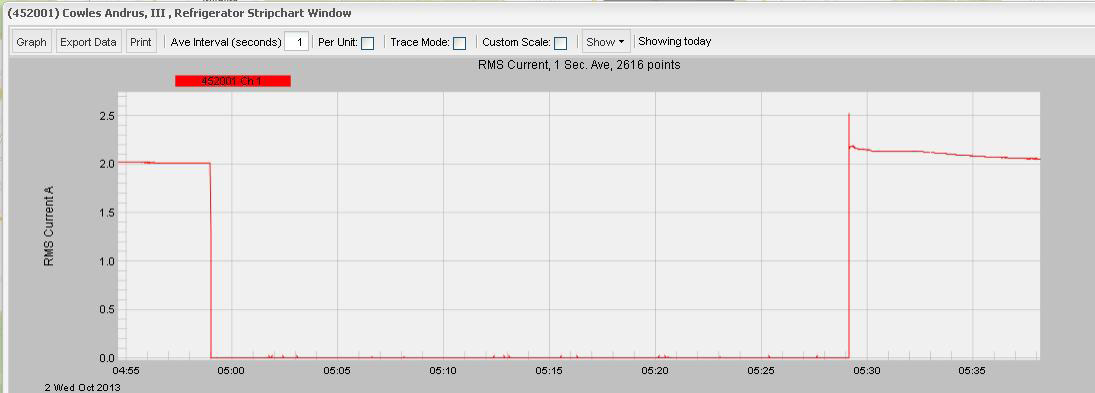
In one test, the Alarm hold off was set to 30 minutes or 1800 seconds. After studying the cycle period of the refrigerator, it was found that it usually doesn’t stay off for more than 29 minutes. During one cycle, possibly due to a cooler outside temperature, the refrigerator did not run during the hold off time, triggering an alarm as shown in Figure 6.
The current strip chart in Figure 7 shows the Refrigerator’s compressor cycle response. The small spikes in the graph represent the refrigerator’s light coming on, meaning the door was opened.
Note that the time above is in local time and the alarm time is in UTC which is 4 hours different on the east coast. When the refrigerator started back up, Canvass sent a second email indicating that the refrigerator was running again.
Conclusion
The Boomerang plug-in is a very flexible, portable, and extremely functional tool that can be used for many different power monitoring applications. It is a very fast and easy way to get remote data on a device and monitor the device in a remote location. Using laptops, desktops and mobile devices with internet connectivity it’s possible to monitor remote devices from almost anywhere. Additionally, because Canvass archives data, it is possible to review device history. With just a couple of simple steps, the Boomerang plug-in can be configured quickly and easily for many custom power monitoring applications. Setting up the Boomerang to email a message when a device has been off line for a given amount of time is a relatively simple task.
