
Abstract
Good cell phone coverage is not always guaranteed. It varies widely depending upon location, system and cell phone provider. The purpose of this white paper is to provide some suggestions and tools to help the installer of system based solely on a cellular communication infrastructure to be successful.
Installation and Considerations
The Boomerang and Revolution Cell phone products both communicate via a RF Cell Phone modem. The Boomerang uses a GSM (Global System for Mobile Communications) modem with the AT&T cell phone network whereas the PMI Revolution uses a CDMA (Code Division Multiple Access) modem with the Verizon cell phone network.
It goes without saying that installing a device in a remote location where there is no cell phone coverage and expecting it to send data via a cellular network is futile. It is very important to check cell phone coverage in questionable areas before installing a unit that uses a cell modem as its sole communication link. There are several ways to check cell phone coverage. A good place to start is to check with the service provider. PMI’s Boomerang uses AT&T, GSM; all of PMI’s other cell modem equipped devices use Verizon, CDMA. If the service provider’s coverage map shows that the intended installation is in a strong signal strength area, it is likely that the system will work fine.
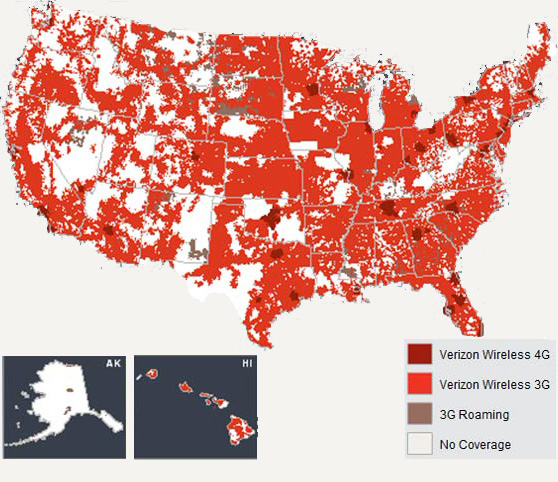
Sometimes even if the coverage map or coverage tool indicates there is good coverage it is possible there may not be. For example, if a structure was built after the coverage map was made, there is a good chance of shadowing or the RF path getting blocked by the structure. This causes the signal to be much weaker than if the structure did not exist. Another issue is that sometimes the coverage maps are done in such a way that their coverage appears to be a little better than they really are in some situations. This does not mean that the provider is trying to present information that is not truthful, it is just that the resolution that is being used to view the information may not be detailed enough to get the true picture of a particular location that a modem based system is placed.
If a cell modem based device must be placed in a location where the cell phone coverage is marginal, it is a good idea to check the cell phone field strength at the exact location of the installation. Phone test sets and analyzers are available for purchase or rent and can quickly verify if a strong enough signal is available at a particular location. There are several companies that sell this test equipment and most of the equipment does a great job at providing information about signal strength and signal quality. However most are very expensive. If a cell phone test set is not available or not cost-effective, it is possible to get an idea of field strength using the bars on a cell phone that uses the same cell phone service provider and mode as the device being installed. At the present time that is Verizon, CDMA for the Revolution (Figure 1) and AT&T, GSM for Boomerang (Figure 2).
Depending on your cell phone, the bar graph may be limited, small and maybe difficult to read. There are several cell phone applications that provide a more quantitative and higher resolution display. Root Metric makes an application for i-phone and Android phones that allow mapping of signal strength via a cell phone. The Sensorly application (Figure 3) uses the cell phone’s RSSI, (Received Signal Strength Indication) and GPS output to collect the data. This information can then be uploaded to Google Map program for viewing cell phone signal strength at a specific location. Sensorly shows the signal strength from the RSSI data in different colors. It also collects useful information such as the cell tower identification or BSSID. This can be a useful tool to get an idea of the typical coverage in a selected area or the exact location where a device is being installed. Below is the existing database that has been uploaded for the area that surrounds PMI showing AT&T coverage. The blank areas do not necessary reflect loss of signal. It could just indicate that the area has not been covered and uploaded as of the time of the screen capture.
There are many other cell phone applications that could be useful when scoping out cell phone coverage. Some other examples are Open Signal Maps by Staircase 3, Inc. RF Signal Tracker by Ken Hunt, and Signal Finder by Akvelon Inc.
If smart phone applications are not an option, it may be possible to use the test codes that most phones have to activate a screen displaying RSSI and GPS data. One of the largest cellular antenna, amplifier and repeater providers in the US is wpsantennas.com Cellular Reception Solutions. On their website they provide a list of cellular phone field test modes. Even test codes on outdated, decommissioned cell phones may likely provide a RSSI on the CDMA signals in the area.
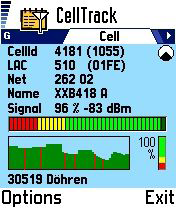
Cell Track for the Nokia cell phones works with the E71 and several other models. Cell Track displays signal strength in dBm along with a bar graph display. This application also collects RSSI data and relates it to a location. Installation pictures can be added to the log. This program has a very detailed bar graph display and shows signal strength over time. A high RSSI usually indicates that the coverage is good at a particular location. Sometimes this may not be true. Sometimes the RSSI can be fooled by something nearby generating noise or an interfering signal. A very strong interfering signal can cause desensitization. Sometimes this can actually lower the RSSI or bar graphs on a cell phone’s screen. Cell phone technology is spread spectrum in nature, and is designed to be relatively immune to many types of narrow band interference, however if the interference is strong and covers a large spectrum; the cell signal can be compromised. These types of issues are rare as cell phone modem designers are very aware of causes of these problems and have designed modern cell phones and cell phone systems to be immune to most of these conditions.
In large cities some phone systems are running close to capacity. In the cases of wide spread emergencies, such as in 9/11 or natural disasters such as earthquakes, the phone throughput can easily exceed capacity causing wide scale system failures.
Conclusion
In summary, it is advisable to check the location on a coverage map or even utilize a cell coverage tool that corresponds to the network and modem type (GSM or CDMA) being used before installing a cell phone modem-based device.
If the coverage map or tool suggests that the signal is marginal, it is wise to check the installation site out using one of the methods described below.
A cell phone test set or analyzer is one of the best ways to check signal strength, signal quality and other noise and interference issues but may not be affordable just for occasional use.
- If using a cell phone to test coverage, the phone modem must be the same type as the device modem (CDMA or GSM).
- A cell phone application that correlates the location using the phone’s internal GPS with signal strength via RSSI is a good option.
- Most cell phones can be put into a test mode by manually keying in a simple test code. This allows the signal strength/RSSI and other information about the system to be available. This will work even with decommissioned cell phones.
- Sometimes a cell phone’s bar graph can be used as is just to get a relative idea of signal strength at a given location.
- There can be locations where the signal strength is strong but data throughput is poor. This can be attributed to a variety of causes such as nearby broadband noise source, a large RF signal causing intermodulation or the desensitization of the phone’s receiver. This is normally the exception and not the norm. In this case expensive test equipment may be required to diagnose the problem.
