
Abstract
Canvass provides a cloud-based system for gathering, storing, and analyzing voltage, current, and power data from Boomerangs and Revolutions. In large deployments, with hundreds or thousands of devices, it’s more convenient to group devices into regions and Canvass subaccounts. With Canvass subaccounts, one master account is a “rolled-up” account that shows all devices, while subaccounts allow other users full administrative access or normal access to just a subset of devices. In addition to its usefulness in handling very large deployments, the subaccount feature works well with special device situations. One case for this feature may be where two utilities wish to share a device’s data at a single location. Another may be where devices belong to a larger utility but are also utilized by a regional cooperative served by that larger utility. A third case may be where a utility installs a device at a customer location, and wishes to share that single device with the customer, but also include it in the larger, private utility account.
How It Works
Originally a Boomerang or Revolution was associated with a single Canvass account prior to being shipped to the customer. While this is still the case, we have reworked the implementation of Canvass to no longer limit a device to a single Canvass account. Once a device is associated with multiple accounts, users of both accounts will be able to see the devices, and edit its properties, just as if they were the sole owner/manager of that device.
Shared Attributes
It is, however, important to note that geographical location, device label, and scale factor settings are shared across all accounts linked to a device. The device’s geographical position (where it appears on the map, based on configured GPS coordinates) is shared across accounts, as a physical device cannot be in two places at the same time, and the scale factor settings are associated with the device location itself, and cannot differ between accounts. In addition, settings that are stored in the Boomerang or Revolution, such as current range, voltage/current/power thresholds, and circuit type, are the same for all accounts.
Users
Each account and subaccount contain a distinct set of Canvass users – a user is always associated with a single account. To maintain a login into a master account and underlying subaccounts, multiple users may be created. These users may be standard or administrative users. Users of the master account have access to all devices in each subaccount but have no access to users, distribution lists, or other non-device information in those subaccounts.
Notifications
Alerts and Events can be configured for a shared device just as if the device were associated with a single account. Any notifications configured in an account will be distributed only to users within the account which configured the notifications. This allows each account to manage its own set of alerts/events for single shared devices, without any concern about unwanted emails or text messages sent to Canvass users outside of your immediate organization. Note that the alarm thresholds themselves are stored in the Boomerang, so they are shared among all users on all accounts.
3 Phase Groups
In Canvass, three single-phase devices may be grouped together to form a virtual 3 phase device in Canvass, known as a 3 phase Group. This virtual Boomerang may be used to graph voltage unbalance, provided the three physical Boomerangs are on separate phases. Three phase Groups are specific to an account. If a 3 phase Group is created in one account (either a master or subaccount), it does not appear in other accounts. If needed, a new 3 phase Group may be created.
Multiple Accounts in Action
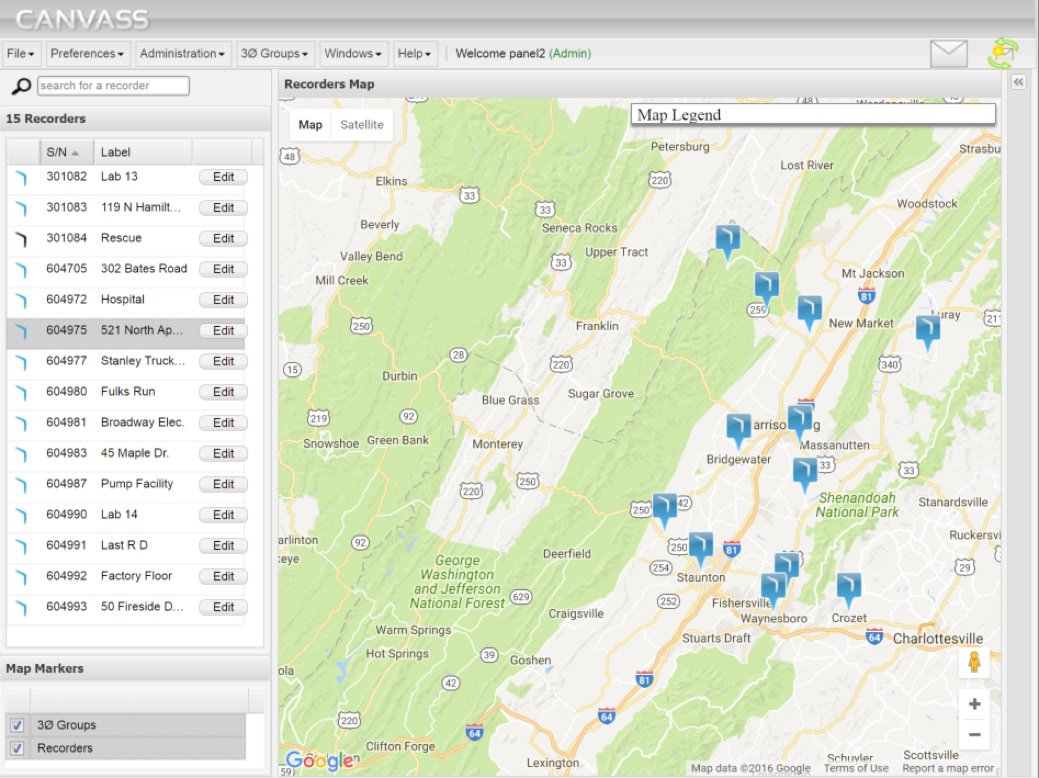
Shared devices will appear no different to devices associated with a single account within the Canvass user interface. In Figure 1, you can see a screenshot of an “umbrella” account with many devices, some shared with other accounts, and some not.
Now, we’ll look at Canvass while signed into a “subaccount” of the “umbrella” account. Figure 2 shows a subaccount containing a subset of devices from the larger umbrella account.
Note that some of the same devices appear in both the umbrella account and the subaccount, such as the “Fulks Run” Boomerang, with a serial number of “604980.”
Adding Multi-Account Support
If multiple account support sounds like a good fit for your organization or use case, you may contact Power Monitors tech support, who will configure the necessary Canvass accounts, and device shares to meet your needs.
Conclusion
Canvass’s new multi-account support makes large scale deployments much easier to organize and manage. Dividing Boomerang groups into subaccounts gives local operators control over their devices while providing upper layer users a full view into the data. On a smaller scale, sharing a Boomerang in multiple accounts also allows for sharing specific devices with outside entities, such as power end-users.
