
Abstract
Utility situational awareness is critical with today’s high customer expectations, increased regulatory scrutiny, and reliance on stable AC power. Voltage interruption/outage detection is the most basic, and usually the most important process in staying ahead of customer complaints and fixing problems as quickly as possible. Traditionally, utilities have relied on sporadic instrumentation at a polled interval or from direct customer notifications to measure the extent, duration, type and severity of interruptions. Some AMI systems have a limited ability to provide outage notifications, albeit on a somewhat delayed time scale. The Boomerang and Canvass provide instant email and SMS notifications of any interruption, along with a historical record of the entire event. This white paper describes the new interruption system.
How It Works
The Boomerang is a line-powered, cellular field device capable of measuring voltage, current, and power. These readings are converted into one-second averages for each channel that is measured (voltage, current, etc.) and accumulated for a period of time before being delivered to the Canvass system. When special types of conditions are met, however, such as an event or an alert state, the device immediately empties its buffers and alerts the Canvass system that one of these configured thresholds has been crossed.
The outage detection alert state is one such condition. When the Boomerang has sensed that the line voltage has dropped below a programmable threshold, it immediately generates a special alert that is forwarded to the Canvass system through the cellular network. In addition to the alert state, all of the device’s stored buffers are also flushed so that the user can see the voltage readings leading up to the outage.
When a device is in an alert state (such as an outage state), this is an occurrence of variable-length duration. These states may last a second or two or several days, weeks or even months, depending on the thresholds configured and the state that the device is in (based on its measurements).
As a device is “heading towards” an outage, the user may note that it crosses several thresholds along the way – and, depending on the duration at these different stages – may produce transitory alarm states. For instance, if the user has configured the device to trigger at 115V for a Low threshold, 110V for a Low Low threshold and has elected to receive alerts for Voltage Interruption, then – depending on the duration that the device measured the voltage at each level, the user may receive “transitional” notifications as it goes from “Ok” to “Low” to “Low Low.” Optionally, separate email/SMS distribution lists may be configured for each type of state, so that some users are notified only on interruptions, and others only for voltage regulation issues.
Users can also be alerted when a device exits an alert state. There is a corresponding option in the Distribution List Setup for each measurement that can be triggered upon. The next section details how to create a new distribution list in Canvass and how to configure it to send emails when interruptions are detected.
Configuring Canvass for Alerts
Only Canvass account administrators can create distribution lists. Administrative privileges in Canvass can be conferred by an existing account administrator or by contacting PMI Technical Support (support@powermonitors.com).
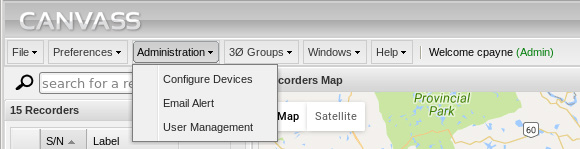
Begin by selecting the Administration menu at the top of the Canvass screen and then select “Email Alert” (Figure 1).
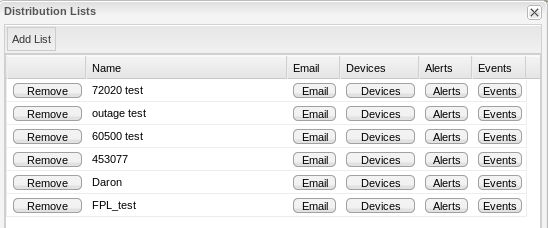
The user will be presented with the Distribution Lists window, which contains a list of each and every distribution list that has been configured for that account. In this example we will discuss how to create a new distribution list. See below for adding outage notifications to an existing list.
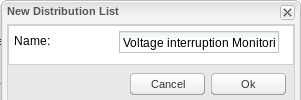
Click on the Add List button at the top of the Distribution Lists window. This will prompt the user to name the new distribution list. The author recommends using a descriptive name such as “Voltage Interruption Monitoring” or perhaps a site name, “Customer John J. Smith.” Type in a name and click “Ok” to continue (Figure 3).
The newly created distribution list will now appear in the Distribution Lists window. It is time to decide which users will be notified when interruptions occur. Click on the Email button next to the newly created distribution list (shown in Figure 3).
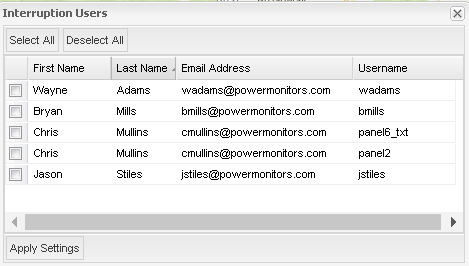
This will display a user selection list. Place a check mark in the box next to each user’s name who should receive interruption notifications and click Apply Settings when complete. An example is shown in Figure 4.
Next, the user will have to select which devices to monitor for interruptions. To do this, click on the Devices button next to the distribution list created above. This will present the user with a device selection list. As with the users, simply place a checkmark in each device whose interruptions are to be monitored and alerted via email (Figure 5).
Finally, the user must configure the interruption alerts. Begin by clicking on the Alerts button next to the distribution list that was created above. This will present the user with a list of alert states that, if triggered, will send emails to the users selected in the “Email Selection” step above. If only monitoring for voltage interruptions, place a check box in the Voltage No Alarm and Voltage Interruption check boxes (Figure 6).
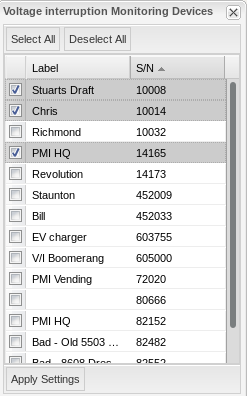
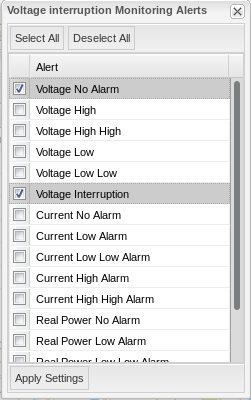
The Voltage No Alarm was selected so that the user will receive an email when the interruption comes to an end. Without this alert state being selected, the user will not receive an alert when the interruption has ended.
Note: For three-phase Boomerangs, an alert will be triggered for each phase individually on which an outage is detected. If the user configures interruption notifications as described above for a three-phase device which experiences an interruption on all three phases, the user will receive six total emails: the first three emails will alert the user that each phase (one email per phase) has experienced a voltage interruption. The following three emails (one email per phase) will be generated in order to alert the user that the voltage interruption has ended on each corresponding phase.
Viewing an Interruption
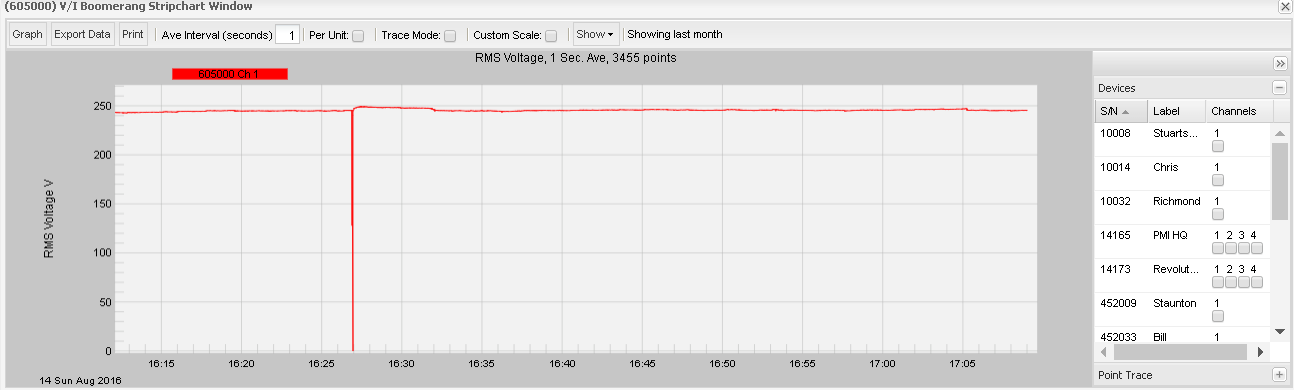
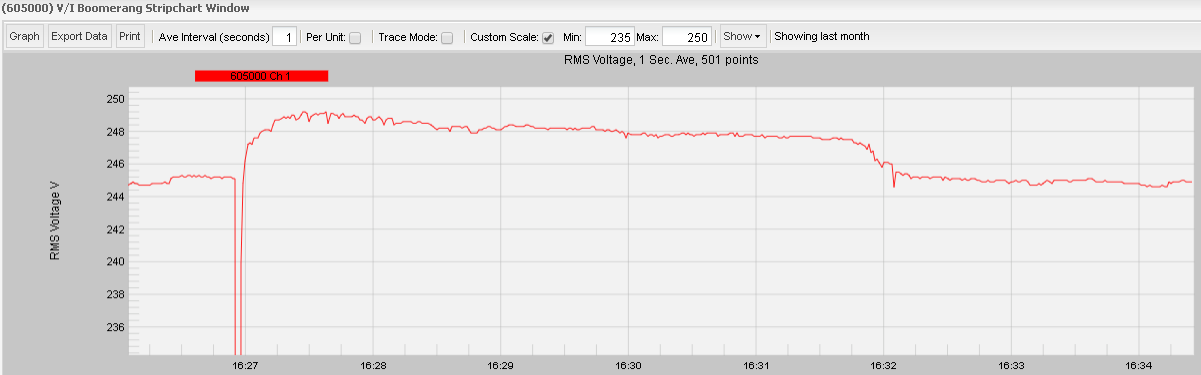
An interruption on any phase, as configured above, will generate an SMS or email alert. In addition, the outage and recovery are permanently logged in Canvass for later analysis. A momentary interruption is shown in Figure 7. Because Canvass stores all 1-second RMS values, it’s possible to zoom in and analyze the details. In Figure 8, the interruption is seen to last only a few seconds, but the recovery has a significant effect on the RMS voltage. The voltage immediately after the restoration quickly increases from the original 245V to almost 250V. After several minutes, the system voltage settles back to the original value, as loads re-energize. A quick check of other outages at this location shows the same pattern. This post-interruption analysis is very useful for characterizing system behaviour.
Conclusion
Implementing a real-time voltage interruption detection can be a costly task for utilities. Canvass with the Boomerang is an exceptionally responsive and cost-effective method for helping to ensure regulatory compliance, responding to customers, and resolving interruption issues as quickly as possible.
