
Abstract
This whitepaper is an introduction to ProVision Mobile and demonstrates how, much like its desktop counterpart, it can be used to initialize and retrieve settings from a recorder.
Initializing and Retrieving Settings
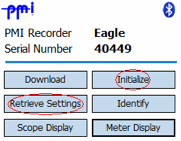
Once the recorder has been connected to the Field PC and ProVision Mobile has established a link to it, the Main Menu is displayed, as shown in Figure 1. The Main Menu displays information such as the model of the PMI recorder attached, and its serial number. Also available are options for interacting with the recorder. This paper discusses the Initialize and Retrieve Settings.
After selecting the Initialize option, ProVision Mobile displays initialization settings with default values, as shown in Figure 2. These settings are displayed across multiple pages. These pages can be accessed using the Next and Back buttons. Additional settings can be reached via the Advanced button, as shown in Figure 3. Some settings are only applicable to certain recorder types. Settings that are not applicable will not be accessible.
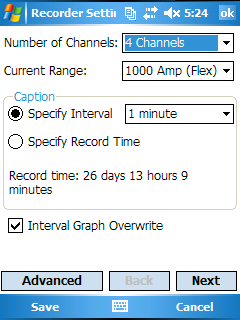
From the initialization settings screen, selecting Cancel will return to the Main Menu and all changes will be discarded. Selecting Save will display a prompt to initialize the recorder with the new settings. Selecting Yes will transfer the settings to the recorder. This may take a few moments depending on the recorder and connection type. When the transfer is complete, select Close to return to the Main Menu.
To edit settings already stored on the recorder, it is necessary to retrieve them first. Do this by selecting Retrieve Settings from the Main Menu. It may take a little while for the settings to transfer depending on the recorder and connection type. After the retrieval is complete, select Open. The Initialization settings are displayed. However, instead of default values, the settings displayed are those retrieved from the recorder; they can now be edited and modified. These settings can then be used to initialize the recorder as described previously.
Being able to retrieve settings and reinitialize the recorder is necessary for modifying how and what data is recorded. The mobile nature of the Field PC allows retrieval and initialization from recorders still connected to the source they are monitoring. Utilizing these tools can be invaluable for scenarios in which physically disconnecting, using desktop ProVision to modify the settings and then reconnecting is not feasible.
