
Abstract
This white paper provides details on how to estimate ring frequency caused by resonances formed between power corrections capacitors and inductive loads using ProVision. Waveform data captured using PMI’s Eagle or Revolution series PQ recorders will be used to calculate the ring frequencies of several different types of oscillatory transients. Additionally, these techniques can be applied to resonances formed by other phenomenon. The data that is obtained from this process can be used to adjust the electrical characteristics of the circuit to mitigate the effects of ringing.
Data Collection
It is necessary to obtain waveform data of the ringing event in order to estimate the frequencies resonant in a circuit. Waveform capture is a triggered data type; to capture a waveform during an oscillatory transient a trigger condition must be met in the recorder during that time.
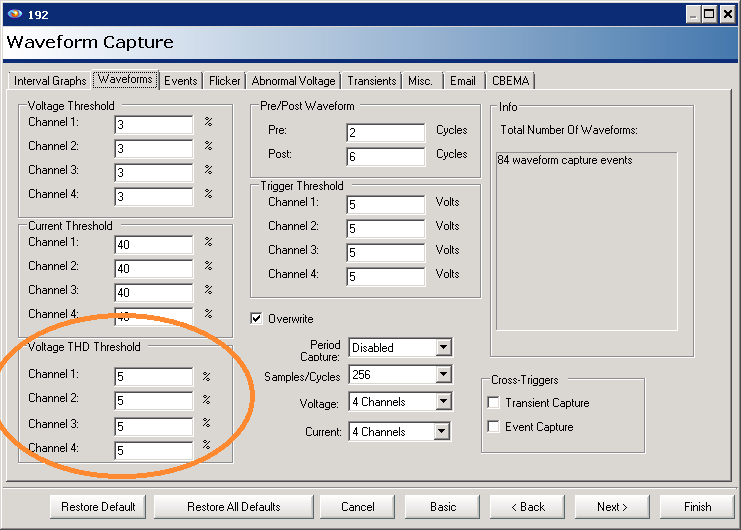
The Revolution supports waveshape triggering, which is based on changes in voltage total harmonic distortion (THD). This is the best method of recording a ringing event, since it’s very sensitive to changes in frequency content. To adjust the threshold for this, adjust the “Voltage THD Threshold” values in the waveform capture setup, as shown in Figure 1. This triggering mechanism uses THD to measure voltage waveform variances from one cycle to the next. A threshold can be set that allows changes in the THD to trigger a waveform capture thus concisely recording the desired data. A threshold setting between 2% and 5% should be used for best results. See white paper “Waveshape Triggering for Waveform Capture” for more details about this functionality.
For the Eagle and other recorders, RMS waveform capture triggering may be used. A voltage threshold of 2% to 4% is suggested. Capturing oscillatory transients is a little trickier without waveshape triggering, since ringing doesn’t necessarily cause a large change in the overall RMS value. Setting the threshold very low risks overfilling the waveform memory with small voltage sags. If the RMS threshold is set very low (2% or lower), it’s suggested to download the recorder relatively soon after any known equipment operation that may cause ringing (e.g. a cap bank connection).
Finding and Isolating Resonances in Waveform Data
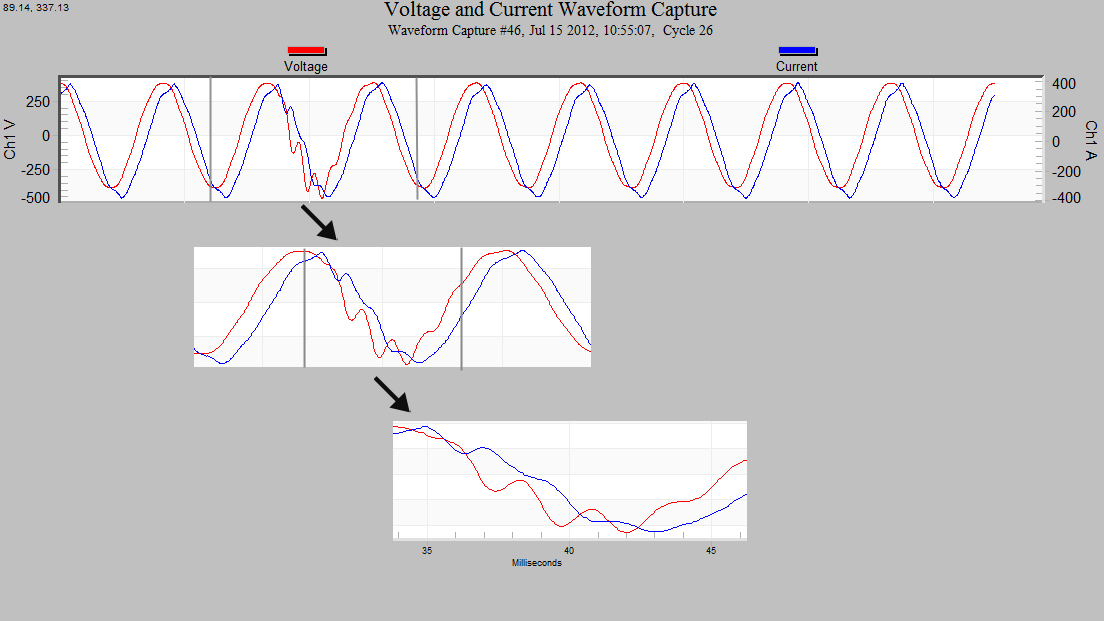
Once the data set is downloaded into ProVision, use the menu to navigate to Graphs > Waveform Capture > Voltage and Current. A list will appear showing all of the waveforms recorded during the session. Select the first waveform and click OK. The entire duration of the captured waveform will be displayed. For a long capture, the level of detail visible may not be enough to immediately see that a disturbance is a ringing event. In this case click and drag on a section of the waveform to zoom in (Figure 2). The directional arrow keys on the keyboard can then be used to scroll left and right. If there are multiple recordings in the set, use the “Page Down” key to switch to the next waveform capture in the set and visually scan until a resonance is found.
Zoom in on the waveform to bring the entire oscillatory transient into view. The waveform capture screen has a view mode that allows inspection of the data recorded at individual points. Press “T” on the keyboard to toggle the Data Point inspection mode and a data points table will be displayed to the right of the waveform box. The individual data points that were collected can now be inspected. For help identifying where the data points occur on the waveform, right-click anywhere on the graph and choose the option to “Mark Data Points” from the menu as seen in Figure 3.

Estimating Ring Frequency
Now that the view is prepared, it is time to collect the data points that will be used for estimating the ring frequency. To calculate this frequency it is easiest to measure from peak to peak. Either the positive or negative peaks may be used, as long as the same direction is used for all measurements.
Find the first peak of the resonance and hover the mouse over the point. The mouse pointer will change to indicate that it can be selected. Select the point using a left-click then use the left and right directional keys move the position indicator to find the value of the maximum (or minimum) of the peak. Once found, write down the time value (in milliseconds – ms.) as indicated at the top of the point table box. Continue collecting data by recording the times of each subsequent peak of the same polarity (Figure 4). To estimate the ring frequency we can use the equation F = 1000/P, where the period P is measured in milliseconds, and the frequency F is in Hertz. Using the point calculations obtained from the previous step, find the interval between each peak and substitute each for P in the previous equation.
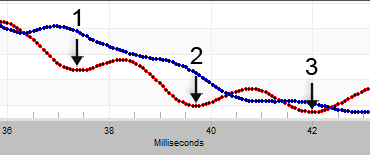
With P = 2.34, from the calculations we can see that the ring frequency is around 427 Hz which is consistent among the other estimates in the set. For very high resonance frequencies (over 2 kHz), the quantized time resolution from the sampling process itself may reduce the estimate accuracy. To improve accuracy in this situation, use multiple periods of the ringing, or average multiple individual periods.
| Point | Time (ms) | Period (ms) | Frequency (Hz) |
|---|---|---|---|
| 1 | 37.37 | — | — |
| 2 | 39.71 | 39.71 – 37.37 = 2.34 | 427.35 |
| 3 | 42.06 | 42.06 – 39.71 = 2.35 | 425.53 |
Table 1: Calculations using Figure 4 data
Pitfalls That Occur When You Don’t Use the Peak
Calculations for ring frequency require an accurate measurement of the waveform period. Since many people have the tendency to think of cycles as starting from zero and ending on zero after a full cycle, they might try to measure ringing in a similar manner. Using an estimated center of a resonance sine wave will introduce error since there is no way to easily determine the zero crossing of the cycle. Additionally, it is tempting to use the point where the ringing pattern crosses one of the horizontal marker bars as a reference. Since the ringing waveform is superimposed on the 60Hz waveform, the resulting calculations will be skewed.
Using Half Cycles to Find Ring Frequency
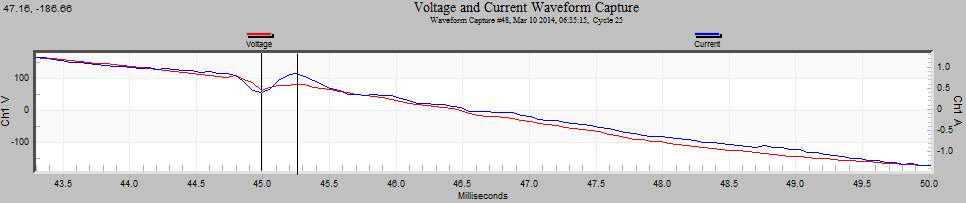
In some instances ringing may be present but heavily damped or mixed with other frequencies in the capture, or other complex events. In these cases a half cycle of a resonance can be used to find the ring frequency, without requiring a clean full period. Figure 5 was taken from a circuit that was resonant throughout most of the recording but in this instance the ring dissipated quickly. We can use the visible half cycle pattern to calculate the ring frequency. The duration from valley to peak is 45.25 – 44.99 = 0.26 ms. Multiply by 2 to get the period of a full cycle: 0.26ms * 2 = 0.52ms. This number can now be used in the frequency estimation equation given above, giving 1000/0.52 = 1923 Hertz.
Using the Harmonic Magnitude Plot
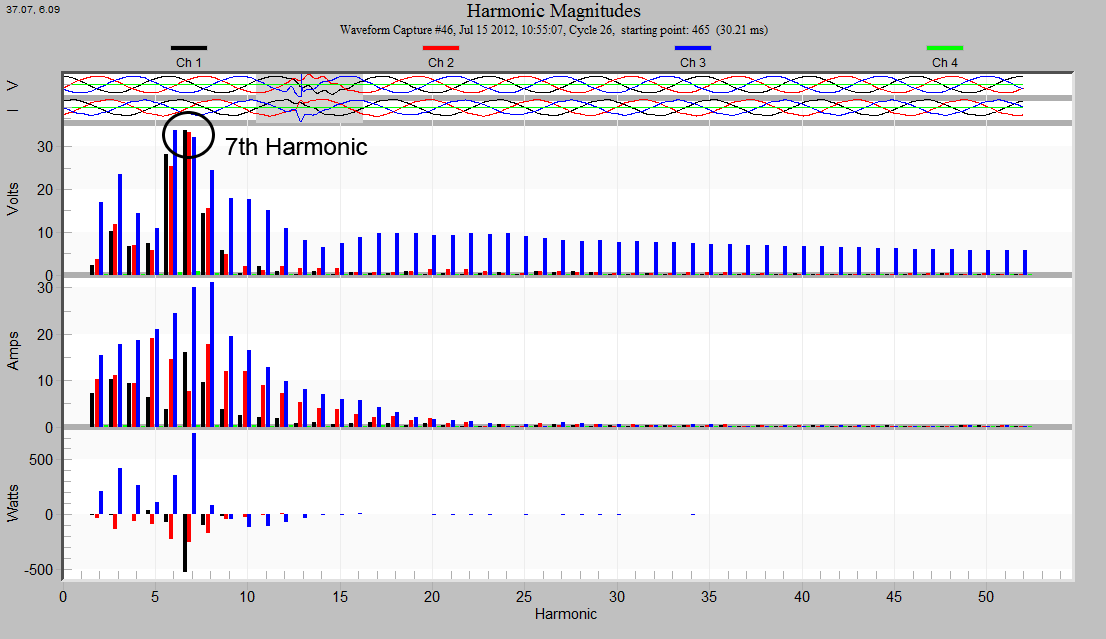
The Harmonic Magnitude Plot available in ProVision can be useful to verify the ring frequency estimate and to show the broader range where the estimate resides. From the main menu choose (Graph > Harmonic Analysis > Magnitude) then select the waveform used in the original estimate. A “Harmonic Magnitudes” graph will appear (Figure 6). Move the 1 cycle window (gray slider box at the top of the Harmonic Magnitudes window) over the section of the waveform that contains the ringing. The ring frequencies found in Table 1 can be compared to the Amps plot of the harmonic graph by dividing each frequency found by 60Hz.
| Harmonic | Frequency (Hz) |
|---|---|
| 2 | 427.35 / 60 = 7.12 |
Table 2: Harmonics calculation using Table 1 data
In this case we can see that our estimate is found in the Harmonics Magnitude chart as part of a resonance near the 7th harmonic. From this we can conclude that our estimates are a good place to start when designing filters or trying to reduce the effects of these resonances.
Conclusion
The ring frequencies of resonant circuits can be discovered by manual analysis of waveform data using ProVision. As little as a half cycle can be used to make an estimate on a ringing frequency while multiple cycles of ring can be used to estimate the range of frequencies on which the circuit is resonating. Like any other rigorous process we also have the ability to verify the results of our work. To do this, we can use the harmonic magnitude plot and compare to the frequency distribution and visualize where our estimates came from.
