
Abstract
Recently, PMI augmented the functionality of the Revolution power quality analyzer by integrating it with the Canvass power quality portal. This white paper reviews the requirements for getting a Revolution up-to-date and connected to Canvass.
Why Use a Revolution with Canvass?
Canvass is a web-based data analysis portal that allows for near real-time analysis of voltage, current and power measurement from Boomerangs and Revolutions. Boomerangs and Revolutions sample each of these measurements for a period of 30 minutes at an averaging interval of one second, then report this data directly to the PMI Canvass database. This data is stored in the Canvass database, thus allowing the customer to retrieve any and all data that their device has reported into the system.
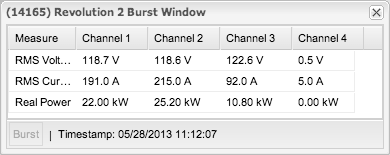
What sets the Revolution apart from the Boomerang in this scenario is that the Revolution, in addition to sending the 30 minute voltage, current and power stripchart data, also stores all of the power quality data that the user has pre-configured it to sample (the Boomerang does not store data in on-board memory). As an example, a user may wish to record one-cycle max and min quantities, harmonics, waveform capture, etc. The user will use ProVision or WinScan to complete this configuration and send it to the Revolution. At the same time, the Revolution can send one-second average trend data to Canvass, allowing immediate access to stripchart data (Figure 1) and near-real-time readings from a web browser on any internet-connected computer (Figure 2).
It should be noted that at the moment, the Canvass interface for Revolutions supports one second averages only. All data that is sent from a Revolution to the Canvass Database will be sent using this averaging interval regardless of the interval used for recording in the Revolution’s configuration file.
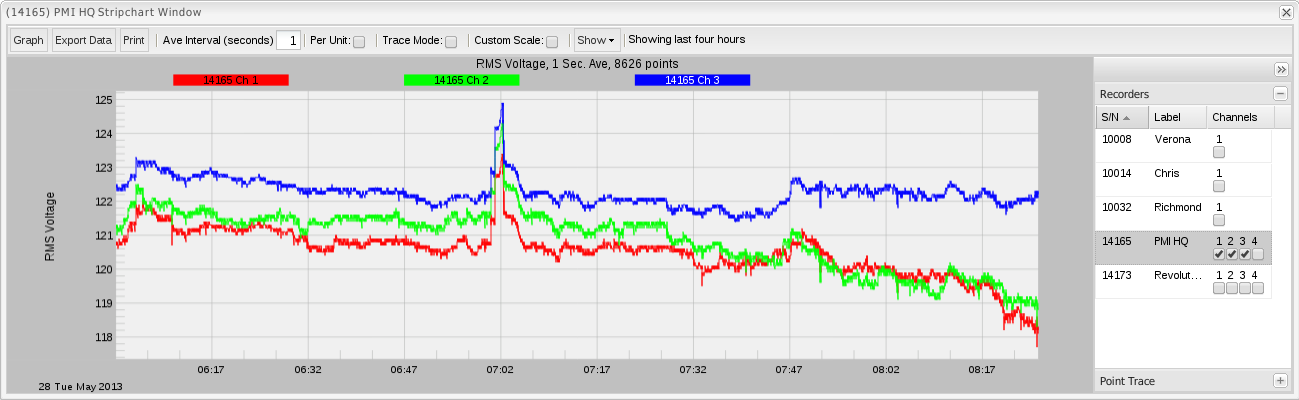
All of Canvass features are available to the Revolution. This includes stripchart, daily profile and histogram graphs for voltage, current and power; voltage unbalance graphs; e-mail alerts for triggered events based on user-defined settings (low low, low, high, and high high triggered alarms for voltage, current and power); geolocated icons on a Google Maps interface to easily identify where a Revolution has been deployed; live indicators in the web user interface to display when a device is in an alarm state, when it is in a “good” state and when it has not reported for a prolonged period of time; multiple users per account and per e-mail alert distribution list; and a web-based interface for configuring Canvass-specific settings in the Revolution. No plug-ins or special downloads are required and Canvass will run in any modern web browser (IE7, IE8, IE9, IE10, Safari, Firefox and Google Chrome).
| Process | Inbound/Outbound | Type | IP Address | Port |
|---|---|---|---|---|
| Canvass to Revolution | INBOUND | TCP | 50.57.235.79 | 65211 |
| Revolution to Canvass | OUTBOUND | TCP | 184.106.97.226 | 11017 |
| Revolution to Canvass | OUTBOUND | UDP | 184.106.97.226 | 11016 |
Table 1. Port settings for communication between the Revolution and Canvass
Prerequisites
In order to connect a Revolution to Canvass the following prerequisites must be met:
- The Revolution must have firmware version 5.66 or later, which can be downloaded from the PMI website at: http://www.powermonitors.com/download/file/pmi-provision-firmware for ProVision and http://www.powermonitors.com/download/file/pmi-winscan-firmware for WinScan. Alternatively, if the user has the latest version of ProVision installed, simply connect the Revolution to the PC, Identify the device with ProVision and ProVision will automatically detect that a new version of firmware is available. Simply follow the on-screen instructions for upgrading from directly within ProVision.
- A Canvass account must be created for the user, and the Revolution enabled for Canvass operation by PMI. Please contact your PMI equipment rep for more information on establishing a Canvass account for a Revolution. There is no charge for enabling Canvass on the Revolution, but there is a small annual per-device charge for Canvass data storage. This fee does not apply when Canvass is only used for e-mail alerts without data storage.
- The Revolution must have either an ethernet port or a cell modem (having both is also okay). All of the power quality data that is reported to Canvass is reported by a combination of TCP and UDP communications over the internet.
- The Revolution must be connected to the internet and be able to reach the PMI Canvass server. See section Ports below for more information on connectivity requirements and potential firewall issues.
Ports
Communication with Canvass from a Revolution may require some ports being unblocked on internal firewalls if the Revolution is to connect via Ethernet. Refer to Table 1. If the Revolution is using a cellular modem, then these restrictions may not apply.
For users that intend on using Ethernet communications to report to Canvass, then the following firewall adjustments should be made:
- Outbound TCP traffic to IP address 184.106.97.226 on port 11017 should be allowed
- Outbound UDP traffic to IP address 184.106.97.226 on port 11016 should be allowed
If the user wishes to allow the Canvass application to be able to communicate with the Revolution to upload/download settings, or for burst mode, then the following firewall adjustments need to be made:
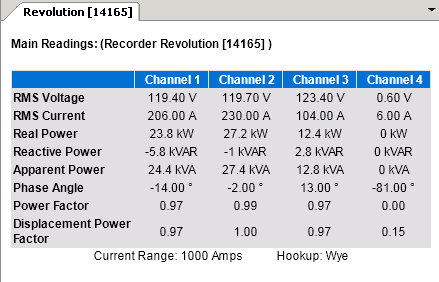
- Inbound TCP traffic to the internal IP address needs to be forwarded from IP 50.57.235.79 on port 65211. This is only required for traffic from Canvass to the Revolution, e.g. Burst mode (for live real-time readings) and sending alert thresholds from Canvass. Both of these functions may also be performed with ProVision (Figure 3), which likely is already inside the private network), so this inbound routing rule is not necessarily required.
For cellular Revolutions, the networking requirements may already be met. If the Revolution modem has a public IP address from Verizon without network restrictions, then no further network configuration is required. If the modem has an IP address in a private Verizon/utility network, then the same firewall and routing changes listed above for ethernet Revolutions apply. Although a static IP address is helpful, it’s not required for Canvass operation.
The Revolution sends a compressed packet to Canvass on periodic intervals (typically 15 to 30 minutes). This packet contains the one-second readings for all channels of voltage, current, and real power, enabling Canvass to provide continuous 1 second trend data. This traffic should fit in a 25MB/month data plan. If Canvass is the only cell traffic used with the Revolution (e.g. no ProVision data downloads), then a 25MB/month plan is typically all that’s needed. Use of ProVision for data downloads requires a much larger plan, usually from 250MB/month up to 1GB/month or more. With these larger plans, the extra traffic required for Canvass is negligible.
References
A variety of white papers on Canvass can be found by clicking HERE. For more information about Canvass and to sign up for a demo account, click HERE.
For more information about the Revolution, click HERE.
Conclusion
The Revolution is a versatile and powerful power quality instrument. With the recently added Canvass functionality a user can now take spot measurements, view near real-time data and perform long-term analysis on voltage, current and power trends from any internet-connected computer without the need for installing any software or plugins.
