
Abstract
The PMI Cell-Modem Revolution is a state-of-the art power quality recorder providing a wide array of connectivity options. This paper will deal specifically with cell modem communications and why the connection process sometimes requires a quick stop through PMI before establishing a direct link with the recorder.
IP Address Acquisition
The PMI Cell-Modem Revolution can be provisioned for one of two different modes of IP address acquisition: static and dynamic. As the names imply, static addresses are assigned to a device and persist over multiple connections to the internet while dynamic addresses will usually (but not always) be different each time the device establishes an internet connection. The type of address that the Revolution uses can be decided at device acquisition (with your wireless carrier).
There are a handful of factors to consider when deciding on a provisioning type and those factors are likely to vary by establishment. From a communications point of view, however, there are significantly fewer and they deal directly with how the customer will configure ProVision to connect with their device.
By choosing a static IP address, the customer can completely bypass the PMI IP Address Resolution Server. The device will be manually added within ProVision as a TCP/IP device (specifying a name for the connection and the device’s statically assigned IP address). ProVision will connect directly to the specified address without querying the servers at PMI.
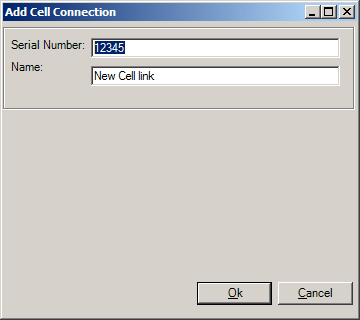
Selecting a dynamic IP address will result in a slightly different connection process. Since the address may change each time that the device connects to the internet, there’s no way to directly connect to it without first determining what that device’s IP address is. This is where the IP Address Resolution Server comes into play.
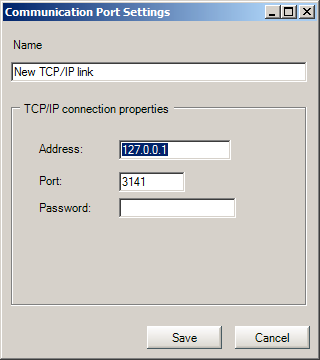
Address Resolution Server Communication
When a user tries to establish a connection with a Cell-Modem Revolution that has been assigned a dynamic IP address a number of things occur behind the scenes. ProVision first opens a direct TCP/IP connection to the PMI IP Address Resolution Server on port 11000. Once the connection has been established with the PMI server, ProVision will send a specially formatted request for the device’s IP address. The PMI server receives the request and the discovery process begins.
Upon receipt of the ProVision request, the PMI server queries a local database for the last known IP address of the requested device. It will then issue a UDP “ping” (on port 7151 – the same discovery port used by the Ethernet enabled scanners) to that address and await a response. If the device responds to the ping, then the queried IP address is immediately returned to ProVision. ProVision will then disconnect from the PMI server and create a direct TCP/IP connection to the returned IP address on port 3141. If, however, the device does not respond, the server initiates the next part of the discovery routine.
When a UDP “ping” fails, the PMI server then crafts an SMS message and fires it off to the device’s phone number. Once the SMS has been sent, the server goes into “wait” mode and remains in that state until one of two events happens: the device never responds and the wait times out or the device responds with some key connection information (to include the IP address).
If the device does not respond and a timeout condition does occur, then ProVision will be notified that the scanner is unavailable. This typically occurs when the Revolution has been placed in a location with poor cellular reception.
If the device does respond, then the connection information (date, time and IP address) are logged in the database (for future UDP “pings”) and the device’s IP address is returned to ProVision. Once ProVision receives the IP address, the sequence is the same as if the device had responded to the initial UDP “Ping”: ProVision closes the connection with the PMI server and then opens a direct TCP/IP connection on port 3141 to the device using the IP address returned by the server.
PMI stores the date and time of both the ProVision request and the device’s response in the database for troubleshooting (requests) and a more rapid response (device response). Often times outbound traffic on non-conventional ports such as ports 11000 (required for ProVision communication with our PMI server) and 3141 (used for TCP/IP communication with a recorder) are blocked at the firewall. By recording the dates of these requests in the database, we can determine whether or not the customer’s requests are reaching the PMI server and whether or not the device is responding to these requests.
Communication Ports
Connecting to and communicating with a Cell-Modem Revolution may require permissions for outbound traffic on two specific ports. For users who have elected to provision their devices with static IP addresses, then only port 3141 must be unblocked to allow for direct recorder TCP/IP communication. For users electing to provision their devices with dynamic IP addresses, then both ports 3141 (device communication) and 11000 (PMI server communication) must be unblocked.
Conclusion
As demonstrated above, the Cell-Modem Revolution provides a reasonable amount of customization with regard to communications. With ProVision and the IP Address Resolution Server, connecting to your Revolution is a very simple and straightforward process.
