
Abstract
Email/SMS alerting from Canvass is a powerful feature providing real-time notification about distribution events and equipment problems in the field. Some notifications require immediate truck rolls, and others are less urgent. In other cases, a problem may resolve itself in a short time. Holdoff and aggregation settings can be used to reduce the number of notifications, so that the urgency and distribution list is best tailored to the event as it unfolds. These settings are described here.
What Is an Alert?
Voltage alerts are the most widely used, but if the device supports current measurements, then current and real power are also available. Alerts thresholds can be set for Low Low, Low, High and High High. The white paper “Alert Level Programming and Analysis” explains alerts from the perspective of the Canvass-enabled device and explains how the device configuration affects these alerts.
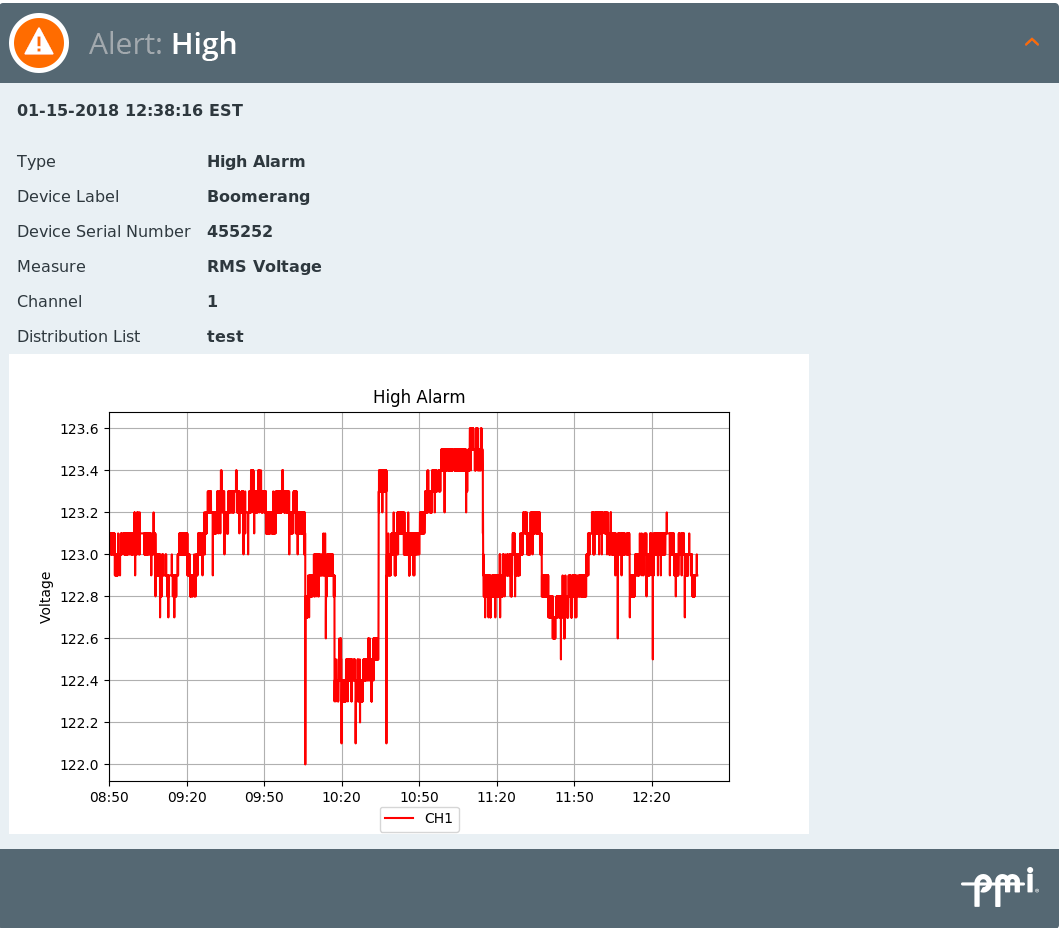
Once an alert is sent by the device to the Canvass server it can be processed based on the server configuration. Canvass server configuration is done as part of distribution list configuration. Generally, the alert information is emailed or texted to one or more users who are interested in the alerts for the device. Figure 1 shows a sample alert emailed from Canvass. See the white paper “E-MAIL Alerts With Canvass” for a general introduction to email alerts.
What Is a Holdoff?
Sometimes you don’t need alerts for momentary interruptions or other temporary events. Some events are short enough that notification is not needed. These short events can result in a flurry of emails or text messages for a problem that’s already resolved on its own. Receiving a flood of notifications for these short events can cause notifications of unresolved events to go unnoticed. Holdoffs can be used to ignore these events when they are short enough that immediate notification is not needed. With holdoffs you can tailor alert sensitivity to match the urgency and user list. There are two holdoff times; one is configured on the device (device holdoff) and the other is configured on the Canvass server (Canvass holdoff).
Device Holdoff
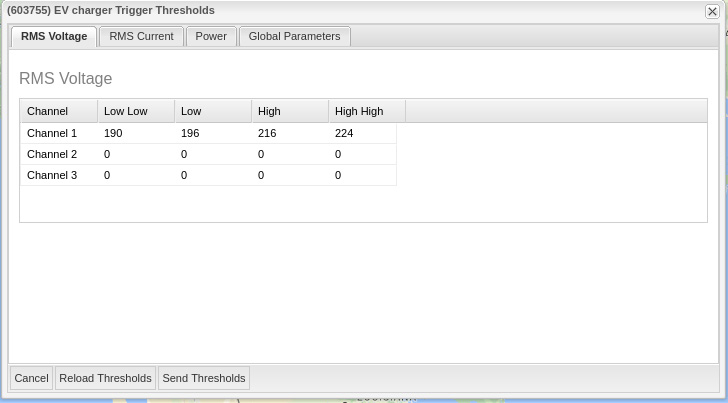
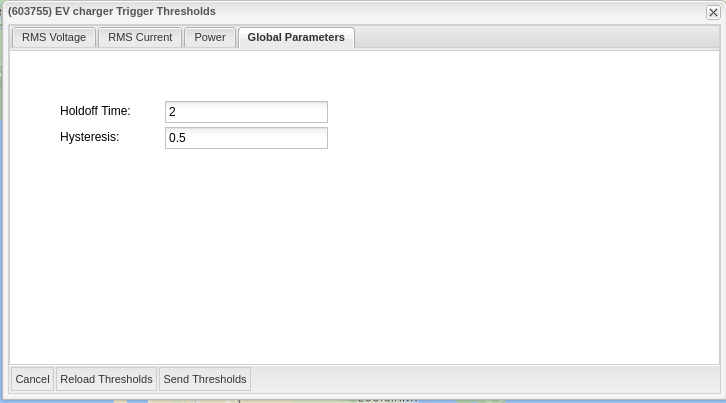
The device holdoff is configured using Canvass or NMS. The Canvass holdoffs are configured in Canvass distribution lists. When a holdoff is configured on the device, the device does not send an alert to Canvass unless the triggering condition persists for at least the configured time. Figure 2 shows the device trigger thresholds configuration page in Canvass where the voltage thresholds are set. Figure 3 shows the holdoff tab in the device trigger thresholds configuration page in Canvass where the device holdoff threshold is set.
Canvass Holdoff
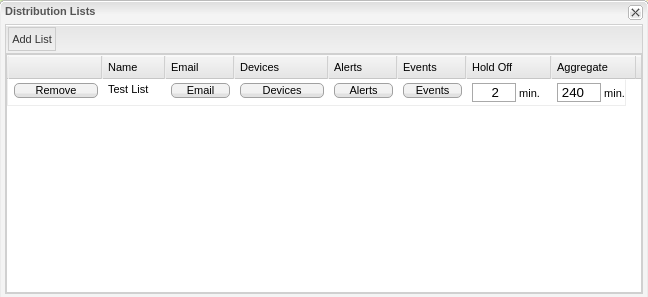
The Canvass server only takes action in response to alerts sent from the device. When a holdoff is configured in Canvass, it will filter alerts with a duration below the Canvass holdoff threshold, and only generate emails to list members for alerts with durations that exceed the holdoff time. If another alert arrives from the device that returns the status to the previous status, then the alert emails will not be sent. Figure 4 shows the distribution list configuration page where the Canvass holdoff threshold is configured.
Note: Holdoff times apply for Canvass alerts but not Canvass events. Events are not time-based, so holdoff timeouts do not apply to them.
What Is Aggregation?
Canvass can be setup to aggregate alerts into a single email. If aggregation is enabled, the Canvass server will hold notifications for the configured aggregation time, waiting for additional notifications to arrive. When the aggregation timeout expires, all notifications in the queue will be sent in one email or text message.
Aggregation can be useful when a device has multiple alerts triggered in a short time. Holdoff can be used to reduce or eliminate notification of rapidly triggering alerts, but sometimes it is desired to see all of the alerts yet not receive an overwhelming number of emails. Figure 4 shows the distribution list configuration page where the Canvass holdoffs and aggregation thresholds are set.
When to Use
If you don’t want any notification for brief threshold exceedances, then device holdoff is the best choice. With a device holdoff, no alert is sent so the cell data plan is not used and the user is not bothered with the extraneous notifications.
Canvass holdoffs are useful when you have the need to have two different holdoff times for the same device. One distribution list can have one holdoff and a different distribution list can have another. Canvass holdoffs can be configured per distribution list so each list can be configured with a separate holdoff time. If you have a need for separate holdoff times, it may be best to set the device with the smallest holdoff time and configure the distribution lists for the remainder.
Note: the holdoff times are cumulative. If you set the device holdoff for one-minute timeout and the Canvass server distribution list for a one minute holdoff time then the effect is a two minute holdoff time.
Aggregation is good when you have many alerts for which you want to receive notification for but want fewer emails. Notification is still sent but with fewer emails.
All timeout settings are cumulative. If a device holdoff, Canvass holdoff, and aggregation time all have a value the result will be a delay in sending an email that will be the sum of all three values.
Conclusion
Canvass enabled devices reporting to the Canvass server give utility professionals much needed information to allow quick response to problems. Canvass’ robust alert notifications provide a powerful tool for monitoring power quality events and provide enhanced situation awareness. Holdoff at the device and server allow greater control on alert sensitivity plus aggregation provides detailed notifications in fewer emails.
