
Abstract
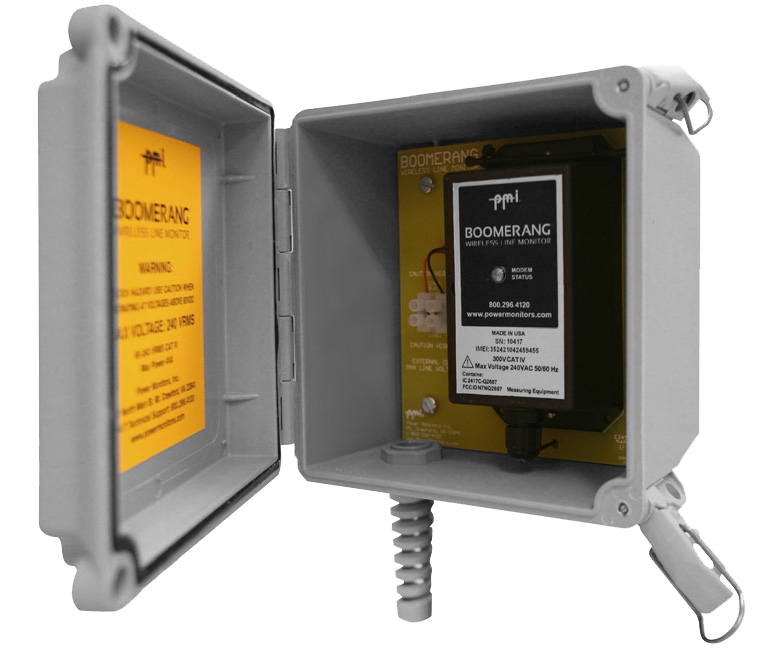
This white paper will explain the process of installing and communicating with a Pole mount Boomerang voltage/current/power sensor (Figure 1). The pole mount option includes a rugged, weatherproof NEMA 4X outer enclosure and terminal block, to facilitate outdoor permanent installation. Getting started with Canvass web interface will also be discussed, however more in-depth instructions and analysis are reviewed in other Canvass related white papers.
Safety Notes
The same care that is required when working with any high-voltage equipment must be taken in order to assure user safely. Please take the time to read the following safety issues before installing the Boomerang. If possible, disconnect the power from the lines you plan to monitor until the installation is complete.
TLAR current clamps and Ultra Slim Flex CT accessories should only be connected to PMI products designated for use with these devices. Some Pole mount Boomerang models are voltage-only while others may not have the current monitoring option. A multi-pin weatherproof connector on the side of the enclosure indicates the ability to connect current probes.
Inspect the CT signal cables for damage to the insulation prior to use. Do not use if there are visible cuts or punctures to the cable jacket, or visible inner signal wires.
Do not use the Flex CT assembly if the inner contrast color of the jacket insulation of the flexible CT is visible.
Do not use chemicals to clean the Flex CT loop, CT output signal cables, or electronics enclosures. Use only a clean, damp cloth to wipe the exterior of these devices.
The Flex CT electronic enclosure is sealed and potted for environmental integrity and safety. To assure safe and reliable operation do not attempt to open the enclosure.
Environmental Considerations
To assure optimum performance and safety, observe the following precautions when selecting an installation environment for the Boomerang recorder, Flex CTs, and TLAR current probes:
Operating ambient temperature must be within -22°F to 130°F (-30 to 55°C).
Mounting the Housing
Included with the Unit is a mounting kit (Figure 2). The kit includes 4 mounting feet and 4 ¼-10 X 0.50 screws to mount them to the housing. Each foot has a 0.30″ x 0.50″ slot. This can be utilized to mount the housing using either wood screws, banding or a hook mount.
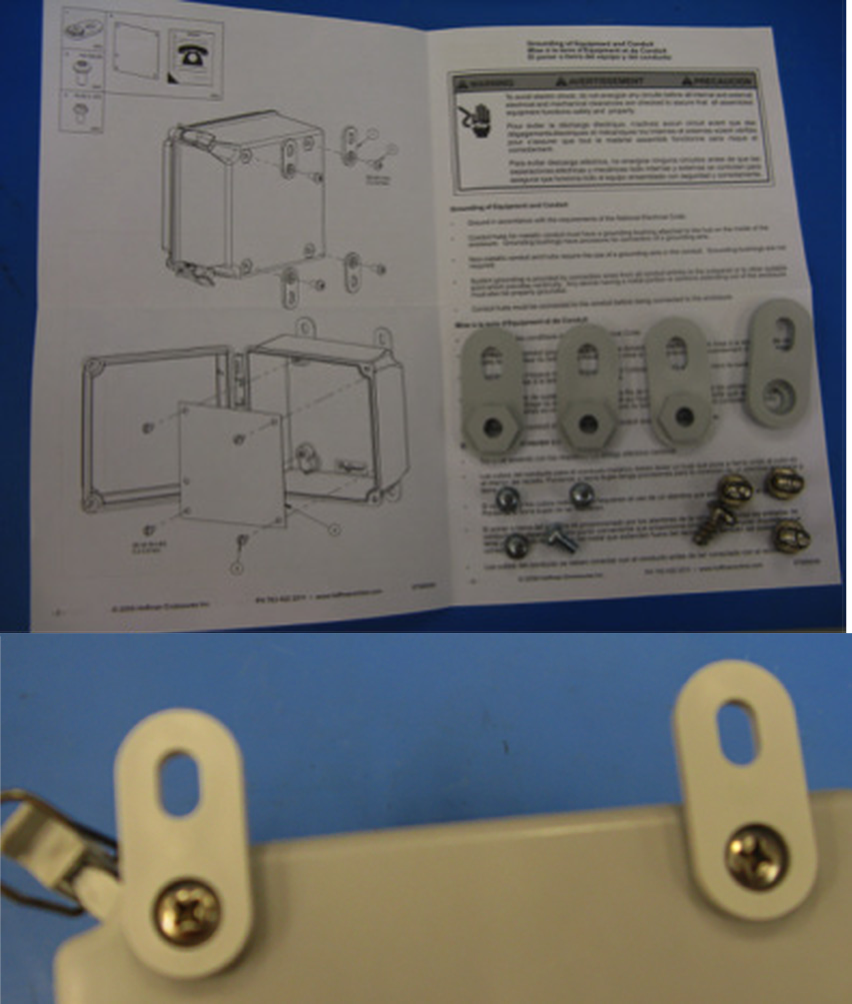
Even though the supplied strain relief should provide a weatherproof seal, a drip loop in the voltage cable will help prevent water ingress. A drip loop such as the one shown in Figure 3 will prevent water from wicking from the cable into the strain relief. An illustrated card featuring the Drip loop is included with the unit.
PLEASE FORM A DRIP LOOP WHEN INSTALLING UNIT TO PREVENT WATER FROM WICKING INSIDE BOX
Do not use in a hazardous location, as defined by the National Electric Code. The Boomerang is not constructed with explosion proof fittings, and is not approved for use near flammable gases or combustible dust.
Connecting the Boomerang
There are two things to connect when installing the Boomerang:
- CTs (Flex or TLARs)
- Voltage cable
The Current Transformers (CTs)
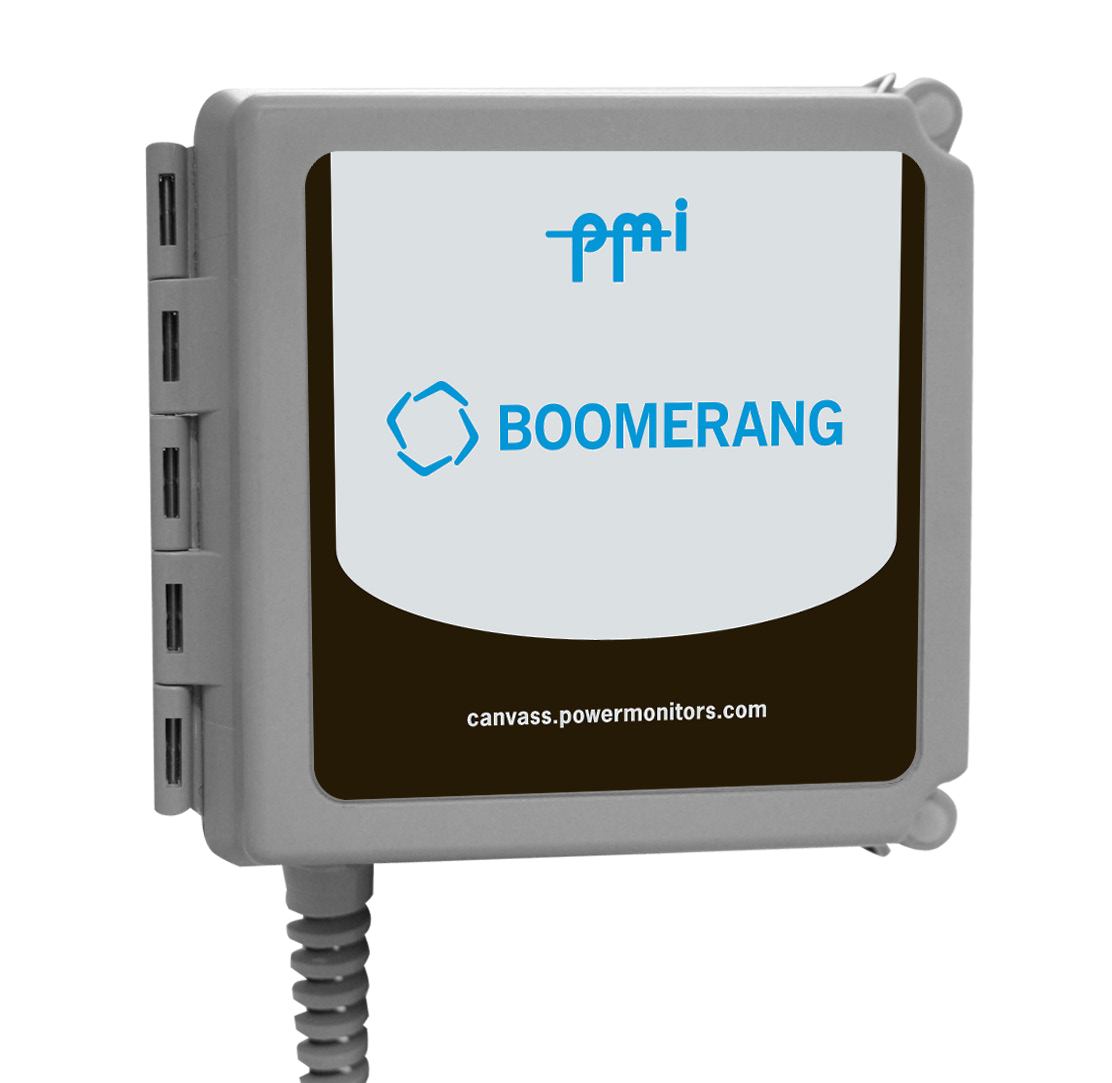
The optional Flex CTs or TLAR current clamps (Figure 4) connect to the nine-pin FEMALE connector on the side of the outer grey housing. The Boomerang automatically detects the type of CT connected. The Boomerang monitor can be equipped with TLARs rated for 20A or 200A, or Ultra Slim Flexible CTs that can be set to multiple ranges of 100A, 1000A, or 5000A. The desired CT range is selected using the Canvass, and can be changed at any time. It is also acceptable to operate the Boomerang (Figure 5) with no CTs attached, if current measurements are not required.
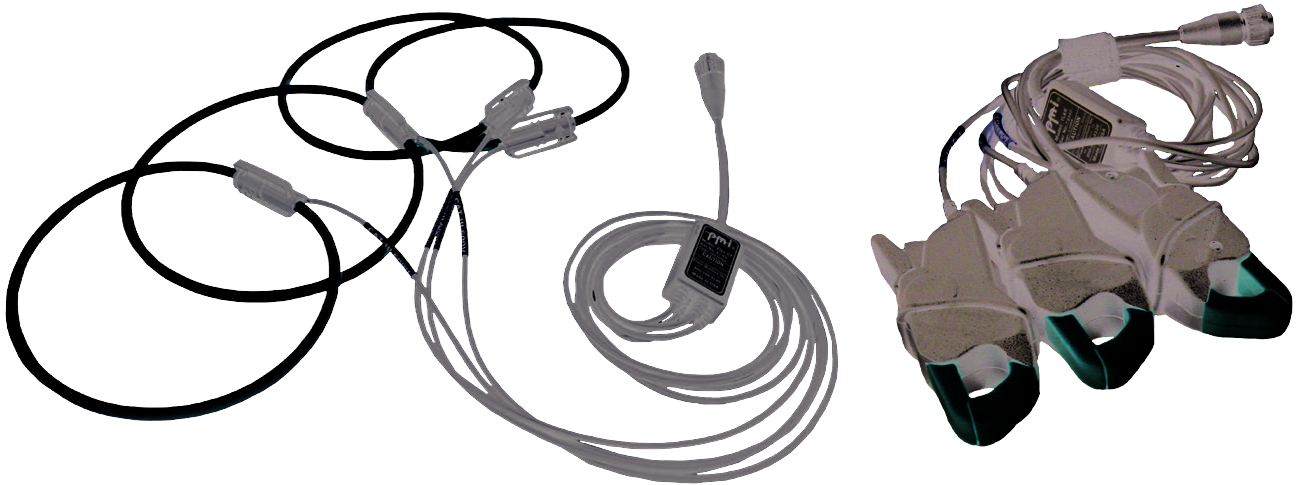
To connect the Flex CT or TLAR probes to the Boomerang, insert the 9-pin MALE connector of the CT output cable into the 9-pin FEMALE connector on the side of the recorder and rotate the locking ring. Loop each flexible CT element, or TLAR probe, around the corresponding conductor or bus to be monitored. The raised plastic arrow on the Flex CT connector body, or at the top of the handle of the TLAR current clamps, must point toward the load that is being measured for the correct current-to-voltage phase relationship. Insert the plastic connector plug on one end of the flex CT into the plastic connector socket on the other end, and snap firmly together.
The Voltage Inputs
Recommended Voltage Cord
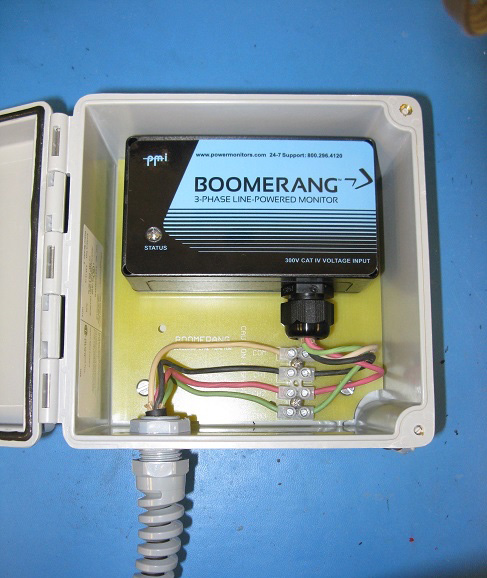
The Pole mount Boomerang is wired with a user-supplied voltage cord. A voltage cord must be installed by the user to connect the voltage inputs. For outdoor applications, an SOOW 600V multiconductor 18AWG cable is recommended, for UV and oil resistance. The cord’s diameter should be between 0.375″ and 0.47″ to properly seal with the supplied strain relief (if a larger diameter is needed, please contact PMI before placing an order).
Installing the Voltage Cable
The Boomerang unit will come with a Strain Relief Nut inside the housing. When inserting your voltage cable, pass the cable through the non-threaded end of the nut and into the housing (Figure 6). The strip back length should be 4″ with 3/8″ exposed copper. Insert each corresponding wire to the correct screw terminal, which are labeled COM and CH 1-3. The Common connection is the terminal farthest from the edge of the housing. Once these are connected, tighten the strain relief nut hand tight. Then, use a 15/16″ wrench to tighten the nut a further ½ turn. If the unit is to remain in place for a prolonged period, a liquid thread locker can be used to ensure the nut does not loosen over time.
It’s recommended to connect channel 1 voltage lead last. This connection sequence will assure that all measured voltages and currents begin recording simultaneously, and will prevent false event triggering that could occur during voltage lead or CT connection. Of course, connect the Boomerang side of the voltage cord first, before connecting the other end to the voltage supply.
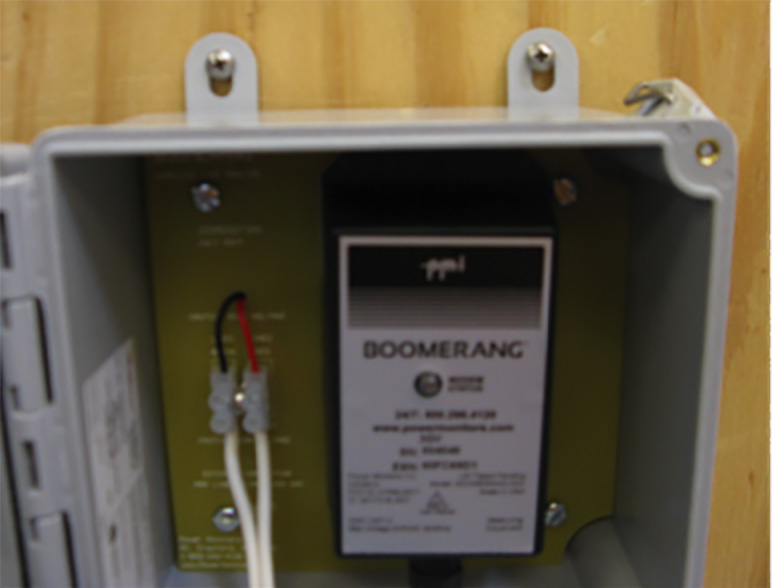
A single-phase Pole Mount Boomerang has one voltage input (see Figure 7), with one pair of wires needed. Since there is no current option with the single-phase Boomerang, phasing on the voltage input is not important, and either terminal may be used as the common or hot input.
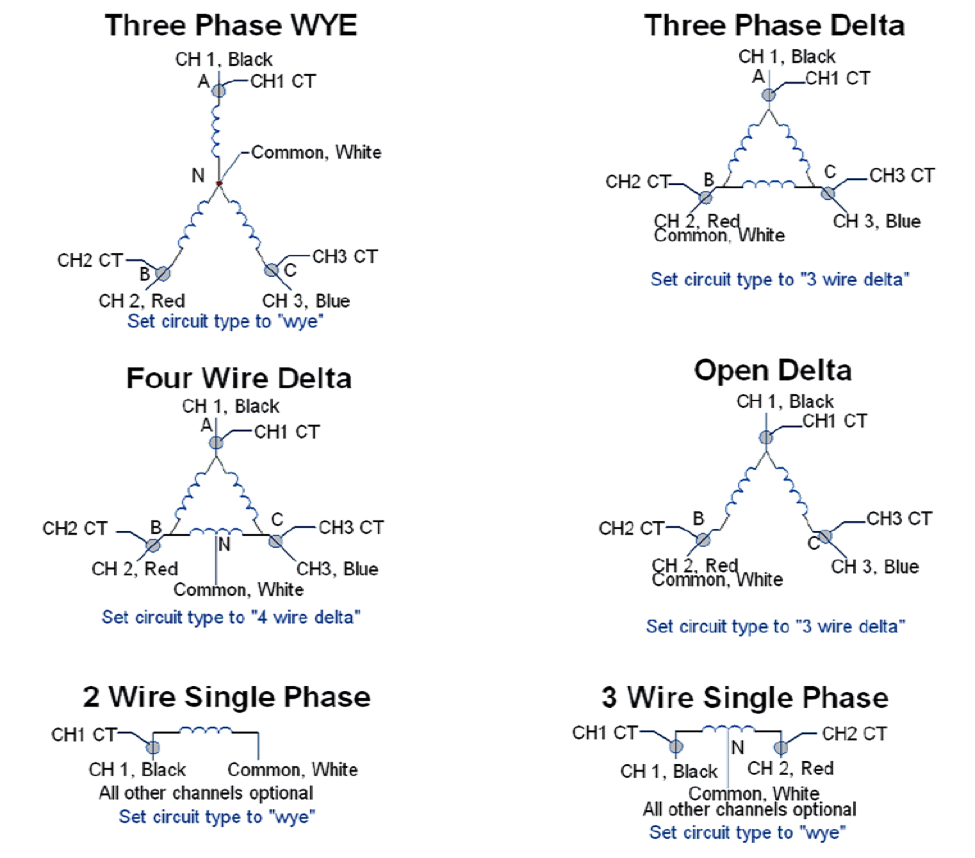
The 3-phase Boomerang features three voltage inputs, and can accommodate several circuit types. For a wye circuit (shown in Figure 8), channels 1, 2, and 3 connect to phases A, B, and C, and the white common lead connects to the neutral. For a delta, the channel inputs also go to phases A, B, and C, but the white common lead goes on phase B as well. Other circuit types are shown below. The connections are similar to the Revolution and Eagle, with the exception that there is no fourth voltage channel. Note that the common input is on the top terminal, and channels 1, 2, 3 are below it.
Please note that there is no internal battery in the Boomerang monitor. A charge is maintained on internal supercapacitors to allow the unit to send an outage notification or alert for a brief period (1-2 minutes) without applied voltage. Therefore, there are no internal user serviceable parts contained in the Boomerang Unit.
Communication
The Status LED on the top of the Boomerang will blink twice red and once green until a cell connection is made. Once it has completed the connection, the monitor will begin transmitting accumulated data to Canvass. The Status LED will blink green once every six seconds so long as the cell connection is maintained. If the unit does not give a regular green flash on the status LED, the unit is not transmitting data to the server. If cell coverage may be an issue, a Boomerang with either an external antenna or antenna kit is available. The lid of the outer grey enclosure must be open to see the interior Boomerang LED, but should be closed when installation is complete.
Using the Canvass Interface
The Canvass interface is PMI’s cloud-based data analysis portal capable of providing data for single and poly-phase voltage and current monitors in a web browser. With Canvass, the user may view strip charts, histograms and daily profile graphs for every data point that the device has ever registered to the PMI Canvass database.
After logging into Canvass, you should be able to view all the Boomerangs you have available listed on the left hand side of the screen, as shown in Figure 9.
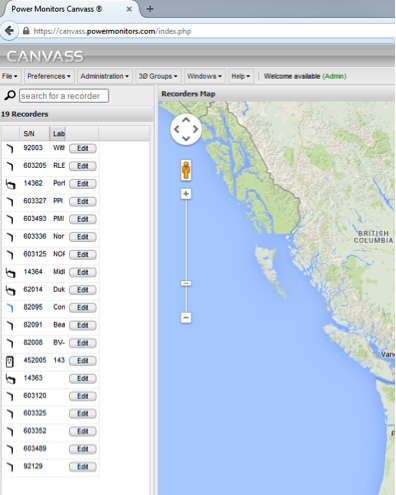
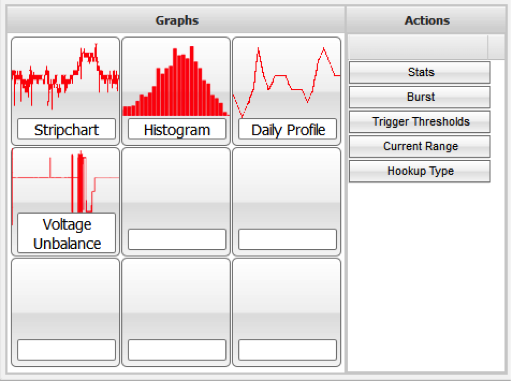
Devices that are in communication with Canvass will appear in a blue font while recorders that are currently not active will appear in black. To access data from a specific device, double-click on its serial number. This will bring up the window with which you can see the data it has sent to the Canvass database (Figure 10).
The fastest way to verify communications is to select the Stats button. This will show the RSSI, or signal strength of the unit, as well as the last time the unit contacted Canvass. Clicking Burst will send a message to the Boomerang for it to send real-time information for voltage, current, and power for spot readings.
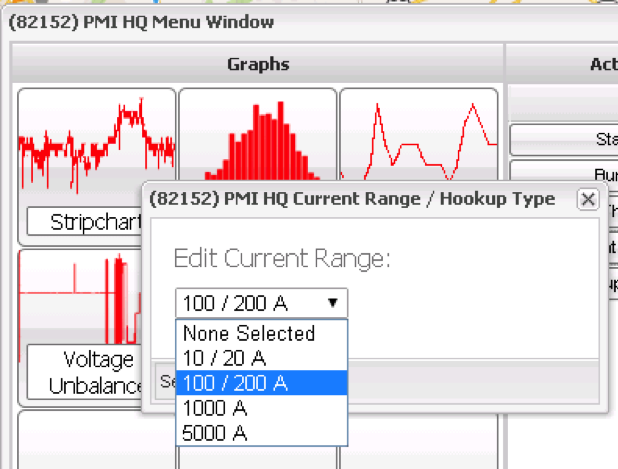
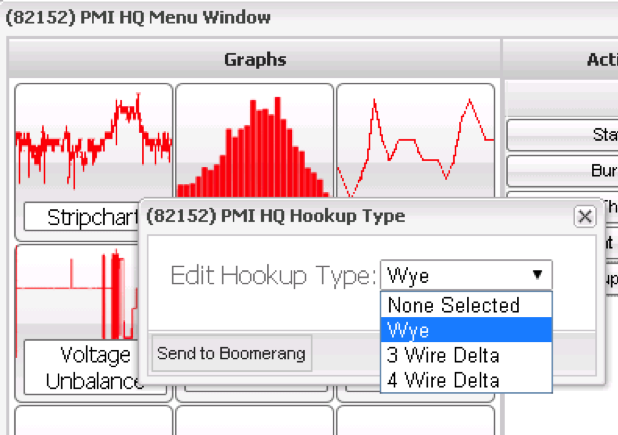
While you are in Canvass, don’t forget to set up the unit. Select the Current Range button to set the FLEX or TLAR max current range or you may use the Hookup Type to specify that you are monitoring a WYE or Delta configured circuit. Select the current range (Figure 11) or circuit type (Figure 12), and click “Send to Boomerang” to update the Boomerang configuration. The Canvass server will send a message directly to the Boomerang with the new setting. The Boomerang must be online to receive the setting. Once received, the settings are stored in the Boomerang, and do not need to be sent again unless a change is needed.
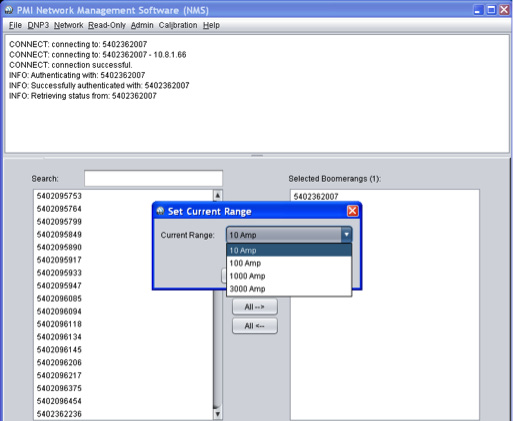
For those customers utilizing the NMS software, you can also use that to set up your configuration. The setup options are under the Network Tab. The “Set Current Range” will allow you to set your device to the proper current range, as shown in Figure 13. The Boomerang unit itself will detect the type of current measuring device you are using, either Flex or TLAR CTs, but the current range should still be set. The “Set Circuit Type” option allows the choice of WYE, and 3 or 4 Wire Delta configurations.
Conclusion
The Boomerang monitor provides 1-second detail for voltage, current, power, and voltage unbalance in a small, easy to install wireless package. The Pole Mount option includes a rugged weatherproof outer enclosure which allows for voltage connections to outside cables. Instructions for installing and getting started with the Pole Mount Boomerang are shown here, in addition to basic configuration for setting the circuit type and current range in the field or back on the office through a web browser.
