
Abstract
The Field PC is a handheld, ruggedized device running Windows mobile and offering a wide array of features. The Field PC comes preloaded with ProVision Mobile; however, other programs come preinstalled as well. These other programs were all selected specifically to accommodate the needs of power quality engineers. This whitepaper serves as an overview to these other programs and once again to the versatility of the Field PC. Note that due to the changing nature of software licensing agreements, some third-party software shipped with the Field PC may change or no longer be available.
PPC Utils Handy Electrical Calculator
The Handy Electrical Calculator provided by PPC Utils provides a wide array of formulas and calculators for most electrical engineering tasks. Simply select the calculator needed from the list as shown in Figure 1.
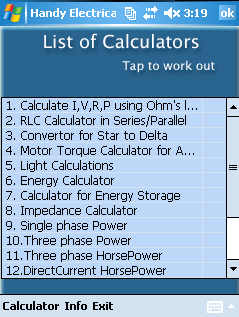
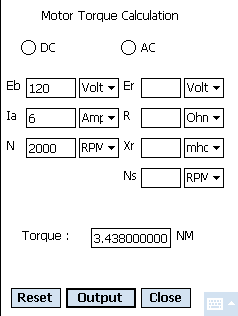
Each calculator requires different inputs based on the task at hand and typically displays the formula being used to perform the calculation. Regardless of the calculation being performed, the three buttons displayed at the bottom of the screen—”Reset”, “Output”, and “Close”—are consistent across all calculators. Selecting “Reset” clears all calculated values and user-defined inputs. Selecting “Output” performs the operation based on the user-defined inputs and populates the answer fields appropriately. Selecting “Close” exits the current calculator and returns to the main menu. Some operations the Handy Electrical Calculator can perform are impedance, single-phase and three-phase power, and determinations based on Ohm’s Law.
Shown in Figure 2 is the Motor Torque Calculation calculator. In this example with example values filled in for demonstration purposes. Note that, when changing the input values, it is necessary to explicitly recalculate the result by selecting “Output”.
LectriCalc
LectriCalc also offers a wide array of formulas and calculators ranging from Ampacity to Wire Cost, as shown in Figure 3. While the formula isn’t typically displayed with the LectriCalc calculators, sample outputs are displayed for common or referential purposes for some calculators. For example, the Footcandles calculator displays the output of the operation if the inputs for it were the luminosity and distance of the full moon. Each operation is processed as the data are entered and the output is modified each time the input data changes, negating the need for a “Calculate” or similar button. Of interest here are calculators for ampacity, box size, conduit fill, motor data, transformers, and voltage drop.
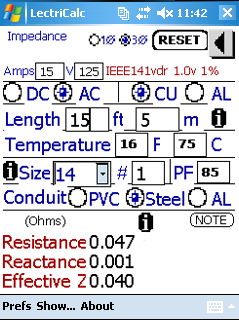
The impedance calculator is shown in Figure 4, with some example values filled in for demonstration purposes. Reported is the result of the calculation as precipitated by the inputs. This can be useful when needing to compare expected impedance against measured impedance. Note that the result is modified dynamically as the inputs are entered and modified.
Sparkle Solutions My Electrical Calculator
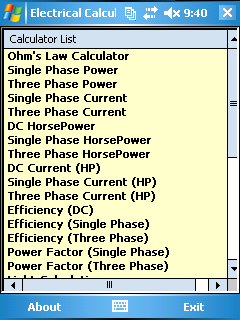
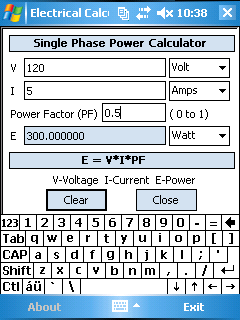
The calculators available in this tool range from single phase and three phase power and current to series and parallel resistance, inductance, and capacitance. For each calculator, each operation is processed as the data are entered and modified, thus displaying real-time results. The formula being used is also displayed. The calculators offered by this software are shown in Figure 5.
Shown in Figure 6 is the calculator for single-phase power, with example values filled in for demonstration purposes. Note the output values are calculated dynamically as the input fields are entered and modified.
Adobe Reader
This portable version of Adobe’s viewing software allows basic navigation and perusing of PDF files. Also included are PDF versions of manuals and documentation for ProVision and other products sold by Power Monitors, Inc. Furthermore, “Hard to Find Information About Distribution Systems”, a book in electronic format, is also included. It is stored on the Field PC simply as “Hard to Find.pdf”. It contains extensive information ranging from transformer saturation to cable impedance.
Shown in Figure 7 is Adobe Reader with part of the table of contents for “Hard to Find.pdf” displayed. The table of contents itself is three full-size pages, which should demonstrate the scope and magnitude of this document.
Microsoft Office Tools
The Field PC also comes installed with lightweight versions of tools commonly found in Microsoft Office—these corollaries being Word Mobile, Excel Mobile, and PowerPoint Mobile. While these versions do not offer the complete array of features available to their desktop counterparts, they do have basic functionality in order to create, load, save, modify, or any combination thereof, for Word documents, Excel spreadsheets, and PowerPoint presentations respectively.
However, the release of the new version of Microsoft Office in 2007 also introduced new file formats: .docx for Word documents, .xlsx for Excel spreadsheets, and .pptx for PowerPoint presentations, in lieu of the original .doc, .xls, and .ppt formats. These new file types are incompatible with previous versions of office software, including the mobile versions with the Field PC, and therefore the mobile versions cannot open any files saved in these formats, nor can they save any existing files in them. However, the desktop versions of Word, Excel, and PowerPoint are capable of saving and loading in the original .doc, .xls, and .ppt format which are compatible with their mobile counterparts—just select “2003 format” when saving your file in the desktop version, and the Field PC will be able to open it in its corresponding application.
Conclusion
The Field PC not only allows for mobile real-time waveform analysis and recording retrieval from PMI recorders via ProVision Mobile, but it also makes available a variety of other tools in the form of wide selection of pre-installed programs. This makes the Field PC an invaluable asset, not only for interacting with PMI recorders, but as a handy tool for when needing to make a calculation on the fly.
