
Abstract
The DNP3 (Distributed Network Protocol v3) is a communication protocol designed for interaction with control (such as SCADA – Supervisory Control And Data Acquisition) systems. Power Monitors has recently introduced a new line of monitors. Boomerang voltage monitors have been designed to integrate not only with PMI’s proprietary Canvass power quality data portal, but also with the SCADA systems used for electrical utility monitoring and control operations. Specifically, this paper will discuss the differences between the two Ethernet-based communication configuration options: TCP and UDP.
TCP and UDP Defined
TCP or Transmission Control Protocol is an IP (Internet Protocol) protocol that was designed to provide a connection-based means of communication between two endpoints. This protocol uses a series of checksums and acknowledgments to verify the success of transmission for each packet being sent between the two endpoints. This series of checksums and acknowledgments provides for a very reliable stream of data, but does result in a higher packet throughput: in other words, this is a “chatty” protocol that results in many packets being sent between endpoints in an effort to ensure that both ends stay synchronized within the transmission stream.
UDP or User Datagram Protocol is also an IP (Internet Protocol) protocol that was designed to be a “stateless” or connectionless protocol. What this means is that there are no checksums, no verification, and no synchronization between packets. This protocol is often times referred to as the “fire and forget” protocol since the sender of the packet does not wait for any sort of acknowledgment of receipt from the recipient (as is the case in TCP). For the reasons mentioned above, the UDP protocol is much lighter-weight than TCP in that it does not have a lot of the synchronization traffic flowing across a stream – there simply is no stream.
DNP3 Acknowledgments
The DNP3 protocol adds a complete new layer to the existing TCP and UDP protocols which provides for error checking, checksum validation, and other validation and verification mechanisms. These mechanisms are present on both the TCP implementation and the UDP implementation of the DNP3 protocol. This does add quite a bit of redundancy to the TCP protocol in addition to making it even more verbose than it already is. A diagram of DNP3 protocol is shown in Figure 1.
NOTE: The DNP3 protocol was designed to work with many different means of communication such as serial. In fact, the original implementation of the DNP3 protocol was primarily geared towards these serial communications which was the reason for a lot of the TCP style verification and validation mechanisms. As TCP grew more popular, rather than completely rewrite the DNP3 specification to better fit the individual communication protocols, the full specification was adopted to be uniform across all means, resulting in an implementation that was uniform, regardless of the communication type.
Infrastructure Considerations
When planning a Boomerang deployment on a SCADA system, several considerations about the communication protocol and the type of connectivity used must be made. One of the primary factors when considering which protocol to use in a SCADA setup is the load capacity of the network infrastructure (switches, routers, servers, etc.).
Depending on the size and scope of the Boomerang deployment (dozens of Boomerangs deployed versus thousands deployed), the network infrastructure can play a huge role in determining which protocol to use. This is because many of the low- to mid-range network appliances are not built to handle an extremely heavy TCP load (such as the TCP load that would be introduced by a multi-hundred Boomerang deployment). In addition to this, several SCADA systems are deployed on slightly dated Microsoft Windows Server systems which are running an antiquated and somewhat under-powered networking stack. This, too, has a severe limiting factor on which protocol is to be selected for a Boomerang deployment.
Network and System administrators should have information about the maximum capacities of the network appliances and servers within the network readily available. In many instances, upgrading significant portions of a network may be necessary, especially for a large-scale TCP deployment. Remember: a network is only as fast as the slowest appliance within it. As an example: if there are 20 boomerangs connecting via TCP to a 1000baseT router, which then goes through a 100baseT switch back to a SCADA system, then the fastest throughput to the SCADA system is 100baseT, regardless of the fact that the initial router can reach gigabit speeds. A full review of the network topology is a great starting point when determining which protocol will fit best.
DNP3 Limitations Based on Protocol Selection
The DNP3 protocol does not discriminate against a particular Ethernet protocol – both TCP and UDP are 100% supported. However, not every SCADA vendor will support the full DNP3 suite over both protocols. This limitation may be one of the largest factors in determining which protocol will be used. While a utility has already defined the requirements for their SCADA system, they must choose a vendor that can provide them a system that will integrate well within the constraints of their network that fully meets their specification. In some cases, there may not be a vendor that fits all these criteria resulting in a change in which protocol sensors will use to feed back into the SCADA system.
Latency with Cell-Modem Enabled Sensors
The Boomerang (and many other sensors that feed into SCADA systems) communicate using a cellular modem. Cellular Ethernet connections tend to introduce a lot of latency, just by their very nature. Different cellular providers handle the build-up and tear-down of cellular Ethernet connections in varying manners which can cause problems if not anticipated.
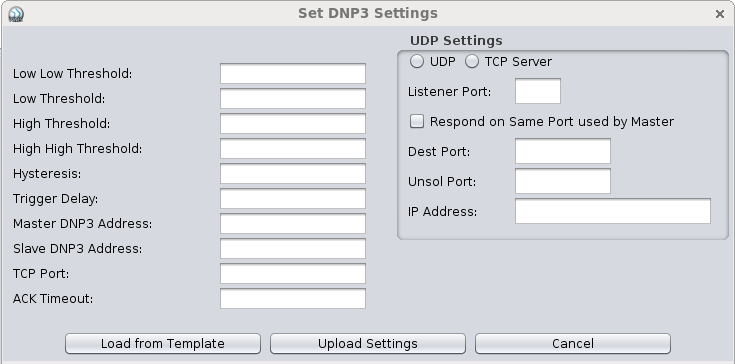
One of the primary latency issues to be considered with TCP connections is selecting a connection timeout for the sensors. If the timeout is too low, the build-up time for the Ethernet connection over the cell network may take too long and cause the connection to fail. Higher connection timeout values should be used if using TCP. The DNP3 settings pane from the NMS software is shown in Figure 2.
Another TCP latency issue lies with when (and how) the cellular network alerts a cellular modem that a TCP connection has been terminated. In many cases, there may be several minutes of down-time (where no traffic is sent over the connection) wherein the cellular network will break down the Ethernet connection (without allowing the TCP connections to terminate), leaving the cellular modem in a state where the connection to the SCADA system has terminated, but the modem doesn’t know it (because it has never received the final acknowledgments from the other end of the TCP connection). When the sensor enters a state where it needs to send data back to the SCADA system, after the Ethernet connection build-up on the cell network, the sensor will realize that the connection has been disrupted and may attempt to reconnect to the SCADA system. However, there is the possibility that since the cellular network interrupted the original session, the SCADA system did not close the socket either (for the same reasons that the cellular modem did not terminate its connection). This scenario results in the SCADA system rejecting the new connections that the sensor is trying to establish, because it thinks that the connection already exists (and a default behavior is to discard multiple connections from the same remote device).
Latency can adversely affect UDP traffic over a cell network as well. Since there is no receipt of acknowledgment with UDP packets (remember: “fire and forget”), several packets may be dropped by the cellular modem or the cellular network before the Ethernet connection is established. Additionally, this behavior may vary from sensor to sensor each and every time a packet is sent, depending on the amount of time between transmissions.
The latency in a cellular network may cause UDP packets to be delivered out of order. Generally speaking, however, the DNP3 protocol provides a fragmentation algorithm wherein each UDP packet is a full DNP3 packet which renders the fragmentation and out-of-order delivery somewhat meaningless. TCP, by nature of its design, does not have this potential problem.
Note: The Boomerangs are configured such that if the UDP protocol is specified, each UDP packet is a full DNP3 packet as well.
Troubleshooting
Once a protocol has been selected and some initial sensors have been deployed, it is time for troubleshooting. There are inevitably going to be kinks in the system: there is an invalid route somewhere; some switch or router is at or above capacity; UDP packets are being dropped; a firewall rule isn’t in place; etc. There are a handful of tools that can be used to help diagnose these problems, but one of the best, full-featured tools for inspecting packets from the Ethernet layer all the way up through the DNP3 layer is WireShark (see resources below for a link to download this software). WireShark is FOSS (Free and Open Source Software) that can be acquired free of cost and is used for deep packet inspection.
Using WireShark can help identify break-downs in communication, misconfigurations on the SCADA or sensor side and many other potential problems. A full tutorial on using WireShark to help diagnose errors with the DNP3 protocol will be provided in an upcoming whitepaper.
Conclusion
Selecting which Ethernet communication protocol to use when deploying sensors in a SCADA system is a multifaceted decision that has far-reaching effects, ranging from the vendor to be used to the overall cost of implementation. While TCP is a reliable protocol (it has many acknowledgments, checks, validations and verifications built-in), it is also a very heavy protocol and can force the upgrade of many elements within a network. On the other hand, UDP is very light-weight, but does not have the same built-in stream control mechanisms that are in TCP (although much of this is mitigated by the DNP3 protocol’s set of checks and validations). A good, top-to-bottom approach is to define what the system needs to do, identify the network’s capabilities and find a vendor that can provide a SCADA system that can (very closely) meet those criteria.
Resources
Listed below are a handful of resources for learning more about the DNP3 protocol and for WireShark.
- Wikipedia entry for DNP3 protocol: http://en.wikipedia.org/wiki/DNP3
- WireShark (a packet analysis tool): http://www.wireshark.org/
