
Abstract
Boomerangs provide advanced triggering mechanisms that can be used to detect and send an alert for Recloser events. A “Voltage Low Low” event will be used to trigger an alert, which can generate an immediate email or SMS message from Canvass to a list of users. A separate alert can be generated if the recloser stays open, resulting in an outage.
Reclosers
A recloser is a circuit breaker that automatically closes a circuit that opened due to a fault. Its function is to isolate a section of the power distribution line, minimize the number of customers with interrupted service and to try to restore power after a temporary fault. Since most short-circuits are transient, clearing themselves quickly, a recloser improves service by automatically restoring power after a momentary fault.
When a fault condition occurs, such as a tree branch falling across a residential power line, the recloser will open and reclose quickly. If the fault is still present the circuit is opened again and in a few seconds is reclosed again. After a few attempts the recloser will lock open. The amount of reclose attempts and the pre-set timing of these attempts are usually set by each utility.
Reclosers are often used in conjunction with sectionalizers to further isolate a faulted section of line from the rest of the distribution system.
Boomerangs
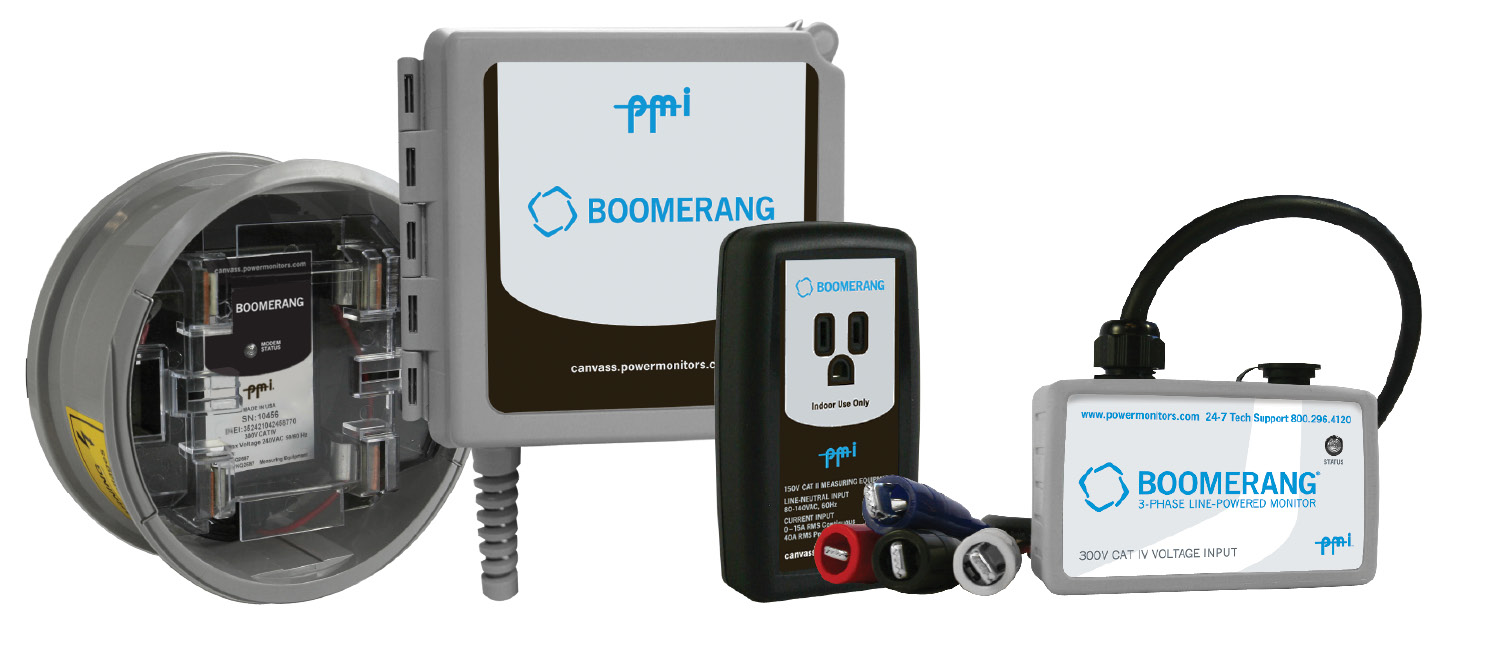
Boomerang wireless monitors are flexible, line-powered and can be used for many different power monitoring applications. Boomerangs can be placed anywhere needed – a residential meter base, a voltage regulator on a pole, the end of a distribution line, or even a 120V receptacle. Boomerangs include either an integrated cell modem with internal antenna or can be powered over Ethernet for unobtrusive real-time voltage, current, and power monitoring. The Boomerang measures RMS voltage, current, and power on a one second basis, and these one second readings are aggregated and sent as compressed packets to Canvass, PMI’s cloud-based data collection and analysis system. The Boomerang is also configurable with a series of low and high thresholds for triggering alerts. Each second, the thresholds are checked, and if triggered, a message is sent immediately to Canvass. Canvass receives the alert, checks the database for the appropriate action, and sends any e-mail or SMS messages as needed. The event and one second data are also logged by Canvass for analysis later.
Boomerangs and Recloser Events
Reclosers are often configured to have the first reclose occur in a fraction of a second. Since Boomerangs record at a one second average, the boomerang will show a significant drop in the average voltage for the previous second. This dip can be as low as zero volts depending on how long the circuit is open and where in the sampling time the circuit is opened.
Figure 1 shows a recloser event in Canvass as recorded by a boomerang (10008). Also included is a trace from another boomerang (10014) about thirty miles away, on a different distribution system. This trace shows a small voltage dip at the same time as the recloser event. Canvass with multiple recorders can be used to show how the effects of events ripple through the distribution lines.
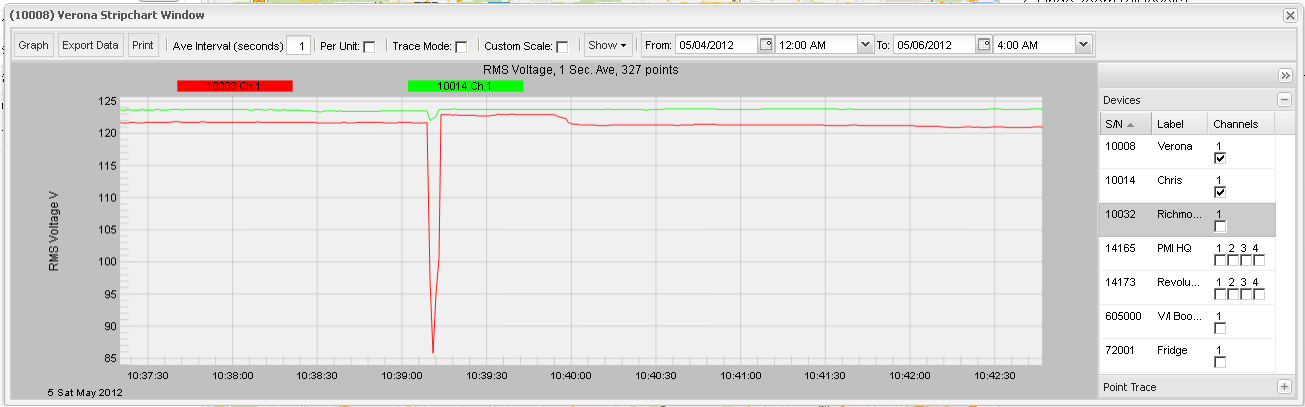
The event shown on Figure 1 would be typically recorded by a boomerang by a 15 to 30 cycle reclose event. Had the short circuit not cleared a longer open circuit would be expected to follow as the recloser tried a longer interval for the fault to clear.
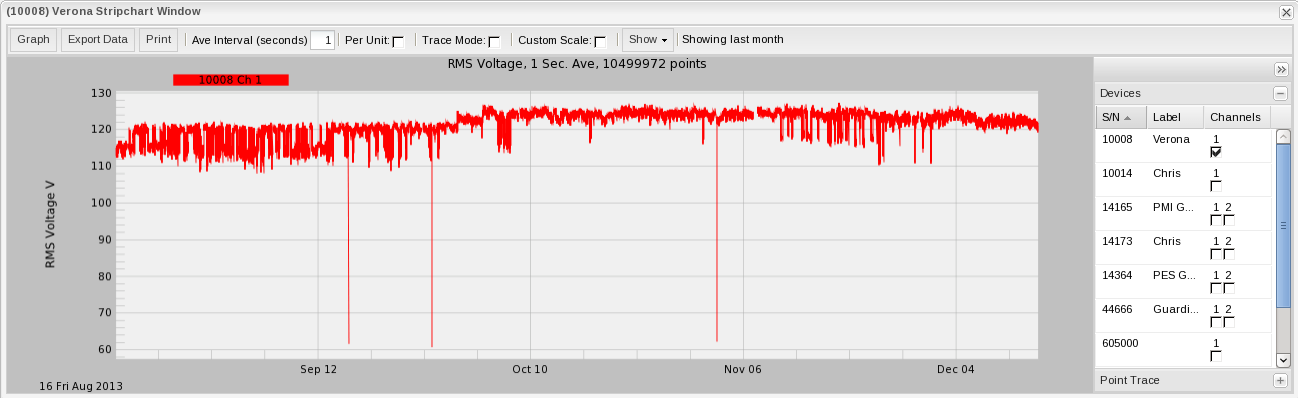
The Canvass system archives data so it is easy to look back and locate events such as reclosers. Figure 2 shows a four month voltage stripchart showing three recloser events. All three of these faults were cleared by the first recloser event since there were no outages following the cleared fault.
Boomerangs are available in single-phase and three phase models. When using a single phase model, consider placing one on each phase. That way, if a single phase recloser operates, it will be possible to catch the event no matter which phase it is on. The single-phase Boomerangs may be grouped in Canvass as a virtual 3-phase device, allowing for voltage unbalance graphing.
Trigger Parameters
The Boomerang includes trigger parameters for: lowlow, low, high, and highhigh voltage thresholds, holdoff time, and hysteresis. The low and lowlow thresholds can be used to set to undercurrent values below a nominal current, and high and highhigh are thresholds over a nominal value. They may be any values, as long as lowlow < low < high < highhigh. The holdoff time is the minimum time, in seconds that a threshold has to be crossed before the Boomerang triggers. The hysteresis is a small value which acts as a slope-dependent offset to the thresholds, and is used to prevent “chattering” when the reading hovers right on a threshold value.
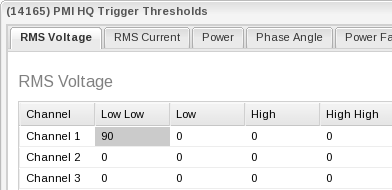
For detecting recloser events, only the voltage low low needs to be set. Set the value to that takes one second averaging into account such as 90 volts. If desired the holdoff time can be set to ignore the first reclosure.
The low, high, and highhigh thresholds may be set for other purposes – line voltage regulation, etc. without interfering with the recloser lowlow value. Separate e-mail/SMS distribution lists are available in Canvass for each specific trigger.
Configuring Canvass Alerts
Canvass can be configured to send alerts when the voltage drops allowing almost immediate detection of recloser events.
To set the thresholds using Canvass, follow this procedure:
- Visit http://canvass.powermonitors.com (or the site configured for your Boomerangs) and login.
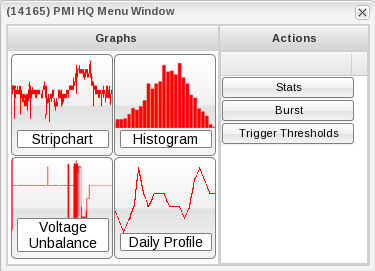
- After logging in, click on the Boomerang in the side panel. A menu box will appear. Under Actions, select Trigger Threshold as shown in Figure 3.
- A message should be displayed saying “Successfully downloaded trigger threshold parameters from xxxxxx”. Left click on the box under RMS Voltage Low Low and change it to 90 volts. The other settings can be left at their defaults. See Figure 4.
- Click Send Threshold. A message should appear displaying the response “Successfully uploaded trigger parameters to xxxxxx”.
- Under Administration, there is a distribution list with several items to set up. Click on Add List and name the device. Click on E-mail and add any e-mail which should receive an e-mail notification from the device. You must be an administrator to configure distribution lists.
- Click on Recorders and select the proper recorder.
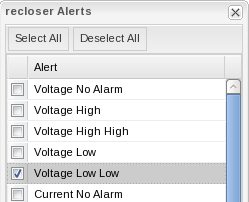
- Next, set up an Alert. For this application, Voltage Low Low must be checked. See Figure 5.
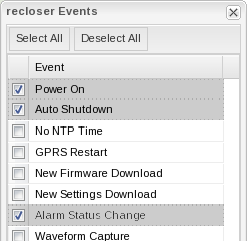
- Just to the right of Alerts, click on Events. Select at least Alarm Status Change. See Figure 6.
Conclusion
PMI’s Boomerang recorders are very flexible, portable, and powerful tools that can be used for many different power monitoring applications. Teamed up with the power of Canvass, detecting fault and recloser events becomes simple. Data from multiple recorders can be used displayed in the same graph to analyze how a fault effects different parts of the distribution system. Alerts can be sent immediately to allow quick action if needed.
