
Abstract
Power Monitors Inc. Canvass allows Boomerang devices to be configured via the Internet. Many parameters can be configured, including DNP3 slave and master settings. Once created, a settings file is saved to the database and can be sent to one or multiple Boomerangs at once. Settings are related to the account a user is signed in with. All settings files saved with the account are loaded when accessing settings. This paper demonstrates how to create new settings, edit settings, and send settings to devices, as well as explain the different settings that can be configured.
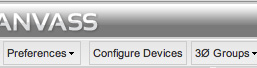
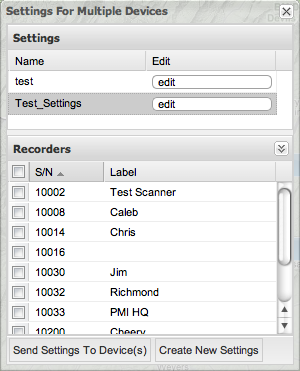
To configure Boomerang settings, click Configure Devices on the main toolbar as shown in Figure 1. The Settings for Multiple Devices window will appear as shown in Figure 2.
Create New Settings
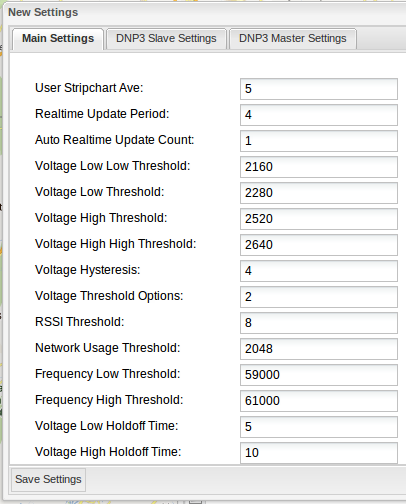
Click Create New Settings on the bottom toolbar of the settings window. A New Settings window will appear as shown in Figure 3. Click on the window tabs to switch between different groups of settings. Once the settings have been configured, click “Save Settings” on the bottom toolbar.
Sending Settings to Devices
After creating a settings file, it is available in the settings window. Click on the named file on the list of settings that appear. Select the device(s) you wish to send the settings to in the device list at the bottom of the settings window and click Send Settings to Device(s).
Main Settings
The following settings can be configured:
- User Stripchart Ave: Number of seconds in stripchart averaging window. Common averages are 1, 5, and 15 minutes.
- Realtime Update Period: How often the device sends new information to the server (measured in minutes).
- Voltage Thresholds (low, low low, high, high high): The minimum voltage needed to trigger the associated alarm. Alerts are sent when voltage passes the defined threshold. Alerts are triggered both ways and status is sent with the alarm; e.g. an alert will be triggered with a status of “voltage low” when voltage falls below the voltage low threshold. When voltage rises above the voltage low threshold it will send a status of “voltage no longer low”.
- Voltage Hysteresis: Threshold prevents voltage alarms from being constantly triggered by creating a window in which the voltage can fluctuate without triggering an alarm. The window is +/- the value specified. Ex: If the voltage low alarm is set to -90 volts and the voltage low hysteresis is set to 5, the voltage must fluctuate 5 volts upward past the voltage low threshold to trigger the voltage low alert. Conversely, the voltage must fall -5 volts past the voltage low threshold the trigger the alert.
- RSSI Threshold: The threshold needed to trigger the RSSI alarm. This alarm is triggered when there is a change in cell signal strength.
- Network Usage Threshold: Threshold needed to trigger the network usage alarm. The network usage alarm is triggered when the Boomerang sends too much data through the network. The threshold is measured in bytes.
- Frequency Threshold (low, high): Minimum number needed to trigger the frequency alarm. This alarm is triggered when the amount of measured voltage sine waves in one second reaches the threshold.
- Hold Off Times (voltage low, voltage low low, voltage high, voltage high high, frequency): Amount of time that voltage needs to be below / above a threshold before an alarm is triggered. This can be used to prevent the Boomerang from sending an alarm every time the voltage dips or rises for an inconsequential period of time.
DNP3 Slave Settings
- Slave DNP3 Address: Address of Boomerang device.
- DNP3 Link Status Period: Number of seconds between messages sent from the Boomerang to the master to ensure that the connection stays alive. PMI recommends that the master be configured to send keep alive pings as it can create a new connection if it detects that the connection has been broken.
- APPL Confirm Timeout: How long Boomerang waits for a response from the master.
- UNSOL Max Retries: Number of times Boomerang will send an unsolicited response to the master before getting a response.
- UNSOL Retry Delay: Period between unsolicited response retries.
DNP3 Master Settings
- Master DNP3 Address: Master’s address.
- Master IP Port: Master’s IP port.
- Master IP Address: Master’s IP address.
- TCP Keep Alive: Seconds between TCP keep alive pings.
- TCP Max Retry Time: Delay in seconds between retrying sending TCP packets.
- TCP Max Retries: Number of times the Boomerang will send keep alive pings before getting a response.
Edit Settings
To edit a settings object, select “edit” in the grid next to the setting’s name. An edit settings window will appear. Once you have finished editing, click “Save Settings”.
Conclusion
Configuring devices with Power Monitors, Inc. Canvass is fast and easy. You can easily create new settings, edit settings, and send settings to multiple devices. All of this can be done anywhere there is access to the Internet. Visit www.picturevoltage.com to register for a free account and demo Canvass.
