
Abstract
Canvass is PMI’s web-enabled distribution system monitoring and analysis platform. Deploying Canvass as a web application provides a wide array of benefits: one installation base (no need to push updates to hundreds of customers over dozens of different operating system versions, etc.); no operating system restrictions (available on UNIX, Linux, Mac and Windows with a modern web browser); and no hardware restrictions (available on desktops, laptops, tablets and most modern smartphones). However, there are also some drawbacks. Being a web application, the software is available 24 hours a day, 7 days a week, 365 days a year to anyone anywhere in the world with an Internet connection. This potentially opens the application to a barrage of traffic – most of which is benign in nature. However, there are a variety of malicious interests constantly attempting to penetrate web systems.
Here, the techniques PMI has used to harden and protect both the data stored within Canvass and the Canvass application itself are described. Specifically, the WhiteHat Security Audit process is introduced, and the method of implementation to ensure the integrity and security of the Canvass application and the user’s data stored within Canvass.
Security Considerations
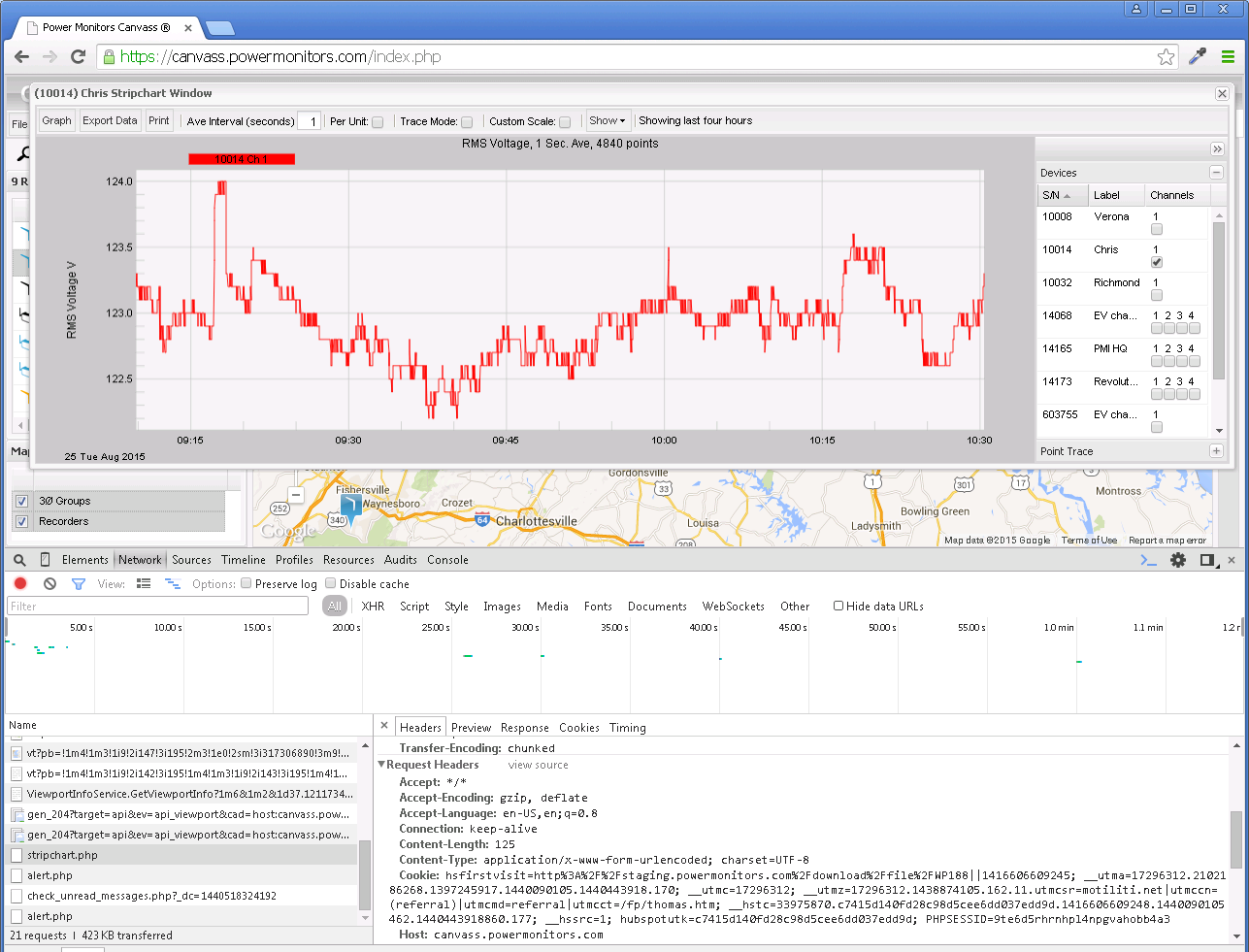
The single most important aspect to web application security is to simply have security in mind from the ground up during the design phase. From the moment the application is conceived, through development and into production, security must be at the forefront of all design considerations. Canvass (Figure 1) was no exception to this rule. From the very first day, security features have been designed into Canvass to ensure that the user’s experience is secure from end-to-end. While sometimes seemingly burdensome, each feature in Canvass was designed to ensure data and application integrity.
Ensuring that data and features are protected from unauthorized access is, in most instances, the primary concern in web application security. To provide examples from Canvass, the access to individual Boomerangs and Revolutions and the data they are reporting should be restricted by user accounts – and access to device configuration should be limited even further to account administrators. In a traditional “desktop PC application” model, this type of access is very easy to restrict. Generally, if you have physical access to the machine, then you have access to the software and that’s all the security needed. However, in a web application, things work quite differently. In a web application, there is essentially one instance of the application running at all times, that is constantly serving (through a web server, such as Nginx or Apache, as two primary examples) the necessary pieces of application code to end users who are viewing the application in a web browser. In this case, there is really no concept of physical access (except for the system administrators at PMI that are responsible for the hardware that is serving the web application). Everyone accesses the application virtually, through an Internet connection from a PC or tablet or phone from just about anywhere.
Every time a user makes a request to the application, it goes through the exact same endpoint, such as a stripchart endpoint for retrieving stripcharts, or a label update endpoint for updating the label that is displayed for a device, etc. Often, the application is accepting dozens, if not hundreds, of requests at the same endpoint simultaneously. This is where the web application security considerations come into play.
Since each endpoint is handling multiple requests simultaneously, usually from multiple different users from disparate accounts, the application needs to ensure that the data being requested (or being sent, in the case of an update) actually belongs to (or should be accessible by) the user making the request. While simple in theory, the implementation of these security features can be quite complex (just take a quick stroll through the tech news to see some major web applications being hacked or compromised).
How PMI Implements Cybersecurity in Canvass
As mentioned above, Canvass was designed with security in mind from the ground up. The author of this paper (a key developer for Canvass) was, in fact, an Information Systems Security Officer (ISSO) with a government agency for several years before coming to work for PMI. While the author’s primary focus was network and UNIX systems security and UNIX systems engineering, application security pulls in large part from the same paradigms as those that the author is familiar with and which were used extensively in developing the Canvass web application.
Even still, one (or even two or three) security experts can’t catch everything. There are always small things (and sometimes large things) that get overlooked or simply aren’t considerations at the time. With time, bad actors change tactics, use new technology and come up with new techniques that were previously unknown – all of which can lead to vulnerabilities in a web application. Enter WhiteHat Security.
WhiteHat Security
Companies such as WhiteHat (https://www.whitehatsec.com/) are dedicated exclusively to network and application security and can perform a wide array of penetration testing, code analysis, and customized data integrity probing.
WhiteHat Security is certainly not the only company to provide these types of services. However, after contacting many different security auditors and discussing our needs, PMI decided that WhiteHat provided the best feature set for ensuring that Canvass was secured.
The WhiteHat Testing Process
The process begins with a meeting with a WhiteHat security engineer. This engineer will learn about the product (in this case the Canvass web application) and will get an in-depth tour of each of the features in the application. Following the initial meeting, the security engineer exercises each page and feature of the application – searching for each endpoint (see above) in the web application. All network traffic and requests back and forth from the user’s browser to Canvass are examined.
The next step consists of an automated test – there are some things that just about every web application will do (authenticate users as an example). The automated scanner crawled for each and every endpoint as well – ensuring that the security engineer didn’t miss anything through hidden links or through background calls that may be polling an endpoint for status updates or the like.
The third step – and the most important step – was the custom security audit. This is a process where a security engineer takes the initial endpoint lists and creates a series of personalized probes for them that fit the functionality of Canvass. These probes test for common attack vectors (such as SQL injection, embedded HTML and CSS redirects, JavaScript exploits and the like), along with less common exploits and vulnerabilities that may be specific to the Canvass architecture. Once the test suite was created and verified as functioning, the security engineer was able to script the tests so that we at PMI could run it at will – without having the direct involvement of the security engineer – at any time. This is useful in the event that PMI makes changes to the way Canvass behaves, for example, the data layout in the database. After making those changes, PMI can re-run the probes and security checks. The probes are also scheduled to run nightly to ensure the continued security of Canvass.
The second two steps (the automated test that checks for routine vulnerabilities and the customized test that is set to test each individual feature set and endpoint in the Canvass application) each provide a very detailed report with any vulnerabilities that are found. They are ranked by severity and can range from Informational to Critical, with Critical obviously being the most severe.
WhiteHat will not “certify” an application unless all non-Informational issues are resolved.
What Was Tested
The following is a non-comprehensive list of some of the items (and types of items) that were tested.
Encryption – all communication from a user’s web browser to Canvass is encrypted using SSL. WhiteHat probed the server and encryption levels being used, ensuring that PMI had disabled old, outdated, unsecure encryption algorithms or methods, and that all endpoints were secured through SSL encryption.
Access Control – WhiteHat was able to verify that there are no unauthorized or unsecured endpoints in Canvass. This means that any endpoint that provides access to a device (Boomerang or Revolution) or that provides access to data (geolocational data, customized user labels for devices, voltage/current/power readings, etc.) is secured and cannot be accessed without proper credentials.
Ownership Integrity – WhiteHat was able to verify that, beyond access control, only actual owners of devices and data were able to access them. In other words, even if a user had access to Canvass with a valid set of credentials, they were not able to access data or devices that did not “belong” to their account.
Application Integrity – WhiteHat was able to ensure that the application itself couldn’t be subverted by bad actors by inserting or injecting JavaScript, HTML, CSS or other dynamic content into a piece of the application. These types of attacks consist of exploits where a malicious user may insert a hyperlink that, while looking innocent, redirects the user out of Canvass and onto a malicious site that may contain other viruses, trojans or malware.
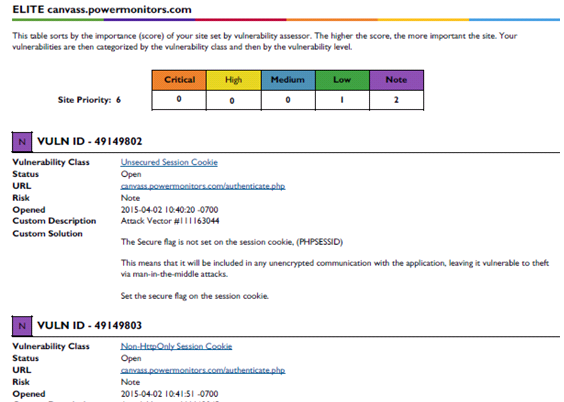
A sample scan output is shown in Figure 2.
The Results
The WhiteHat testing process, from start to finish, took several months and was very instructional for the development crew here at PMI. The testing helped shed some light on some new clever ways in which malicious users are subverting systems. After the first (automated) and second (customized) scans were completed, PMI received a list of vulnerabilities and suggestions to be addressed.
After addressing all potential vulnerabilities and suggestions, a manual review was again performed by a WhiteHat security engineer to verify that Canvass has passed all cybersecurity requirements.
Standards
The electric utility industry is pretty heavily regulated at both the federal and state levels (with most states). A common NIST standard that is required is NIST SP 800-95 (link to PDF: http://csrc.nist.gov/publications/nistpubs/800-95/SP800-95.pdf), Figure 3. While Canvass isn’t itself an actual web service (there is no separate web service component to Canvass – it’s simply one large web application without external service endpoints and cannot be “discovered” like a traditional SOAP or RESTful web service), the data access pieces of Canvass do adhere to the recommendations as far as possible in this NIST standard.
Conclusion
The Canvass web application is a very powerful tool for long-term and correlational distribution grid analysis. A tremendous amount of data flows into and out of this application each and every day. Knowing that PMI’s engineers have designed Canvass with security in mind and knowing that PMI has gone out of their way to have an external auditor regularly help review the security of the application should provide peace of mind to the security and regulatory conscious electric utility user.
