
Abstract
PMI’s latest software and hardware solutions (Canvass and the Boomerang) provide a tremendous new platform for voltage monitoring. As long as Boomerang monitors are powered up they are constantly sending voltage readings and status updates to Canvass, PMI’s Power Quality Portal. As each Boomerang sends an update into the Canvass system, it is recorded and immediately available for analysis, providing potentially multi-year long trending data. Sometimes, however, it may become necessary to poll a Boomerang by forcing it to update at a more rapid rate to provide near real-time analysis of events as they happen. This paper demonstrates how the Boomerang can be placed into this mode and what some of the benefits of doing so are.
Normal Operation
Under normal operation, a Boomerang will report to Canvass over TCP every 30 minutes providing the previous 30 minutes of one-second stripchart data. In addition to this stripchart record, a status record is also sent via UDP. The status record contains information such as the internal battery status, signal strength, IP address and alert codes.
In addition to the regular stripchart and status records that are sent twice an hour, whenever an event (such as a device power-up, device shut-down or an error log message being generated) or an alarm condition (such as voltage low or voltage high) occur, a status record is sent via UDP to Canvass and is immediately reflected on the Canvass map with an orange marker as shown in Figure 1. If zoomed in on a recorder this icon expands. In addition to the on-map changes, if the user has previously created a distribution e-mail list for the specified event or alarm, then each user on that list will be notified by e-mail of the event’s occurrence.

The data structures that PMI has developed to transport this information have been created in such a way as to provide for the smallest possible data consumption, even going as far as compressing the stripchart records before sending them to the Canvass system. This allows the user to have a low-cost, low-bandwidth and highly-affordable telemetry data plan while still getting every last bit of valuable voltage information from the system.
Burst Mode Operation
Under burst mode operation things work a bit differently. When placed into Burst Mode, a Boomerang will empty its stripchart buffer (regardless of how far into the 30 minute buffer it is) by initiating a TCP connection with Canvass and sending the stripchart. This technique can be used to update a stripchart graph in a more rapid manner.
In addition to the initial TCP connection and stripchart dump, the Boomerang – when in burst mode – will send a voltage reading every two seconds for 120 seconds (two minutes) over UDP (these values are adjustable by the user).
Burst Mode is a multi-user feature, meaning that multiple users can both set a device to Burst Mode and view the real-time voltage readings as they come into Canvass. In order to do this, each user simply selects the Boomerang to view and then selects the “Burst Mode” option (see the instructions that follow for placing a device in Burst Mode).
It is worth noting that each time a user requests Burst Mode data from a Boomerang – even if another user has previously placed the Boomerang in Burst Mode – a TCP connection is established from the Canvass system to the Boomerang and the Boomerang Burst Mode Counter is reset. This does not, however, double the data consumption as the Boomerang still only sends each packet once, regardless of the number of users that are “connected” and viewing the live Burst Mode data. (When the Burst Mode counter is reset, this means that the packet counter starts back at zero. Example (assuming the defaults have not been changed): User A starts Burst Mode and is watching the live updates. Twenty seconds later User B connects to the same Boomerang and requests Burst Mode data. At that point, the Burst Mode counter – which was at 10 (one packet every two seconds) – is now reset back to 0 and the packet counting starts again.)
After the two minute period has completed and no interim Burst Mode commands have been issued, the automatic Burst Mode updates will cease. The user can re-initiate Burst Mode by simply clicking on the “Burst Mode” button again as shown in Figure 2. (See Data Usage During Burst Mode below for more information on the amount of data that may potentially be used during a Burst Mode request.)

Placing a Boomerang in Burst Mode
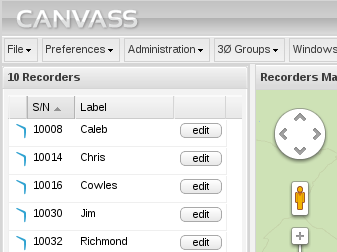
Placing a Boomerang into Burst Mode is very straightforward. Start by selecting a Boomerang either by clicking on its corresponding icon on the map, or by selecting it in the Recorder Panel on the left-hand side of the screen as shown in Figure 3.
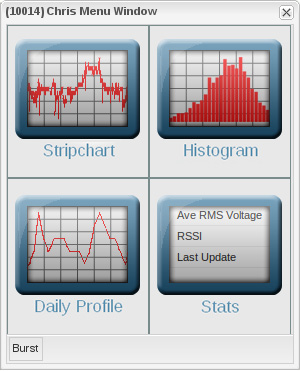
Once the Boomerang has been selected, the Graphing Options menu window will appear as shown in Figure 4. From the Graphing Options menu, select Burst Mode at the bottom-left of the window.
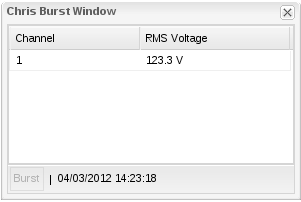
After clicking the Burst Mode button, the Burst Window will appear and – after up to a few seconds (latency in connecting to a Boomerang via TCP on a cellular network) – the real-time readings will appear as shown in Figure 5. Channel and RMS Voltage are displayed in the main panel of the window, and the last timestamp at which an update was received is shown at the bottom of the window. When the timestamp stops updating, the user will know that the Boomerang has exited Burst Mode.
To re-initiate Burst mode, simply click on the “Burst” button again.
Note: Aside from initiating a stripchart dump at initiation, the Burst Mode operation of the Boomerang does not in any way alter the stripchart data or stripchart graphs. Additionally, if the Boomerang is configured for DNP3 use, that protocol is completely unaffected by Burst Mode.
Data Usage During Burst Mode
When a Boomerang is placed in Burst Mode, data usage will increase. This is simply because the device has gone from updating once every 30 minutes to once every two seconds. Figure 6 contains a formula for calculating approximate data usage for a Burst Mode request.
Ethernet Header (14 bytes) + IP Header (~20 bytes) + UDP Header (8 bytes) + PMI Binary Reading Structure (3 bytes) = Approximate Data Usage: 45 bytes per packet
Assuming the default configuration was left in place, each Burst Mode would result in approximately 60 × 45 = 2700 bytes or 2.64 KB (which is about 0.1% of the typical 2MB/month data plan). This usage is in addition to the initial TCP stripchart dump that occurs exactly once each time a Boomerang is placed in Burst Mode or the Burst Mode counter is reset. The size of the initial TCP packet will depend on how far into the 30 minute buffer the Boomerang is before the dump.
Registering for a Demo Account
The device used for demonstration purposes (serial number 10014) in this white paper (in addition to a handful of other demonstration units) is available for testing to users who register for a demo account in Canvass at the following URL: http://canvass.powermonitors.com/util/register.jsp
Conclusion
Canvass and the Boomerangs are a great set of tools for voltage trending analysis. They can also – as this paper has shown – be used to take on-the-spot real-time measurements without having to leave the comfort of one’s office.
